





Nextdoor: Neighborhood Network review
 Analysis by Appsdrops
I think Nextdoor: Neighborhood Network makes the most sense when you treat it as a place to learn what is happening nearby, not as another general-purpose social feed. Its value depends on whether people around you use it and whether you want local recommendations, event notices, marketplace posts, or neighborhood updates in one app. For a first-time user, the best goal is modest: get the local view set up, find one useful piece of information, and decide whether the neighborhood conversation is worth keeping in your routine.
What you can expect from a neighborhood-focused feed
Nextdoor is a free lifestyle app from Nextdoor, Inc. It has a 4.6 average from around 446,000 ratings, and more than 10 million installs. Those figures suggest it has found a substantial audience, but they do not guarantee that your particular area will have an active or helpful community. Local usefulness is the deciding factor: a lively neighborhood can make the app feel practical, while a quiet one may leave you with little reason to check in.
Rather than competing directly with broad social networks, it centers the experience on nearby life. That changes what a worthwhile post looks like. A recommendation from someone who knows the area can be more useful than a polished review from far away; a notice about a local event may matter more than a trending topic. The trade-off is that neighborhood conversation can be uneven. You may find thoughtful advice alongside posts that are less relevant to you, and the feed’s usefulness depends on what residents choose to share.
I would go in expecting a mix of practical information and ordinary community chatter. The app’s scope includes local alerts and news, recommendations, marketplace listings, and events, but that does not mean every category will be equally active around your home. If you mainly want national news, entertainment, or a carefully curated stream from friends, a conventional social app is likely a better fit. Nextdoor is strongest when your question is specifically, “What is going on close to me?”
Start with a useful, low-pressure setup
After installing it, take a moment to make the neighborhood context work for you before judging the feed. The goal is not to fill every screen with activity; it is to see whether local posts answer the kinds of questions you actually have. Read a few recent conversations and look for signs of practical participation: residents sharing clear recommendations, replying with relevant details, or posting information that helps people make a decision.
Nextdoor is rated for Teen audiences, so it is not presented as an adults-only service. I would still encourage any new user to approach a community feed thoughtfully: consider what you share, keep personal details out of public conversation, and assess whether a post belongs in a neighborhood discussion before responding. The app is a place where local context can make a post useful, but the same context can also make oversharing feel more personal than it would on a broad network.
One useful first-session habit is to browse before posting. That gives you a feel for the tone and for the kinds of requests neighbors answer. Notice whether recommendations include enough detail to act on, whether event notices explain who they are for, and whether discussions stay relevant. This small bit of observation can save you from asking a question that has already been answered or posting to the wrong audience.
Your first meaningful success: solve one local question
For a realistic first win, imagine you have just moved and need a reliable recommendation for a nearby repair service, a place to donate household items, or a community event to attend. Search the local conversation by browsing what residents have already discussed, then compare a few responses rather than relying on the first confident comment. A useful answer often gives you a reason behind the recommendation or a detail about the experience, not just a name.
If you decide to ask the community, make the request specific enough to invite useful replies. Instead of posting a broad “Any recommendations?”, explain what kind of help you need and what matters to you, while avoiding unnecessary personal information. For example, a request that names the type of service and the general area is easier to answer than one that gives a long, vague account. The practical insight is that local knowledge works best when you give neighbors a clear question they can respond to from experience.
That workflow also helps you judge the app fairly. A single quiet afternoon is not proof that the service has no value, but a pattern of unanswered questions or outdated recommendations may mean your local community is not active enough for your needs. Conversely, a handful of relevant replies can demonstrate its advantage over a broad search or a general social feed: people nearby may know the small details that are difficult to infer from a generic listing.
Where the experience can be confusing
The main source of friction is not complicated navigation so much as mixed relevance. A neighborhood feed can put different kinds of local information next to each other, and not every post will fit your interests. If you open the app expecting a streamlined bulletin board, the conversational posts may feel distracting. If you expect a lively social network, practical notices and service recommendations may seem less entertaining. I recommend checking it with a specific purpose rather than scrolling simply because the app is there.
It can also be hard to tell how much weight to give a recommendation. A neighbor’s experience is valuable, but it is still one person’s experience, not a guarantee that a business or service will suit you. Look for multiple perspectives and ask a follow-up when an important detail is missing. For time-sensitive matters, confirm the details directly before making plans. That is not a flaw unique to Nextdoor; it is the sensible way to use local advice instead of treating a comment as a verified directory entry.
Marketplace posts and event information need the same careful reading. Check what the post actually says, whether the timing and arrangements suit you, and whether you are comfortable with the proposed next step. The advantage of a local listing is proximity; the limitation is that listings are created by people and can vary in clarity. I would not assume that every item or event has the same level of detail or follow-through. A quick, polite clarification can prevent a wasted trip or an avoidable misunderstanding.
Another point worth understanding is that the app’s value is geographic, not universal. If you move, travel, or spend most of your time outside the neighborhood represented in your feed, the local emphasis may become less useful. It is better suited to someone who wants to stay connected to a home area than to someone seeking a single platform for all social and information needs. For broader discovery, search tools and city-wide sources may cover more ground; for very personal updates, a group chat may be more direct.
How it compares with familiar alternatives
Compared with a general social network, Nextdoor gives local matters more room. You do not have to rely on a friend’s post to learn about an event or recommendation relevant to the area. The downside is that the conversation can feel narrower, and activity may depend heavily on your neighborhood. A large, general platform may offer more content and more people you already know, while this app’s particular strength is the possibility of getting answers from people who share your local context.
Compared with maps, search, or review services, it offers a more conversational route to recommendations. That can reveal practical context that a short rating does not capture, but it also means the answer may be subjective and the discussion may not be as easy to compare at a glance. I would use neighbor comments to discover options and formulate better questions, then use other sources or direct contact to verify details that affect cost, availability, or suitability.
For neighborhood events, a dedicated community noticeboard or a message from an organizer may be clearer if you already know where to look. Nextdoor is more convenient when you want local notices and resident conversation together, but it cannot make a quiet community busy. This is why I would not recommend installing it solely because you expect a complete, authoritative guide to your area. It works better as a supplementary local channel than as the only source you consult.
Make the app earn a place in your routine
Once you have found one useful answer, choose a simple reason to return: checking for a relevant event, looking for a recommendation when a need arises, or keeping an eye on local notices. Avoid turning casual scrolling into a daily obligation. The most concrete benefit is often occasional rather than constant—a good suggestion at the right moment can be worthwhile even if you do not open the app every day.
If you are deciding whether to post, ask whether the answer would help other nearby residents too. A concise question with enough context is more likely to start a useful exchange than a vague complaint. If you are responding, add specifics you personally know and make clear when you are sharing an opinion. These habits improve the signal for everyone without requiring you to become a frequent poster.
The current version is 5.37.1, and the app supports operating systems from version 8.0 onward. It is free, which makes trying the local feed a low-commitment way to see whether your area participates. I would give it a fair test by looking for one concrete local need rather than judging it solely by the first few general posts. The large audience behind the service is encouraging, but the quality of your experience remains tied to the people and information in your own neighborhood.
Who I would recommend it to
I would recommend Nextdoor: Neighborhood Network to people who want a neighborhood-specific place to discover recommendations, local notices, marketplace listings, and events, especially if they are new to an area or like keeping up with community activity. It is also useful for someone who would rather ask residents about a local choice than rely only on broad search results. Its Teen content rating and free access make it approachable to try, while the app’s 92,000 reviews show that many users have taken time to share their experiences.
I would skip it if you do not want another social feed, if you rarely need local information, or if you expect every post to be current, complete, and independently checked. I would also choose a more direct channel when I need an answer from a specific person, and a dedicated search or review service when I need to compare options systematically. My overall view is that Nextdoor is most worthwhile when used deliberately: browse first, ask one clear question, verify consequential details, and keep it only if the neighborhood conversation genuinely helps you.
What we like
- Connects you with people and organizations in your local area.
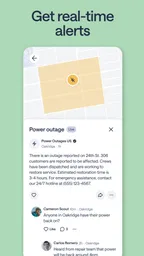
- Local alerts can help you stay informed about nearby incidents.
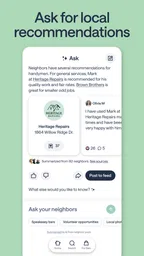
- Members can ask neighbors for recommendations and practical help.
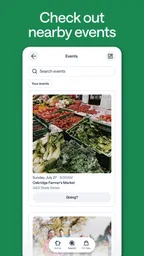
- Community posts cover local events and neighborhood updates.
- The free app makes it easy to browse nearby discussions.
What could be better
- The amount of useful content depends on local participation.
- Some neighborhoods may have few active members.
- Posts can include rumors or unverified claims.
- Frequent notifications may become distracting.
- Sharing local details can raise privacy concerns.





