



NBA: Live Games & Scores review
 Analysis by Appsdrops
I like having the NBA’s own app on hand when I want to follow a game without settling in front of a screen for the whole broadcast. It gives basketball fans a place to check scores, stats, highlights, and studio coverage, but it is also a busy companion app rather than a minimalist scoreboard. In my experience, the best way to enjoy it is to decide what I came for first: a quick score check, a closer look at a matchup, or video coverage. That small choice helps keep the app useful instead of turning a spare moment into a long scroll.
Finding your way through a busy game day
NBA: Live Games & Scores is a free sports app from NBA Properties, Inc., with an Everyone age rating. Its audience is broad: devoted followers who want the league close at hand, casual viewers checking a result, and fans who prefer highlights to watching a full game. The app has an average rating of 4.6 from around 251,000 ratings, and it has been installed over 50 million times. Those figures suggest a well-established destination, but they do not make every visit equally smooth; what you see and how useful it feels depends on what you want from it.
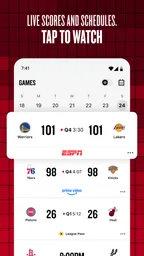
The opening challenge is often not finding basketball content, but choosing among it. A live score, a box score, a highlight, and studio coverage answer different questions. If I only have a few seconds, I look for the game or team I care about rather than browsing every available item. When I have more time, I move from the score to the stats, then use video to add context. Treating the app as a set of routes instead of one endless feed makes it easier to get a useful answer quickly.
A common point of friction is arriving during a live game and expecting the first screen to explain everything. A score tells me where the game stands, not why it has shifted. For that, I need to open the relevant matchup and inspect its stats or find a highlight. Conversely, a highlight is not a substitute for a complete live account: it selects moments, while a score and stats give a broader snapshot. Keeping those roles distinct prevents the familiar disappointment of tapping a video when all I wanted was a quick update.
Start with the question you want answered
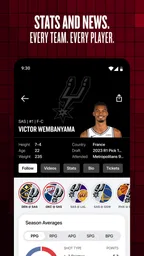
Before opening the app, I find it helpful to frame the task in plain language: “Is the game close?”, “How did my team perform?”, or “What happened in that play?” A live score is the fastest route for the first question. Stats are more useful for the second, while highlights and studio coverage suit the third. This is a small but practical workflow, especially when I am checking during a commute or between other tasks and do not want to explore several sections just to reach one answer.
There is a useful trade-off in putting official league material together. A fan can move between game information and NBA video coverage without treating a third-party scoreboard as the central source. On the other hand, the app’s range of material can make it feel heavier than a simple scores-only tool. If your normal habit is to glance at one number and close the screen, a lightweight scoreboard may suit you better. If you often want the score, supporting stats, and league-produced coverage in the same visit, this app makes more sense.
Simple checks when something seems stuck
If the content does not look current, I avoid assuming immediately that the app itself is broken. First, I check whether the phone has a working internet connection by loading another current page or app. Then I return to the game view and give it a moment to refresh, rather than repeatedly tapping controls. A weak or interrupted connection can make live information feel delayed, and switching between Wi-Fi and mobile data can help identify whether the trouble is local to one connection.
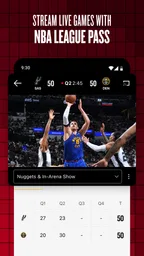
When a video will not play, I separate that problem from score checking. I test whether the game information is still accessible, then try the video again after confirming that the connection is steady. If the score and stats work but video does not, the issue may be limited to playback or the network conditions at that moment; it does not necessarily mean the whole app has stopped working. This distinction saves time and keeps me from restarting a useful session just because one kind of content is slow.
It is also worth checking that the app is current through the app store and that the phone has enough room and a stable connection for ordinary app use. These are sensible general checks, not guarantees: an update or a restart cannot fix every temporary service or network interruption. I would avoid clearing app data as an early troubleshooting step, since that can remove locally stored preferences or require setting things up again. Start with the least disruptive checks and escalate only if the problem keeps returning.
Recovering a useful routine after an interruption
Suppose I open the app at halftime, get pulled away, and come back later. I do not try to reconstruct everything from a stream of clips. I first check the game’s current score, then inspect the stats to understand the broader shape of the matchup. Only after that do I watch a highlight if I want to see a particular moment. This order is more reliable than beginning with video, because a clip can be exciting without showing how representative that moment was.
For a fan following more than one game, I use the same sequence separately for each matchup rather than relying on memory. A quick score check can tell me which game deserves attention; the stats help decide whether a close score reflects a competitive contest or a brief swing. If I only want the final result, there is no need to watch anything. If I missed a key sequence, video adds the visual detail that a box score cannot. Pairing a quick score check with a deliberate follow-up is the app’s most practical everyday workflow.
Another helpful habit is to treat the app as a reference point, not as a promise that every update arrives at precisely the same instant. If a screen looks frozen, I check the connection and revisit the relevant game rather than making decisions from a stale-looking view. For a casual check, a short wait is usually more sensible than repeatedly closing and reopening the app. If I need a broader account of a game, I use stats and coverage together instead of expecting one screen to provide every kind of context.
When the problem may be outside the app
Not every frustrating moment is an app fault. A poor connection can affect live updates and video differently, and background activity on a phone can make loading feel inconsistent. If scores appear but clips struggle, I check the network before blaming the score service. If several apps are also slow, that points me toward the connection or device rather than the NBA app alone. Trying again on a stronger connection is a practical test, though it cannot guarantee an immediate fix if the issue is temporary elsewhere.
There is also a difference between “I cannot find it” and “it is unavailable.” The NBA app brings together multiple kinds of material, so I first make sure I am looking in the part of the experience suited to the task: a game and its stats for match details, or video and studio coverage for viewing. If I want a full live broadcast experience, I should check what viewing access is offered in the app store and in the app itself before relying on it for a particular game. The app’s focus on scores, highlights, stats, and studio coverage does not make it interchangeable with every live-TV or streaming option.
That distinction matters for expectations and spending, too. The app is free to install, while in-app purchases range from about one dollar to around four hundred dollars per item. I would review any purchase details on the relevant screen before confirming anything and would not assume that installing the app automatically includes every paid offering. If my main goal is simply to follow scores and check available coverage, I can begin with the free app and decide later whether any optional purchase is actually relevant to my viewing habits.
Who will get the most from it
I would recommend it to fans who want league-specific information close by and like moving between a score, stats, and NBA video. It is especially handy for someone who watches games irregularly but wants to catch up on important moments, or for a regular viewer who wants a quick reference while following a game elsewhere. The official identity is a plus when I want NBA-focused coverage rather than a general sports feed where basketball competes with many other leagues.
I would steer away from it as a primary choice if all I need is a bare score and nothing else. A simpler scoreboard can mean less browsing and fewer distractions. It is also not the best fit for someone whose top priority is a guaranteed full-game broadcast experience; that is a different need from checking scores, statistics, highlights, and studio material. The app is more rewarding when I use its mix of formats, and less compelling when I expect it to behave like a single-purpose ticker or a universal replacement for live television.
Compared with general sports apps, the NBA app’s strength is its narrow focus on basketball and league-related coverage. A multi-sport service may be more convenient if I follow several competitions and want one place for everything. A scores-only option may be faster for a one-second check. The NBA app sits between those choices: more context than a bare scoreboard, but not necessarily the leanest route for someone who never watches clips or reads game stats. That is a real distinction, not a flaw for every user.
My practical verdict
NBA: Live Games & Scores is worth trying if you want more than a final number and appreciate having league-focused scores, statistics, highlights, and studio coverage together. I find it most useful when I enter with a clear purpose, check the score first, and then choose stats or video based on what I still want to know. That approach also makes ordinary troubleshooting less frustrating: test the connection, distinguish a video issue from a score issue, and avoid drastic resets as a first response.
My recommendation is measured rather than universal. The app is a strong companion for NBA fans who want a practical way to keep up and catch selected moments, but its breadth can feel like extra noise to someone who only checks results. It is free to start, has an Everyone age rating, and is backed by a large audience; the meaningful question is whether you will use its mix of basketball information and coverage. If that matches your routine, it earns a place on your phone. If you want only a minimalist scoreboard or dependable access to full live broadcasts, another kind of service may fit better.
What we like
- Live scores make it easy to follow games as they unfold.
- Game schedules help fans plan around upcoming matchups.
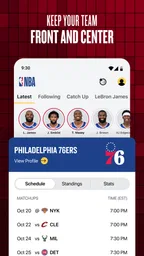
- Team pages offer quick access to standings and season results.
- Personalized alerts can notify you about teams and games you follow.
- The app covers the full NBA season including playoffs.
What could be better
- Some features may require a subscription or in-app purchase.
- Frequent alerts can become distracting unless carefully adjusted.
- Live updates may lag behind the television broadcast.
- The app needs an internet connection for current scores and news.
- Availability of video content can vary by region.




