





Bleacher Report: Sports News review
 Analysis by Appsdrops
I like a sports app best when it helps me answer two questions quickly: what is happening, and what should I pay attention to next? Bleacher Report: Sports News is built around that habit. It brings news and scores together across leagues, with a strong emphasis on following the teams and sports that matter to you rather than treating every headline as equally important. It is a free sports app from Bleacher Report Inc., and its long-running presence in the category makes it a familiar option for fans who want a regular check-in without opening several league apps.
Build a useful baseline routine
My most practical way to use Bleacher Report: Sports News is to make it a starting point, not a place to consume every sports story in full. I check the app for a quick sense of scores and headlines, then open an article when a result or story genuinely affects a team I follow. That distinction matters: a feed can make a busy sports day feel manageable, but it can also turn into an endless scroll if I treat every item as essential.
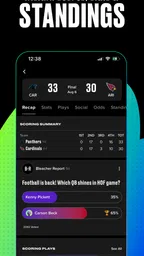
The app covers several sports, including NBA news and stats, NFL coverage, and college football scores. That range suits someone whose interests shift with the season or who follows more than one competition. Instead of switching between separate apps just to see whether a game has ended or whether a major story has broken, I can use one place for a broad overview. It is especially handy when I want context across a day’s sports news rather than a single team’s official updates.
For example, during a work break I might open the feed, scan for a score involving a team I care about, and read one short news item before putting my phone away. Later, if the result raises a question, I can return for more coverage. This small routine works better for me than checking repeatedly without a purpose: it keeps the app useful while limiting the time a constantly changing sports feed can absorb.
Personal relevance is the key to that routine. When I focus on my teams and sports, the experience feels more like a compact briefing. When I browse everything, the mix can be noisy, particularly on a day crowded with games and breaking stories. I would spend a little time shaping the feed early rather than waiting for it to become useful by accident.
Make the feed work for your interests
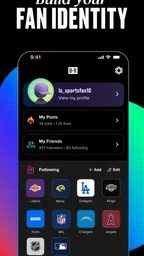
Before relying on the app for quick updates, I would choose the teams and sports I actually follow and then judge the feed over a few visits. The goal is not to eliminate every unfamiliar headline; it is to make sure the top of the experience gives me a useful read on my own interests. A fan who follows both an NBA team and an NFL team can get value from the breadth, while someone interested in only one club may find a dedicated team app more focused.
I also find it useful to separate a score check from a news session. Scores answer a narrow question—how did the game go?—while articles provide more explanation and interpretation. Switching between those purposes deliberately keeps me from mistaking a headline for a full account of a game. If I only need a final result, I can stop after finding it; if I want to understand a turning point or a wider story, I can give the article more attention.
The app’s scale suggests it has become a mainstream choice: it has passed ten million installs and carries a 4.7 average from around 184,000 ratings. Those figures are reassuring signs of an established audience, though they do not tell me whether its particular mix of coverage suits my teams. I would still assess the feed based on the leagues I care about and how quickly I can find the information I need.
Settings and habits worth checking
I would review notification choices before making any sports app part of my daily routine. A fan who wants to know about important developments may welcome timely alerts, while someone who checks scores only at set times may prefer fewer interruptions. I would start conservatively, see which alerts are genuinely useful, and adjust from there. That is a better approach than letting every possible update compete with work, messages, and other notifications.
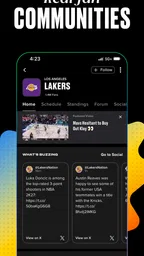
It is also worth checking which teams and sports are shaping the main feed. If an item repeatedly feels irrelevant, the answer may be to refine what I follow rather than to give up on the whole app. Conversely, if the feed becomes too narrow, adding a second sport or a broader interest can make it more valuable during off-days for a favorite team. I treat this as a small maintenance task: revisit the choices when my viewing habits change, rather than assuming they will always fit.
There is a trade-off between speed and depth. A broad news feed helps me notice stories I might otherwise miss, but a quick scan is not a substitute for detailed game analysis or a full statistical reference. If I am preparing for a fantasy decision, studying a matchup, or checking a precise historical detail, I would use a specialist tool alongside the app. Bleacher Report is strongest as a convenient overview and news companion, not as a replacement for every kind of sports research.
The app is free to download, with in-app purchases ranging from $0.99 to $49.99 per item. I would check what an individual purchase offers before spending, and I would not assume that paying is necessary for the basic purpose of keeping up with sports coverage. For a reader who simply wants news and scores, the sensible first step is to try the regular experience and decide whether any optional purchase addresses a specific need.
Faster patterns for everyday use
A repeatable check-in can make the app feel faster even without relying on any special shortcut. I use the same order: first look at the teams I follow, then scan the broader headlines, then open only the story that answers a question I have. This prevents me from bouncing between unrelated items and makes it easier to leave once I have caught up. It is a simple habit, but it turns a general feed into a purposeful briefing.
Another useful pattern is to use the app at natural transitions in the day—before a commute, during a lunch break, or after a game—rather than opening it every time I have a spare moment. Before a game, a quick look at the latest coverage gives me context; afterward, checking the score and reading one follow-up story gives me a clearer sense of the result. I would not rely on a headline alone when the details matter, but this approach is enough for casual catch-up.
For fans who follow multiple leagues, season changes are a good time to revisit what they want to see. An NFL-focused feed may be most useful during football season, while NBA coverage may take priority at another point in the year. Adjusting interests as attention shifts is more effective than letting an old setup dictate what appears. It also helps keep the app from feeling cluttered with coverage I no longer follow closely.
When I share a story or mention it in conversation, I try to distinguish a report from a quick score update. Sports headlines can compress a complicated development into a few words; opening the article before drawing a conclusion is a worthwhile check. The app’s value is not just that it surfaces items, but that it gives me a place to follow up when a result or news event deserves more than a glance.
Where it reaches its limits
Bleacher Report’s breadth is also its main compromise. A fan who wants only one team’s official lineup announcements, ticket information, or club-specific service may be better served by that team’s own app. Someone who wants box scores with detailed filters or deep statistical tools may prefer a specialist scoreboard or analytics product. I would keep this app for its news-and-overview role rather than expect it to win every comparison within sports software.
There is also a natural limit to how much news I want in one feed. If I follow many teams, the volume can make important items harder to distinguish from routine updates. Narrowing my interests and checking at chosen times helps, but it does not change the fact that a broad sports service is designed to cover plenty of activity. Readers who dislike frequent headlines or prefer a quiet, highly controlled experience may find a simpler score tracker more comfortable.
The version available is 11.13.0.39, and the app supports Android devices running version 9 or later. Its content rating is Everyone 10+, which gives families a useful starting point when considering whether it fits a younger sports fan. I would still consider an individual reader’s preferences and device setup, particularly if notifications or in-app purchases are a concern.
Bleacher Report has been available since May 23, 2011, so it is not a new experiment in sports coverage. That history is useful context, but what matters day to day is whether the current feed helps me follow the leagues I care about without adding more noise than value. I would judge it by how well it fits into my routine, not simply by how many headlines it can show.
Who I would recommend it to
I would recommend Bleacher Report: Sports News to fans who follow several teams or sports and want one convenient place to catch scores and news. It works particularly well for a casual but engaged reader: someone who wants to know what happened, has time to read a story when something catches their eye, and does not need every update delivered in exhaustive detail. The free entry point also makes it easy to try as a companion to existing sports apps.
I would skip it, or use it only occasionally, if my priority were a single team’s official information, highly detailed statistics, or a distraction-free way to check one score. In those cases, a focused team app or dedicated scoreboard may offer a cleaner fit. I would also avoid turning on more alerts than I can use; the best routine is one that keeps me informed without making every game feel urgent.
Overall, I see it as a flexible sports briefing rather than an all-purpose sports authority. Set the feed around real interests, check notifications with care, and use articles when a headline deserves context. With those habits, it can make everyday sports catch-up easier. Without them, its broad coverage may feel like more scrolling than insight.
What we like
- Personalized alerts help you follow teams and leagues.
- Scores and game updates are easy to check on the go.
- The app covers a broad range of major sports.
- Video clips add useful context to breaking stories.
- Team-focused feeds make relevant news easier to find.
What could be better
- Frequent notifications can feel overwhelming.
- Some coverage may favor popular teams and leagues.
- Live updates can lag during busy games.
- Video playback may use significant mobile data.
- The interface can feel crowded with headlines and alerts.





