


ESPN review
 Analysis by Appsdrops
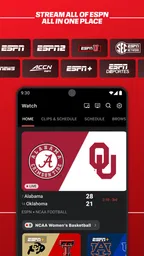
I think ESPN works best as a dependable sports companion rather than an all-purpose media hub. I’d use it to keep up with teams, check what is happening across several sports, and follow news without constantly switching between separate sources. Its biggest strength is the breadth of that routine; its main trade-off is that watching live sports is not necessarily as simple or universally available as checking a score. If you want one familiar place for sports updates, it is an easy app to consider. If you only follow one competition and already like its dedicated app, ESPN may add more browsing than value.
A practical home for following sports
ESPN is a free sports app from Disney, and its long run helps explain why it feels like a broad, established destination rather than a single-league utility. It has been available since June 2010, and the scale of its audience is substantial: it has an average rating of 4.5 from around 1.2 million ratings and over 100 million installs. Those figures suggest wide adoption, though they do not guarantee that its mix of coverage will suit every fan.
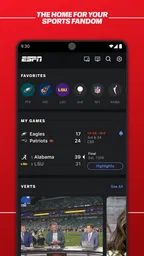
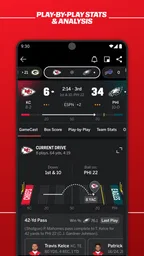
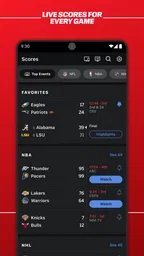
In everyday use, I find the app most valuable when I want a quick answer rather than a long session. A glance at scores can settle whether a game is close, while news and alerts help me keep tabs on a team when I am busy. The appeal is not simply having sports content on a phone; it is being able to move between results, reporting, and viewing options in one place.
That combination also gives ESPN a different role from a league-specific app. A dedicated team or competition app can be the better choice when you care about one schedule, one set of standings, or one team’s announcements. ESPN makes more sense when your interests cross those boundaries, or when you want a broader sports check-in without deciding in advance which separate app to open.
Where the app earns a place in a routine
The most useful habit is to treat ESPN as a quick-check tool and make it serve your own priorities. If you follow several teams, start by narrowing your attention to the ones you actually care about rather than trying to absorb every headline. A sports app with wide coverage can otherwise turn a simple score check into a distracting scroll through unrelated stories.
For example, I can imagine checking the app during a commute to see whether a match has started, then returning later for the result and a recap of the surrounding news. That is a realistic advantage over relying on a search engine each time: the app keeps the sports context together, so I do not have to reconstruct what matters from a string of scattered results. It is particularly useful during a busy day when I want to stay informed in short visits.
Alerts can make that routine more timely, but I would be selective about them. If every team or event is allowed to compete for attention, notifications stop feeling helpful and become another stream to clear. Choosing only the updates that would genuinely change what you do—such as checking a game or catching a major development—makes alerts more useful. This is a small setup decision with a meaningful effect on whether the app feels like a personal score desk or a noisy feed.
Scores and news are the dependable core
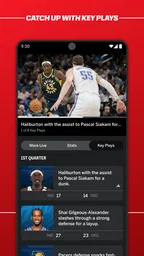
Scores are the clearest reason to keep ESPN close. They answer a practical question quickly: what is happening, and do I need to pay attention now? News adds context that a score alone cannot provide. I value that pairing because fans often want more than a number, but not necessarily a full broadcast or a long analysis piece every time they open an app.
The balance will depend on how you follow sports. If you enjoy checking several competitions, a broad sports destination is convenient. If you want only a particular team’s most detailed coverage, a specialist source may have a tighter focus. ESPN’s range is an advantage for curious or multi-sport fans, but breadth naturally means the experience may include plenty of material that is irrelevant to a person with a narrow interest.
One practical way to avoid that mismatch is to use the app with a clear purpose. Open it to check a result, scan the headlines that matter to you, or look for a live viewing option; do not assume every visit needs to become a general news-reading session. I find this distinction important because sports coverage can be absorbing, and an app that is useful for quick updates can easily consume more time than intended.
Live viewing is useful, but expectations matter
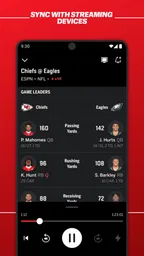
ESPN includes live sports viewing, which can make it more than a score-and-news companion. Still, I would not choose it on the assumption that every event I want will always be watchable in the app. Sports viewing can depend on the event and the access available to the viewer, so I would check the relevant options before relying on ESPN as the sole way to watch a particular game.
This is where the app’s value differs from its value as a score checker. A score is a straightforward update; viewing is a more demanding use case, and a fan may have to consider whether the event is available to them and whether any associated purchase is worthwhile. ESPN is free to download, but it offers in-app purchases ranging from $4.99 to $79.99 per item. I would review the specific purchase details in the app store before spending, rather than treating the free download as a guarantee that every viewing option is included.
If watching is your main priority, compare the available choices for the event you care about before game time. If you simply want to know the score, the app remains useful without making a viewing purchase. That separation is worth keeping in mind: ESPN can serve both needs, but the free, low-friction score-checking experience and the paid or access-dependent viewing experience are not the same thing.
Small choices that make it more useful
My first tip is to decide what role you want ESPN to play before turning on alerts. A score monitor, a news reader, and a live viewing destination create different expectations. If you mainly need timely results, prioritize alerts for only your most important teams or events; if you want a daily sports briefing, you may prefer to open the app when you choose rather than letting every update interrupt you.
Second, use it as a broad overview and keep a specialist app only when you need its narrower depth. For a fan who follows a favorite team plus a few unrelated sports, ESPN can reduce app-hopping. For a supporter who wants highly focused coverage of one local team, a dedicated source may be quicker to navigate and less crowded with other sports. There is no need to choose one approach for everything: the broad app can handle general checking while a specialist source fills a genuine gap.
Third, separate “I want to know” from “I want to watch.” When a game matters, check viewing access before it begins instead of discovering at the last minute that your preferred option is not available in the way you expected. When it does not matter enough to watch, a score update or later recap may be all you need. This simple distinction helps avoid both unnecessary purchases and the frustration of treating a general sports app as a universal broadcast pass.
Who will enjoy it—and who may not
I would recommend ESPN to people who follow more than one sport, want scores and news together, or like having a familiar place to check live updates. It can also suit someone who watches sports occasionally and does not want to install a separate app for every league. The app is rated Everyone 10+, which gives families a useful age guide when deciding whether it fits a younger sports fan.
It is less compelling for someone who wants only one team’s most specialized coverage, dislikes notifications and feeds, or expects every live event to be included without checking access. Those users may be happier with a league or team app for focused information, or with a viewing service chosen specifically around the events they want to watch. A broad sports app is convenient, but it is not automatically the best tool for every narrow need.
Device compatibility is another practical check before installing: ESPN requires iOS 7.1 or later. The app’s longevity and large audience make it familiar to many fans, but the best reason to try it is simpler than popularity. It should make your own sports routine easier—whether that means following several teams, catching up on news, or checking a score between other tasks.
My verdict
After weighing its strengths and friction points, I see ESPN as a strong general-purpose choice for keeping up with sports, especially when scores and news matter more often than uninterrupted viewing. Its breadth is genuinely useful, and I like that it can support quick checks as well as deeper browsing. The drawback is that broad coverage can feel busy, while live access deserves a separate check rather than an assumption.
I would install it if I wanted a single starting point for several sports and was willing to tune alerts to my interests. I would skip it as my only sports app if I needed deeply focused coverage of one team or guaranteed access to a particular live event. For the right fan, ESPN is a convenient daily companion—not a substitute for every specialist source, but a sensible place to begin when I want to know what is happening across the sports I follow.
What we like
- Live scores and game updates are easy to check.
- Personalized alerts help you follow favorite teams.
- The app covers a wide range of sports.
- Articles and analysis offer context beyond scores.
- A free version provides access to some content.
What could be better
- Some live video requires a paid subscription.
- Coverage and features vary by location.
- Frequent notifications can feel distracting.
- Some content may require a TV provider login.
- The app may use substantial mobile data during streaming.




