



Sofascore: Live Sports Scores review
 Analysis by Appsdrops
When I follow several matches at once, I want more than a score that updates eventually. I want to see what is happening, check the standings, and move on without opening a different app for every competition. Sofascore is built around that kind of quick, connected sports check-in. It is a free sports app from Sofascore, and I find it most useful when I have a reliable connection and want a broad view of live events rather than a deep, single-team news experience.
Live updates are only as useful as your connection
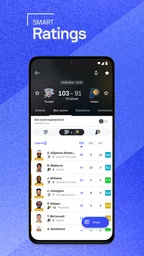
The app’s central strength is the way it brings live scores, match statistics, fixtures, and team standings together. During a match, that combination helps me answer more than “who is ahead?” I can look at the score, then use the available match information to understand how the contest is unfolding. For someone following football while keeping an eye on other sports, that breadth is a real convenience.
There is a clear trade-off: a live-score app depends on information reaching your phone. If your connection is weak or intermittent, updates may arrive later than you expect, and moving between event pages can feel less immediate. I would treat the display as a useful companion to a match, not as a guaranteed real-time substitute for watching or listening to it. A brief delay matters less when I am checking a result after work than when I am following a tense finish minute by minute.
That makes the app particularly practical in ordinary moments when I cannot keep a broadcast on. If I am commuting, waiting for an appointment, or sitting through a work break, I can check a fixture and its score without committing to a full stream. The connection still matters, but the interaction is suited to quick visits: glance at the match, look at the relevant details, then put the phone away.
What the live view is good for
I get the most value when I use the score as an entry point rather than the whole experience. A score tells me the immediate result; match statistics can add context, and standings help answer why a result matters to a team’s position. Before kickoff, fixtures help me plan which events to check later. Those pieces work together better than a bare scoreboard, especially when I follow multiple teams or competitions.
There is also a useful habit for avoiding needless browsing: decide what you want to know before opening the app. If the question is simply whether a match has started, go straight to the event. If you are checking how a result affects the table, move from the match to the standings and stop there. That small distinction keeps the app’s wider coverage from turning a quick check into an extended scroll.
Made for phone-sized gaps in the day
On a phone, the app fits the small windows of attention that sports often create. I might check a fixture before leaving home, reopen the event during a break, and then look at the final score later. This is more convenient than trying to remember kickoff times or searching separately for each result. The experience is especially appealing to people who follow sports across a busy schedule but do not need a continuous video feed.
For a realistic example, imagine following a football match while travelling across town. Before leaving, I check the fixture; during a stop, I open the match to see the score and available statistics; after arriving, I check the standings to understand the result’s wider impact. That workflow is efficient when mobile data or Wi-Fi is available. If the journey includes a dead zone, I would not rely on the app to keep a live picture of the match while disconnected.
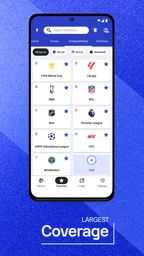
Its wide sports scope is another advantage, but it can also make the first visit feel busy if you only care about one team. I recommend narrowing your attention to the competitions or events you actually follow instead of treating the full catalogue as a to-do list. The app is strongest as a personal scoreboard and reference point; it is less compelling if you want every visit to deliver a carefully edited stream of team reporting and long-form analysis.
What happens when service is interrupted
Connectivity problems change the experience in two ways: current information may not refresh as promptly, and pages that need fresh content may take longer to load. If an event appears frozen, I would first check whether the phone has a working connection, then reopen the event or refresh the view once service returns. Repeatedly switching between pages while the signal is unstable is unlikely to make the information arrive faster.
It is worth setting expectations before a big match. If you need dependable moment-by-moment coverage, keep a broadcast or another trusted source available as a backup. Sofascore is useful for checking and comparing information, but I would not make it my only option in a place where connectivity is unreliable. For casual score checks, a short delay is usually manageable; for a decisive final stretch, it can be frustrating.
I also prefer to distinguish a connection issue from an app issue before deciding something is broken. If other online services are struggling too, the network is the more likely obstacle. If the connection is working elsewhere, closing and reopening the event is a sensible first step. This is a practical troubleshooting routine rather than a promise that every interruption will resolve immediately.
Using it without wasting mobile data
Because this is a connected sports experience, I would use it differently on mobile data than on a stable Wi-Fi connection. Checking a score or opening a fixture for a short look is a lighter habit than repeatedly browsing many event pages. If I am watching my data use, I keep visits focused and avoid leaving the app open just to monitor a match I am not actively following.
I would not assume that a live score will remain current without connectivity. Before entering a tunnel, boarding a flight, or heading somewhere with poor reception, check what you need while the network is available and plan to catch up after reconnecting. That is a more dependable approach than expecting an app centered on live information to behave like a downloaded reference guide.
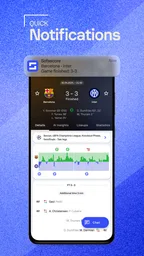
Notifications and frequent checks can also make a sports app feel more demanding than it needs to be. I recommend being selective about what you follow and how often you open it. The goal is to make match information easy to reach, not to turn every fixture into a reason to pick up your phone. That balance matters most for people following several leagues or sports at once.
How it compares with simpler score apps
Compared with a basic scoreboard, Sofascore offers a more useful path from score to context: match statistics, fixtures, and standings sit within the same sports-focused experience. That is valuable when I want to understand a result rather than merely record it. A single-league app may feel calmer if I follow just one competition, while a news-focused alternative may be better for interviews, transfer coverage, or longer analysis. The right choice depends on whether your priority is broad live reference or a narrower editorial experience.
The breadth is not automatically a win for every reader. Someone who only wants to know whether one team won might prefer a simpler app with fewer sections to navigate. A person who wants to watch games will still need a suitable broadcast service; a score and statistics app is not a replacement for video. I see Sofascore as the middle ground between a minimal score alert and a full sports-news destination.
Who will get the most from it
I would recommend it to people who follow several teams, want fixtures and standings close at hand, or need to check matches while doing something else. It is also a sensible pick for someone who follows football alongside other sports and would rather keep those checks in one place. The main condition is a reasonably dependable internet connection whenever live updates matter.
I would steer away from it if you rarely follow live sport, want a distraction-free single-team tool, or expect a complete match experience without a network. If you mainly want articles and commentary, a sports publication may suit you better. If you want to watch, choose a streaming or broadcast option. The app’s value is strongest when scores and structured match information are the things you reach for most.
Cost, audience, and long-term appeal
The app is free to download and use, with optional in-app purchases listed from under a dollar to around forty dollars per item. Its age rating is Everyone, so it is positioned for a general audience. I would still check purchase details in the app before confirming anything, particularly if a child uses the phone.
Its 4.5 average from around 1.2 million ratings suggests that many users find the approach worthwhile, while more than 100 million installs show how broadly it has been adopted. Sofascore was released in 2015 and supports Android 8.0 and newer. Those details make it an established option rather than a new, untested scoreboard, though the best reason to keep it installed is still whether its match coverage fits your own routine.
My connectivity verdict
After weighing its strengths and limits, I see Sofascore as a capable, flexible companion for following sport in short bursts. Its combination of live scores, match context, fixtures, and standings saves time when I want a clearer picture than a score alone can provide. The experience is less dependable when the connection is poor, and it cannot replace a broadcast, a dedicated news source, or a simpler app for someone with only one narrow need.
My practical advice is to use it as a focused check-in tool: choose the events you care about, consult the statistics or table when they add something, and keep another source available for high-stakes moments or unreliable networks. If that matches the way you follow sport, the free app is easy to recommend. If you expect uninterrupted live coverage regardless of signal, or want watching and analysis in one place, a different option will serve you better.
What we like
- Live score updates make it easy to follow matches as they unfold.
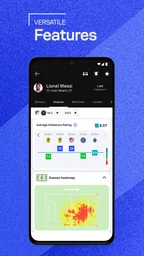
- Detailed player ratings help fans compare individual performances.
- Custom alerts can notify you about important match events.
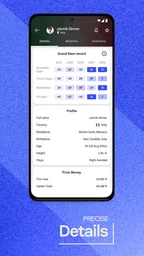
- Coverage spans many sports beyond football.
- Match statistics provide useful context beyond the final score.
What could be better
- The volume of statistics may feel overwhelming for casual fans.
- Some advanced features may require a paid subscription.
- Notifications can become distracting during busy match days.
- Live updates may occasionally lag behind television broadcasts.
- The interface can take time to navigate across many sports and leagues.





