
Fishbrain - Fishing App review
 Analysis by Appsdrops
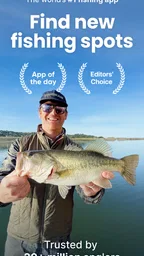
When I plan a fishing trip, the hardest part is often deciding where to start: a familiar stretch of water, a spot someone mentioned, or somewhere entirely new. Fishbrain is built around that practical problem. It is a free sports app from Fishbrain that brings fishing-related maps and community information together, with tools intended to help anglers explore spots, understand local rules, and think about bait. I find the idea most appealing when I want more context than a plain map can give, while still making my own decisions on the water.
What you get before paying
The app is free to install, but it also offers in-app purchases priced from $1.99 to $199.99 per item. That is the clearest way to think about its cost: you can try the basic experience without paying, while optional purchases may add paid value for people who want more. I would explore the free experience first and decide whether a paid option solves a real need for my trips, rather than assuming that every useful feature requires a purchase.
That wide purchase range calls for a little care. The price span alone does not tell you exactly what each item includes, so I would check the current in-app purchase details before buying and compare them with how often I fish. Someone heading out occasionally may be perfectly comfortable with free access; a regular angler may find an optional upgrade more worthwhile if it supports a repeated planning task. Either way, the sensible question is not whether the most expensive item is “worth it” in the abstract, but whether a specific purchase earns its place in your routine.
The app has a 4.5 average from around 68,000 ratings, and it has been installed over 10 million times. Those figures suggest that many anglers have tried it, but they cannot tell me whether the information around my particular lake or coast is useful. Local coverage and community activity matter more than broad popularity when I am choosing a new spot, so I would judge it on the waters I actually fish.
How it helps turn a map into a plan
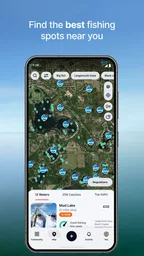
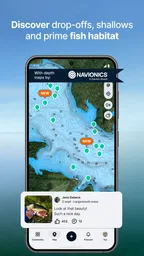
The main value is the combination of fishing maps, spot discovery, angler rules, and bait-related guidance. A general map can show roads, shorelines, and access points, but it usually leaves the angler to piece together fishing context elsewhere. Fishbrain’s approach is to put fishing-specific information closer to the place you are considering. That can make early planning easier, especially when I am unfamiliar with a body of water and want leads before I set off.
I would use it as a planning aid rather than a promise of a catch. A mapped spot can help me decide where to investigate, but it cannot account for every change in weather, water conditions, access, or fish activity. The most useful habit is to treat app information as one input: check the location, consider the rules, then make a fresh assessment when I arrive. That keeps the map helpful without mistaking it for a guarantee.
One practical workflow is to check a new area before committing to a long drive. I can look for likely fishing locations, note which options seem accessible, and identify the rules I need to understand before packing. If the information points toward a promising area, I can prepare a couple of alternatives rather than tying the whole day to one pin. That simple backup plan matters because a spot that looks appealing on a screen may not suit the conditions or my preferred way of fishing once I get there.
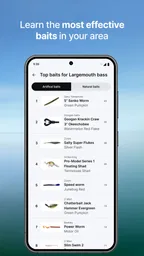
The app is also useful for making bait choices less guesswork-driven. I would use its bait-related information to build a shortlist, not to assume that one suggestion will work everywhere. A better approach is to compare the guidance with the target species, local conditions, and what I already know about the water. This is a modest but meaningful benefit: a shortlist can help me pack more thoughtfully, while leaving room to adapt instead of carrying every option I own.
Rules are another area where the app’s fishing focus can save time. Before trying a new location, I want to know what angling restrictions apply, rather than discovering a rule after I have arrived. I would still treat rules as something to verify for the exact water and situation, especially when boundaries or local requirements could matter. Using the app to orient myself and then checking details carefully is a more responsible workflow than relying on a map marker alone.
Where community context can help—and where it cannot
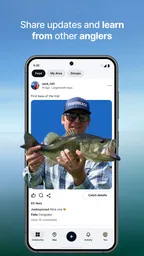
A fishing-focused community can add a kind of context that a standard navigation app does not: anglers are interested in spots, catches, and tactics rather than simply getting from one place to another. That makes Fishbrain a more relevant starting point for someone looking for fishing ideas. The trade-off is that community information reflects what people share. A quiet page is not proof that a spot is poor, and a busy one does not mean conditions will be right when I arrive.
For that reason, I would avoid planning a trip around a single report or apparent hotspot. I would compare several possibilities and keep my expectations flexible. This is especially useful for beginners: community clues can help narrow the search, but learning to read the water and make independent choices remains essential. Experienced anglers may get value in a different way, using the app to scout unfamiliar areas rather than expecting it to replace years of local knowledge.
There is also a privacy-minded trade-off to consider with any app built around fishing locations and shared activity. Before posting or contributing, I would think about how much detail I want to make public about a spot I value. Even when sharing is useful to other anglers, not every location needs to become a precise recommendation. I would use community features selectively and keep sensitive locations to myself if protecting them matters to me.
Friction to expect on the water
Fishbrain’s usefulness depends on the relevance of what it can show for the place and style of fishing I care about. If I mainly return to one well-known spot and already know the rules, access, and tactics, a fishing map may add less than it would for someone exploring new water. Similarly, anyone who prefers to plan entirely from personal notes or local conversations may not want a community layer at all.
Maps and shared guidance should not replace basic preparation. I would still plan for changing conditions, check access, and bring the equipment I need rather than assuming the app can settle every practical question. A location pin is not a substitute for judging whether I can safely reach a bank, launch, or shoreline. The best use is to reduce uncertainty before the trip, not to outsource on-the-ground judgement.
Another friction is deciding whether paid access is relevant. Because optional purchases range widely in price, I would not buy simply because the app offers an upgrade. First I would use the free version on a few real outings, notice what information I actually consult, and identify any recurring limitation. If no paid option clearly addresses that limitation, keeping the app free is a reasonable outcome.
Who is most likely to get value
I think this is a strong fit for anglers who regularly explore unfamiliar waters, want fishing-specific map context, or like having spot and bait information in one place while planning. It can also suit a newer angler who wants a starting point for research, provided they understand that app suggestions are not a substitute for learning local rules and conditions. The experience is most valuable when someone is willing to compare information and adapt, not just follow a marker blindly.
It is less compelling for someone who fishes the same familiar place every time and already has a trusted routine. It may also be the wrong choice for an angler who does not want a community-oriented layer, prefers paper maps and personal notes, or expects a location finder to guarantee productive fishing. In those cases, a basic mapping tool, direct local advice, or simply continuing with a proven plan may be a better fit.
A realistic use case is a weekend trip to water I have not visited before. On a weekday evening, I could use Fishbrain to shortlist fishing areas, review the angling rules that appear relevant, and consider bait options before packing. I would choose a primary location and a backup, then reassess access and conditions on arrival. That workflow does not promise success, but it can make preparation more focused and help me avoid arriving with no idea where to begin.
A mature app, with a sensible trial-first approach
Fishbrain was released on February 25, 2013, and its current version is 11.70.1. It is rated for Teen users, and it runs on operating systems from version 10 onward. Those details make it straightforward to check basic compatibility before installing. The app’s long presence and broad uptake give it a substantial audience, but the deciding factor for me remains whether its fishing information is useful around the waters I visit.
For a free starting point, I see a practical case for giving it a try if fishing maps and location discovery are part of how you plan. The app’s strongest value is not that it removes uncertainty; it is that it can help organize a search and bring fishing-specific context into the preparation stage. Paid purchases may suit frequent users, but I would evaluate them only after seeing what the free experience contributes to my own routine.
My recommendation is therefore a measured one: install Fishbrain if you want a fishing-oriented way to explore spots and prepare for unfamiliar water, then test it against a real trip before spending anything. Keep a backup plan, verify important rules, and treat shared information as guidance rather than certainty. If you already know exactly where and how you fish, or want a simple map without community context, you may not need it. For curious anglers who like researching their next outing, though, it offers a useful place to start.
What we like
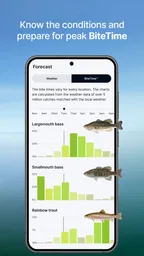
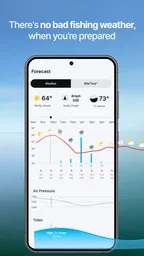
- Fishing forecasts help plan trips around changing conditions.
- Catch logging makes it easy to track past fishing outings.
- Local reports can reveal promising spots near you.
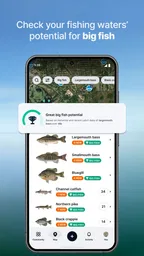
- Species guides offer useful details for identifying fish.
- A large angler community provides tips and shared reports.
What could be better
- Some features require a paid subscription.
- Accurate forecasts depend on local data availability.
- Shared reports may reveal popular fishing locations.
- The amount of community activity varies by area.
- Location access is needed for nearby recommendations.





