
Da Fit review
 Analysis by Appsdrops
I see Da Fit as a companion app for people who already use a compatible fitness band and want an easy way to follow everyday health activity. Its appeal is practical rather than ambitious: it brings wearable readings into one place so you can check patterns across the day instead of relying on memory. I would consider it most useful as a lightweight habit tracker, not as a substitute for medical advice or a specialist sports platform.
What free access means in practice
Da Fit is a free sports app from MO YOUNG LIMITED. That makes it straightforward to try if you have a band it supports: you can install the app without paying for access upfront. The free price is a concrete advantage for someone who wants to see whether a wearable routine suits them before spending time or money on a more involved tracking setup.
The app has been available since December 14, 2017, and its current version is 2.9.25-97-gf8b4dff77d. It runs on Android 6.0 and later, which gives it a broad range of Android compatibility. Its age rating is Everyone. Those details help set expectations about access, but the practical first step is still checking whether your particular band works with the app; a free download is only valuable if the wearable can connect and report the information you want.
Da Fit has a 3.6 average from around 414,000 ratings, with about 12,000 written reviews, and has passed 100 million installs. That scale suggests many people have tried it, while the average rating is a reminder not to expect a flawless experience on every phone-and-band combination. I would treat the app as something to test with your own device rather than assuming popularity guarantees a smooth connection.
Value comes from a usable routine
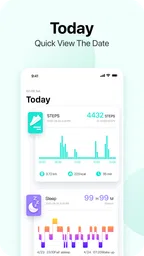
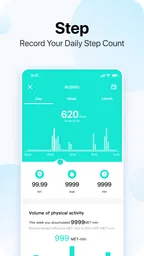
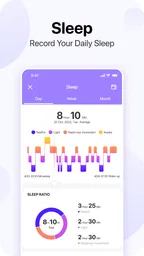
The real value is not simply that the app costs nothing; it is whether the information it gathers changes a small daily decision. If I check activity after lunch and see that I have barely moved, I can take a short walk before the end of the workday. If I review sleep-related records in the morning, I can compare several days and notice whether late nights tend to coincide with a less satisfying rest. Those are modest uses, but they make tracking feel purposeful rather than decorative.
A sensible way to start is to wear the band consistently for several ordinary days before drawing conclusions. I would keep the routine similar, open the app at the same time each day, and look for trends rather than reacting to a single reading. This is especially useful because wearable measurements can be affected by fit, movement, and how consistently the device is worn. A number on a screen is a prompt for reflection, not proof of a diagnosis or a definitive account of your health.
For a new user, the first useful question is not “How much data can I collect?” but “What will I do differently if I see this?” Pick one goal—more regular movement, a steadier bedtime, or a clearer record of activity—and give the app a role in that goal. If the answer is nothing, the daily checks may become another notification or screen to ignore.
Small workflows that make tracking more useful
One helpful approach is to use the app as a review point rather than constantly checking it. I would glance at the day’s activity after work, then decide whether a short walk or a rest makes sense. This avoids treating every fluctuation as important and turns the band into a reminder system instead of a source of pressure.
A second useful habit is to compare like with like. When judging sleep, for example, compare weekdays with other weekdays and note major routine changes; a weekend with a late night is not a fair benchmark for a typical workday. For activity, compare days with similar schedules. This simple method helps separate a real pattern from an unusual day, even without sophisticated analysis.
A third trade-off is consistency versus comfort. A band only gives a useful personal record when you actually wear it, but wearing a device overnight may not suit everyone. I would try a short period of daytime-only tracking first, then decide whether overnight use is comfortable and worthwhile. There is little value in collecting a broader record if the routine makes you abandon the device altogether.
If you change phones or reset a wearable, I would make reconnection an intentional step rather than assuming the app will continue as before. Check that the band is paired and that new records are appearing before relying on the app for a personal log. That small check can prevent a blank day from being mistaken for a lack of activity.
Where it fits among tracking options
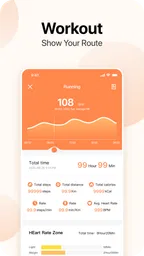
Compared with recording workouts manually in a notes app, Da Fit can make routine monitoring less laborious because the band is intended to gather information while you go about your day. Compared with a sports service built around structured training, route planning, or detailed coaching, its role is more everyday: checking general activity and following health-related records associated with the wearable. I would choose the simplest tool that matches the question I actually have.
That distinction matters for runners and other serious athletes. If your decisions depend on detailed training plans, precise sport-specific analysis, or a particular ecosystem of connected equipment, you should verify that your existing tools offer what you need rather than assuming Da Fit will replace them. A general companion app can support awareness, but it is not automatically the right hub for every training workflow.
It is also not a good choice for someone who expects a phone app to provide dependable medical monitoring. Wearable readings can be useful for noticing personal patterns, but they should not be treated as clinical measurements or used to make urgent health decisions. If you need medically reliable monitoring, follow guidance from a qualified professional and use equipment intended for that purpose.
Who is likely to get value
I would recommend giving Da Fit a try if you own a compatible band, prefer a simple overview to a complicated dashboard, and want a low-cost way to build awareness of daily movement or rest. It may suit someone who does not want to enter every walk by hand and is happy to check broad patterns rather than interpret a large collection of advanced metrics.
It is less suited to people who do not have a compatible wearable, dislike wearing a band, or want detailed coaching and sport-specific analysis. It may also frustrate anyone who expects every reading to be perfectly consistent. The app’s usefulness depends on the device connection and on your own willingness to wear the band regularly; without those, there is little reason to keep opening it.
Because the app is free, I would judge it by the time and effort it asks of you, not by an assumed paid-versus-premium comparison. The verified cost fact is that access is free; that does not establish anything about optional purchases or services, so I would not make a decision based on imagined upgrades. Start with the features available to you, see whether the records help, and avoid building a routine around functions you have not personally checked.
My verdict after weighing the trade-offs
Da Fit offers a sensible starting point for everyday wearable tracking: it can help turn a band’s day-and-night readings into a routine you can review and act on. Its strongest case is for people who want a basic companion without an upfront app cost, and who are comfortable using trends as gentle prompts rather than precise answers. I like that this kind of setup can encourage small, realistic changes without requiring a full training program.
The main caution is to keep expectations matched to that purpose. A free app with a large audience is still not automatically the best option for every device or every athlete, and its 3.6 average rating points to mixed experiences worth keeping in mind. Confirm compatibility, wear the band consistently, and judge the app by whether its records help you make a useful choice during an ordinary week.
My buy-or-skip advice is simple: if you already have a compatible band and want an uncomplicated view of your daily activity, Da Fit is worth trying because the app itself is free. If you need clinical certainty, advanced training tools, or a guaranteed frictionless connection across your devices, I would look for a solution built specifically around those needs instead.
What we like
- Pairs with many budget-friendly fitness bands and smartwatches.
- Shows daily activity trends in a clear dashboard.
- Lets you customize watch faces from the app.
- Supports reminders to move and drink water.
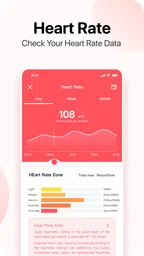
- Provides basic sleep and heart-rate tracking.
What could be better
- Health readings are not a substitute for medical advice.
- Some features depend on the connected watch model.
- Data accuracy can vary between devices and users.
- Limited workout tools may not suit serious athletes.
- Syncing can occasionally be slow or unreliable.





