


Nail Design Studio review
 Analysis by Appsdrops
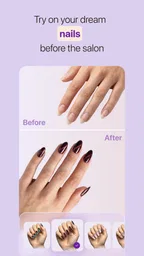
I’m drawn to nail-design apps when I want to test an idea before committing to a manicure, and Nail Design Studio is built around that kind of visual planning. It is a free beauty app from DigiTide Blaze that lets me explore nail looks and see styles on a photo of my own hand. That last part makes it more practical than a gallery of inspiration alone: a design can look appealing on a model and still feel wrong for my nail shape or skin tone.
My overall impression is that Nail Design Studio is most useful as a low-pressure idea-testing tool, not as a substitute for a nail technician or a hands-on design editor. The AI try-on concept gives the app a clear purpose, but the result is best treated as a preview rather than a promise of exactly how a real manicure will look. If I keep that distinction in mind, it can help narrow down choices without turning a simple beauty decision into a project.
Trying ideas without committing to a manicure
The central appeal is the chance to bring inspiration closer to reality. Browsing manicure ideas is easy; judging whether a color or style will suit my own hand is harder. Being able to try a look against a photo can make that choice more concrete, especially when I am deciding between noticeably different options rather than tiny variations.
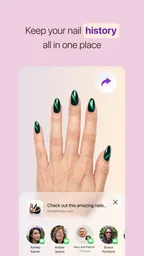
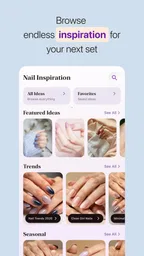
I would use the app before booking an appointment, saving a few promising directions and then discussing them with a nail artist. It can also help when I want a change but have no clear starting point: looking through designs may give me a useful reference instead of leaving me with the vague instruction to “do something different.” For a casual user, that is a meaningful improvement over collecting screenshots from unrelated social feeds.
The preview should not be treated as a precise simulation of every detail. A photo-based result can help communicate the general mood, color family, and placement of a design, but it cannot guarantee that the same look will translate perfectly to a different nail length, shape, or real-world finish. I would take a screenshot or note the visual idea and use it as a conversation starter, not as a technical specification.
Where the AI preview helps most
Try-on tools are particularly valuable when the decision involves a strong visual contrast: a vivid shade instead of a neutral one, a more decorative style, or a look that feels unfamiliar. Seeing an idea on my own hand can reveal that it feels too bold for everyday wear, or that a color I would normally overlook is surprisingly appealing. That sort of quick comparison is more useful than staring at a polished sample image and imagining the result.
For the most helpful comparison, I would keep the photo conditions consistent while trying alternatives. Use a clear, well-lit picture with the hand visible, then compare a small set of distinct looks rather than cycling through many near-identical choices. This is a practical way to judge the overall direction without letting tiny differences in the image distract from the question that matters: would I actually want to wear this?
There is also a useful distinction between choosing inspiration and choosing a service. A digital preview can help me settle on a palette or general style, while a salon appointment still involves practical questions such as nail length, upkeep, and what can be achieved with the products and techniques available. I would not assume the app resolves those details; its strongest role is helping me arrive with a clearer idea.
Speed expectations and busy sessions
The app’s concept is visual, so the moments that matter most are likely to be opening designs, preparing a hand image, and viewing a try-on. I would expect those steps to feel more demanding than simply reading text, particularly when image processing is involved, but I would not judge the app by an imagined instant result. The useful test is whether it lets me move from one idea to another without making the comparison feel cumbersome.
A heavy-use session might mean trying several designs against the same photo, changing the reference image, or browsing while deciding what to save for later. I would keep the session focused: first settle on a suitable photo, then compare a few looks, and only replace the image if the framing is clearly limiting the preview. This reduces needless repetition and makes it easier to remember why one option worked better than another.
If a result takes a moment, that is less frustrating when I have a specific choice in mind than when I am tapping randomly through designs. I would avoid interpreting a pause as proof of a problem without considering the phone and the image being used. The app’s appeal depends on a visual workflow, so some variation in how responsive it feels is a reasonable possibility across devices and conditions.
My practical tip is to treat each try-on as a comparison rather than a final answer. Pick one or two broad directions, inspect how each reads on the hand, and stop once the choice is clear enough to discuss or save. That makes the app more useful than endless browsing, where a growing pile of options can make decision-making harder rather than easier.
Reliability and the limits of a visual result
For this kind of app, reliability is not only about whether it opens. The preview needs to be understandable enough that I can tell what I am looking at and make a decision from it. A clean photo and a simple, consistent comparison process give the visual result a better chance of being useful; a poorly framed hand can make any try-on harder to assess.
I would also be cautious about judging a manicure by a screen preview alone. Lighting in the original photo, display settings, and the difference between a digital image and a finished manicure can all affect how a design appears. If I am choosing a color for an important event or paying for a detailed salon service, I would use the app to shortlist ideas and seek a real-world reference before making a final commitment.
If an image or result does not look right, the sensible recovery step is to try a clearer photo and compare again, rather than assuming the design itself is unsuitable. A straight-on, well-lit hand image is a better starting point than a shadowed or cropped one. That small adjustment can make the comparison feel more informative, even though it cannot eliminate every difference between a preview and a real manicure.
Device fit, cost, and who should choose it
Nail Design Studio is listed for devices running Android 7.0 or later, which gives it a broad baseline of compatibility across Android versions. That does not mean every compatible phone will feel equally quick: image-heavy tasks can be more comfortable on a device that handles visual apps smoothly. I would also keep enough free space for normal app use and close other demanding tasks if a phone is already struggling, rather than expecting a beauty tool to fix a device-level slowdown.
The app is free to install, with optional in-app purchases ranging from $3.99 to $29.99 per item. I would explore the basic experience before paying for anything, then consider a purchase only if it adds something I genuinely expect to use. For someone who wants occasional inspiration, paying for extras may not be worthwhile; a frequent user who finds a particular option valuable may see the decision differently.
It is rated for Everyone, so its audience is broad, and the current version is 2.0.0. It has a 4.6 average from 284 ratings, with 50K+ installs. Those figures suggest that people are using it and generally respond well, but they do not tell me whether its particular workflow will suit my own device or expectations. I would still decide based on whether photo-based previews are the kind of help I want.
This app is a good fit for someone who enjoys experimenting with manicure ideas, wants a visual reference before an appointment, or finds it hard to imagine a style from a sample image alone. It is less suitable for someone who needs precise professional design controls, exact color matching, or a guaranteed preview of the finished salon result. If those are the priorities, a consultation with a nail technician or a more technical design tool is the better route.
How it compares with familiar alternatives
The usual alternatives are browsing manicure photos, saving inspiration from social platforms, or asking a technician to suggest a look. Each has a different strength. Photo collections can offer a wider range of real-world examples, while a nail artist can advise on what is practical for a person’s nails. Nail Design Studio’s distinct advantage is the personal try-on angle: it aims to make inspiration feel closer to my own hand before I choose.
That advantage comes with a trade-off. A gallery can show an actual finished manicure, while a digital preview is a planning aid; a professional can answer questions about execution, while an app cannot replace that conversation. I would combine them rather than pick one as a complete solution: use the app to narrow the look, then bring the strongest reference to the person doing the manicure.
For an everyday scenario, imagine I have a salon visit coming up and keep changing my mind between a restrained look and something more expressive. I could choose one clear photo, compare a few designs, and note which option still feels right after seeing it on my hand. Then I could show that idea to the technician and ask what would work with my preferred nail shape and maintenance routine. That is a realistic use of the app without expecting it to make the appointment decisions for me.
My verdict on performance and everyday value
Developed by DigiTide Blaze, Nail Design Studio offers a focused way to explore manicure styles and preview them against a personal hand image. I would not make sweeping promises about speed, stability, or battery use across every phone; those experiences depend on the device and on how visual tasks run there. The sensible expectation is to use it for deliberate comparisons and judge its responsiveness on the phone I actually own.
What I like most is the shift from “this looks nice on someone else” to “I can imagine this on my own hand.” What I would keep in check is the temptation to treat a digital result as an exact forecast. The app is most convincing when it helps me form a preference, not when I ask it to settle every technical detail of a manicure.
My recommendation is to try it if you enjoy visual experimentation and want a more personal starting point for choosing nail art. It offers a useful middle ground between browsing inspiration and making a real appointment, especially for people who are unsure which direction to take. If you need precise salon advice or a highly controlled design workflow, I would choose a professional conversation or a specialist tool instead. For casual planning, though, Nail Design Studio is a sensible free place to begin, provided I treat its previews as guidance rather than guarantees.
What we like
- Easy-to-use tools make designing nails approachable for beginners.
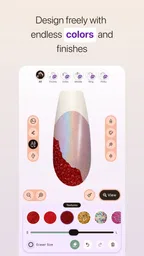
- A wide range of colors supports varied design ideas.
- Decorative elements help create personalized nail art.
- Virtual previews let users experiment before choosing a look.
- Finished designs can inspire ideas for a salon visit.
What could be better
- The virtual results may not match real nail polish exactly.
- Some design options may require in-app purchases.
- Small details can be difficult to adjust on a phone screen.
- The app may feel limited for users seeking advanced editing tools.
- Designs may not account for different nail shapes.





