


MySubaru review
 Analysis by Appsdrops
MySubaru is easiest to judge not as another app to open every day, but as a digital companion for owning a Subaru. The first week can feel reassuring: instead of keeping every ownership task in your head or searching through old messages and paperwork, you have a dedicated place to start. The real test is what remains useful once the novelty wears off. In my view, its lasting value depends on whether you regularly need Subaru-specific ownership help—not on how often you enjoy tapping around an app.
Useful from the first week, if you own a Subaru
This is a free auto-and-vehicle app from Mobile - Subaru Of America, aimed squarely at Subaru owners. That focus is its biggest strength and its main limitation. It is not a general-purpose car tool that happens to mention Subaru; it makes sense when your vehicle and your ownership tasks are the reason you installed it.
The name MySubaru may suggest a broad digital garage, but I would approach it more practically: as a single starting point for Subaru-related ownership needs. That framing keeps expectations sensible. It can be convenient to have the brand’s app ready when you need to check something, but it should not be treated as a replacement for the car’s manual, a mechanic’s diagnosis, or your own service records.
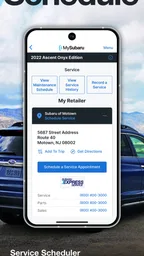
In an ordinary week, the useful moment may be brief. Imagine you are planning a service visit and want to get your ownership details in order before calling or heading out. Opening one Subaru-focused app is a more natural first step than searching through unrelated vehicle apps or trying to remember where you saved a document. The practical benefit is not necessarily doing more; it is reducing the small bits of friction around an existing task.
That is also why this app is less compelling for someone who does not own a Subaru, is only browsing vehicles, or wants one neutral tool to manage several makes. The brand-specific approach is helpful when it matches your car, but it does not automatically make the app useful to a mixed household or a driver who prefers to keep every vehicle in a single independent system.
Make the app useful before you need it
My best advice is to set it up while you have time, rather than waiting until you are standing in a service lane trying to find information. A calm first session gives you a chance to see how the app fits your normal ownership routine and decide what you actually want to use it for. If you only open it during a rush, any setup or navigation friction will feel larger than it is.
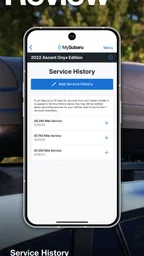
A small but valuable habit is to treat the app as a prompt to keep your ownership information organized, not as proof that everything has been recorded automatically. When you book maintenance or receive advice, make a note of the relevant details in the place you already trust, whether that is the app, a paper folder, or another record-keeping method. This avoids the common trap of assuming that installing a manufacturer app has, by itself, created a complete service history.
The app is available on Android, is free, and carries an Everyone age rating. It has a 4.7 average from around 93,000 ratings, with more than a million installs. Those figures suggest that it has found a substantial audience among owners, though popularity does not guarantee that every feature or workflow will suit your particular vehicle or habits.
What keeps it relevant month to month
For a car owner, recurring value often comes from a handful of occasional tasks rather than daily entertainment. A Subaru-specific tool can earn a place on your phone if it makes routine ownership feel less scattered: one place to begin when you have a question, need to prepare for a visit, or want to reconnect with the brand’s ownership resources. Those moments may be infrequent, but they matter more when they are easy to handle.
To make that value last, I would tie opening the app to a task you already do. For example, when you review household errands or arrange vehicle care, check the app as part of that same routine. This is more dependable than expecting yourself to remember a separate monthly habit just because the app is installed. If it helps you complete a real task, it has earned attention; if you keep opening it without a clear purpose, the habit is unlikely to stick.
It also helps to think of the app as one part of an ownership system rather than the whole system. Keep important maintenance notes in a durable place you can access even if you change phones, switch apps, or sell the car. A manufacturer app is most useful as a convenient front door to relevant help; it is less wise to rely on any single mobile app as the only record of something important.
That distinction matters when comparing it with the usual alternatives. A general vehicle-maintenance app may be better for tracking several makes or building a personal log across multiple cars. A calendar can be enough for simple reminders, and a paper folder may suit someone who wants records independent of a phone. MySubaru’s advantage is the brand-specific context, not a promise that it replaces every other tool.
Low effort, with a few habits worth keeping
Maintenance burden is not just about updating an app; it is about the attention it asks for over time. MySubaru is most likely to remain useful if you keep your use focused. Decide which ownership tasks you want it to support, learn where those tools are, and avoid turning every notification or screen into a new obligation. If you are not getting practical value from a section, you do not need to make it part of your routine.
One useful workflow is to check the app before contacting a service provider, then keep a separate note of what you arranged and when you expect to follow up. That gives you the convenience of starting with Subaru-specific resources without depending on the app to remember every conversation. It also makes it easier to compare what the app offers with the advice you receive in person.
Another sensible approach is to review your setup after changing phones or changing how you manage vehicle records. Confirm that the app still fits your routine instead of assuming that an old installation is automatically current or complete. The current version is 3.7.1, and the app has been available since June 23, 2015; for an owner, the more important question is whether the present experience supports the tasks you actually perform.
There is also a practical boundary to keep in mind: an app can help organize access to ownership support, but it cannot inspect a vehicle or make a mechanical judgment for you. If a warning or unusual behavior calls for professional attention, use the appropriate service route rather than treating an app screen as a diagnosis. That is not a flaw unique to this product; it is simply the right way to use digital tools around a physical car.
Where the routine can become tiring
The biggest source of fatigue is expecting a brand app to be useful every day. Most owners do not have a fresh Subaru-related task each morning, so a daily check-in would be artificial. If you prefer apps that reward frequent use or bring together every vehicle in your household, this one may feel narrow. Its value is tied to ownership needs, which come and go.
Another possible frustration is having to move between the app and other channels. Some tasks may still lead you to a conversation, a service location, a manual, or a separate record. That is normal for vehicle ownership, but it means the app should not be judged by whether it eliminates every step. I would judge it by whether it makes the first step clearer and saves enough searching to justify keeping it installed.
It is also worth resisting the assumption that the same setup works equally well for every Subaru owner. A driver with one car and a simple service routine may want only occasional access. Someone coordinating multiple vehicles, keeping detailed repair histories, or managing a car they do not personally own may need a broader system alongside it. The app’s focused identity is an advantage for the right owner, not a universal solution.
For readers considering the commitment, the app has 7,300 reviews, and the overall rating is strong. Still, I would treat any rating as a starting point rather than a decision. Your own vehicle, the tasks you need, and the way you prefer to keep records matter more than a crowd’s general impression.
Who should keep it installed
I would keep MySubaru if I own a Subaru and like having a manufacturer-specific place to begin with ownership questions or routine tasks. It is especially sensible for a driver who is new to the brand, wants to reduce scattered searching, or already checks digital tools when arranging vehicle care. The key is to connect it to a real moment in your routine instead of expecting the app itself to create one.
I would be less inclined to recommend it as a main vehicle organizer for someone with several makes, or to a person who prefers not to depend on manufacturer-specific apps. A general maintenance tracker may be a better fit if cross-brand history is the priority. If your needs are limited to a basic reminder, a calendar can be simpler. There is no reason to maintain another app unless its Subaru focus saves you effort.
Overall, I see MySubaru as a practical ownership companion rather than a daily destination. Its strongest case is the convenience of having a dedicated Subaru starting point when a real question or task comes up. Its weakness is the same narrow focus: outside those moments, it can sit unused. If you set it up thoughtfully, keep important records in a way you control, and open it when it supports an actual task, it can earn lasting space on your phone without demanding more attention than car ownership already does.
What we like
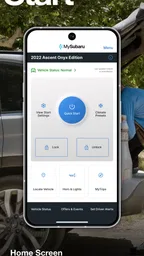
- Remote start lets you warm up or cool down a compatible vehicle.
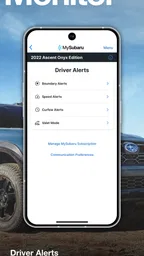
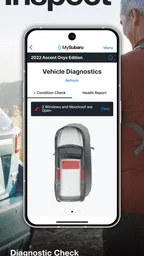
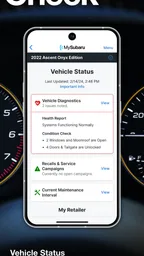
- Vehicle health alerts can help flag maintenance needs early.
- The app can show your car's location when you need to find it.
- Service scheduling is available through participating Subaru retailers.
- Digital owner resources make vehicle information easy to access.
What could be better
- Remote features require a compatible Subaru and an active subscription.
- Some connected services are limited by vehicle model and year.
- Features may not work well where cellular coverage is weak.
- Retailer availability can limit convenient service scheduling.
- Location and vehicle data collection may concern privacy-minded users.





