

myQQ – Quick Quack review
 Analysis by Appsdrops
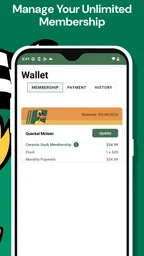
I think myQQ – Quick Quack makes the most sense when a household already uses Quick Quack Car Wash and wants one person to manage the membership without turning every wash into a small administrative task. It is a focused Auto & Vehicles app from Quick Quack Car Wash, LLC, built around the company’s Unlimited Membership rather than general car-care tools. That narrow purpose is both its advantage and its main limitation: it can be useful in a regular Quick Quack routine, but it is not a substitute for a broad vehicle-services app or a membership at another wash chain.
One household routine, one membership manager
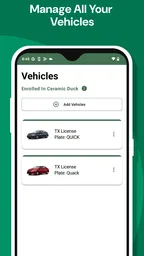
Picture a household where one person usually handles the car-wash membership, while different family members take the car in on different days. The practical value of myQQ is having a dedicated place to manage that Quick Quack membership, instead of relying on paper reminders, a saved note, or a second person trying to keep track of the account informally. The app’s purpose is specific, so I would approach it as a companion to an existing customer relationship, not as an app that helps me discover every wash option in town.
That distinction matters when deciding who should install it. If you are already an Unlimited Membership customer and you are the person who handles the account, the app has a clear role. If you only visit a car wash occasionally, or you are comparing several local providers before choosing one, a general maps app and each company’s own information may be more useful at first. myQQ is centered on Quick Quack’s membership, so its value depends on whether that is already part of your routine.
In a shared-car household, I would decide early which person is responsible for managing the membership. That does not mean the app should be treated as a family dashboard; the known purpose is account management, not household scheduling or shared access. Keeping one clear account manager can reduce confusion about who is expected to handle membership-related tasks, especially when the car itself is used by more than one person.
What the app is for—and what it is not
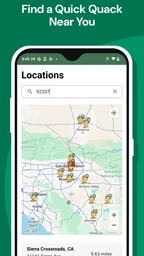
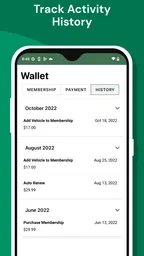
The most useful way to think about this is as a narrow digital control point for an Unlimited Membership. It is not described as a generic wash finder, expense tracker, vehicle-maintenance log, or shared calendar. I would not download it expecting those broader functions. For someone who simply wants a convenient way to manage a Quick Quack membership, that focus is sensible; for someone seeking one app for every vehicle and provider, it is likely too limited.
That also makes it easier to set expectations in a household. One person can be the account owner and use the app for membership management, while other drivers can know which wash membership the household uses without assuming they have access to the account. Before relying on a particular arrangement for several drivers, I would check the current account and membership terms directly with Quick Quack rather than assume the app offers family profiles or shared credentials.
Setup, account boundaries, and day-to-day coordination
For setup, I would begin with the person who already handles the membership and install the app on their own phone. The store identifies the app as free, but that is the cost of the app itself, not a statement about membership charges. It is worth keeping those separate: downloading a membership-management app does not mean the underlying service is free. If another household member is expected to manage the account, decide whether that person should use the account holder’s device or follow the company’s approved account process, instead of casually sharing login details.
This boundary is a small but useful practical safeguard. A household may have a shared tablet or a phone that several people use, but an account-management app is still tied to a particular customer relationship. I would avoid leaving an account signed in on a device that guests or children use, and I would not treat a screenshot of account details as a reliable replacement for access through the app. Those are general account-handling habits, not special controls I would assume myQQ provides.
For coordination, a simple division of responsibilities often works better than trying to make every driver an account manager. The account holder can take care of membership matters, while the person driving the car can follow the household’s usual plan for when to wash it. If the driver changes at short notice, a quick message between adults can prevent someone from assuming the account is set up on their phone. This is especially relevant when a car is shared among people who do not all use the same device.
One non-obvious trade-off is convenience versus continuity. Keeping membership management on one person’s phone gives the household a clear point of contact, but it can become inconvenient if that person is away, has a dead battery, or changes phones. I would plan for that by making sure the account holder knows how to regain access and by checking with Quick Quack about the proper process for any backup manager. I would not solve the problem by assuming multiple logins or transferable access are available.
A useful everyday workflow is to handle account-related tasks when you have a moment at home rather than waiting until the car is already in line. That avoids trying to troubleshoot sign-in or remember account details while juggling passengers and a busy day. The app’s membership focus makes it a sensible place to start those tasks, but I would still keep any important account information private and use the company’s normal support route if something about the membership itself needs attention.
Shared devices and clear expectations
If two adults both want to use the app, the important question is not simply whether both can install it; it is how the membership account is intended to be managed. I would check the available account options before setting up a second device. That avoids a common household snag: one person changes account details while another expects the old arrangement to remain in place. Clear ownership is more valuable than an improvised system built around passing a phone back and forth.
For a shared family device, I would be more cautious. A device that is routinely handed to children or visitors is not an ideal place to leave a membership account open. The safer household habit is to keep account management on an adult’s personal device and have other drivers coordinate directly with that adult. That advice does not depend on assuming any particular lock, profile, or permission feature inside myQQ.
Age context and trust
The app is rated for Everyone, so its listed content is suitable for a broad audience. That rating is useful context, but it does not mean every child should manage an adult’s car-wash membership. The account can involve a real service relationship, so I would keep responsibility with the adult who owns or manages that membership. A teen who drives a household car may need to know the family’s plan, but that is different from being given control of the account.
I also see a practical trust boundary here: the app is developed by Quick Quack Car Wash, LLC and is specifically for managing a Quick Quack membership. That makes it more directly relevant to an existing customer than a third-party organizer would be. At the same time, I would still use ordinary care with sign-in information and confirm account questions through the company’s established customer-support channels. Being an official, brand-specific tool does not remove the need to keep personal account access private.
In terms of platform requirements, the listed minimum operating system is version 8.0, and the current app version is 4.32.0. The app has been available since May 10, 2022. I would check compatibility on the specific phone before making it the household’s only way to manage a membership, particularly if the account holder uses an older device. Those details are useful when planning a shared routine, because a household arrangement is only convenient if the person responsible can actually run the app on their own phone.
How it compares with other ways to manage a wash routine
Compared with handling everything through a browser, paper notes, or a general payment reminder, a company-specific app has the advantage of keeping membership management associated with the provider. That can make sense for a customer who already knows they want Quick Quack’s Unlimited Membership. But a notes app may be better for a household that only wants to record which car was washed or remind someone to clean the vehicle; those are separate tasks, and I would not expect myQQ to replace a general checklist.
Compared with a competitor’s app, the decision is even simpler: myQQ is relevant when the household uses Quick Quack. It is not a neutral tool for comparing memberships across brands. If you are still shopping around, compare providers’ terms and locations first, then use the corresponding company app once you have made a choice. If your family changes providers often, maintaining several brand-specific apps may be less convenient than using a general reminder for the household’s schedule.
The app’s public reception is encouraging without being a reason to overlook fit: it has a 4.5 average from around 3,600 ratings, with over 100,000 installs and about 405 written reviews. Those figures suggest plenty of people have tried it, but they cannot tell me whether it suits a particular household’s account setup. The deciding factor remains whether the person responsible for your Quick Quack membership wants an app specifically for managing that relationship.
Who should choose it, and who should skip it
I would recommend giving it a try if you already have a Quick Quack Unlimited Membership, regularly handle membership matters on your phone, and want the account manager to have a dedicated app. It is especially sensible when one adult consistently takes responsibility for the account and the household has a straightforward way to coordinate with other drivers. The app is free to download, which makes it easy to consider as a management tool, while the membership itself remains a separate decision.
I would skip it, at least for now, if you are not a Quick Quack customer, wash cars only rarely, or want a single app to manage services from multiple providers. I would also avoid making it the center of a family system if every driver expects independent access and you have not confirmed that the membership supports that arrangement. In those cases, a shared household reminder and direct communication may be simpler, while the account holder keeps the membership management in their own hands.
Quick Quack has a 4.5 average across roughly 3,600 ratings, but my recommendation is still conditional rather than universal: this is a focused tool for people who already have a reason to manage a Quick Quack membership. If that describes your household, it can give the responsible adult a clear place to handle the account. If not, installing it is unlikely to solve a broader car-wash planning problem.
My household verdict
My overall view is that myQQ works best as a deliberately limited, adult-managed companion to a Quick Quack membership. Its role is clearest when one person owns the account responsibilities and other household drivers know how to coordinate with that person. I would keep account access on the manager’s device, confirm any multi-user arrangements with the company, and avoid assuming that the app includes family profiles or shared controls.
For a household already using Quick Quack, that modest setup can be enough: the right person has the membership-management app, drivers know whom to contact, and the account is not left casually accessible on a shared device. For a household still comparing wash providers, or one that needs broad multi-brand tracking, a general planning tool may fit better. That is why I would recommend myQQ to an existing Quick Quack customer who values a direct, focused way to manage the membership—not to everyone who happens to own a car.
What we like
- Quick access to account details makes routine tasks easier.
- The app offers a convenient way to manage a Quick Quack membership.
- Mobile access can help you check account information while away from home.
- A focused layout keeps the app centered on Quick Quack services.
- It provides a digital option for handling membership-related needs.
What could be better
- Its usefulness is limited to Quick Quack customers.
- Some features may require an active account or membership.
- The app offers little value if you rarely visit Quick Quack locations.
- A network connection may be needed to access current account details.
- App features and availability may vary by region.





