
myQ Garage & Access Control review
 Analysis by Appsdrops
If you’re considering using myQ Garage & Access Control, the first thing to know is what kind of help it offers: it puts garage and access-control tasks on your phone, rather than trying to be an all-purpose smart-home dashboard. I like that focused idea. When the garage is the part of the home you want to check or manage remotely, a dedicated app can be more useful than hunting through general home controls.
The app is a free Lifestyle product from The Chamberlain Group LLC. It has an average rating of 3.6 from around 131,000 ratings, so users’ experiences are not uniformly glowing. That seems worth keeping in mind: the concept is practical, but your satisfaction will depend on whether your access equipment and day-to-day routine work well with it. It is rated for Everyone and has more than 10 million installs, which suggests it serves a broad range of households, not just technology enthusiasts.
What to expect from a garage-focused app
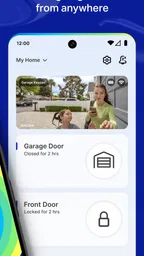
Think of myQ as a remote layer for garage and access control, not a substitute for every part of the physical system. The useful question is not simply whether an app can open a door; it’s whether having that control on your phone makes a real task easier. For me, the clearest examples are checking the garage while away, handling an arrival when I’m not at the door, and building a habit of confirming the garage is secure before settling in for the night.
That focus is also a limit. If you only want a conventional wall button or handheld remote and never need to interact with the garage from your phone, the app may add little to your routine. Likewise, it isn’t a general-purpose home app simply because access control is part of its name. I’d choose it for a garage-related need, rather than expecting it to organize lighting, heating, or unrelated household devices.
Compared with a basic remote, the phone-based approach is more convenient when you’re already carrying your phone and need to check or manage access away from the garage. Compared with a broad smart-home platform, a dedicated garage app can keep the relevant task easier to find, though it won’t necessarily offer the wider range of household controls those platforms aim to provide. That trade-off matters: choose the tool around the job you actually need done.
The app has been available since August 29, 2011, and its current version is 5.324.0.1132442. Those details indicate an established product that continues to receive version updates, but they don’t tell you whether a particular garage setup will suit your needs. Before relying on phone control, check that your access equipment is compatible with myQ and that the app’s current setup instructions match it. Compatibility is the first practical checkpoint, not something to leave until after you’ve built your routine around the app.
Start with the equipment, then install
For a first-time user, I’d make the setup feel manageable by treating it as two separate jobs: confirm the garage equipment can work with myQ, then follow the app’s instructions to connect it. The app is available on mobile operating systems that meet its minimum requirement of version 12. If you’re setting it up on an older device, check that requirement before spending time troubleshooting an installation that cannot proceed on that operating system.
Once installed, take a moment to identify the specific garage door or access point you intend to control. This sounds obvious, but it prevents a common kind of confusion: assuming the phone app itself is the whole system. It is the interface you use; the equipment at the property still needs to be supported and connected. If you’re helping a family member set it up, have them identify which door they want to manage before you begin, especially if the home has more than one garage entrance.
I’d also do the initial connection while you’re physically near the relevant equipment, with enough time to follow the prompts carefully. That gives you a straightforward way to compare what the app shows with what the garage actually does. Don’t make the first test when you’re already driving away or depending on the door to close on a tight schedule. The point is to establish a dependable routine, not to turn setup into an urgent experiment.
As you go through the setup, read each screen rather than tapping through on autopilot. The exact path can vary with the equipment and the state of the account, so a confident but incorrect tap may create more work than pausing to check. If the app and your opener seem not to communicate, return to the compatibility and connection steps instead of repeatedly issuing a control command. That distinction helps separate a setup problem from a momentary control problem.
Make the first success a simple, supervised test
Your first meaningful success should be modest: use the app to check or operate the connected access point while you can see the physical result. This confirms more than an on-screen change. You can verify that you selected the right door, that the garage responds as expected, and that the connection is ready for ordinary use. I’d repeat the check once, calmly, before treating the phone as a dependable alternative to the familiar control.
A useful first-day workflow is to open the app before leaving home, confirm the garage state, and then use the control only if it’s genuinely needed. Later, try the same check when you’re away from the immediate doorway, without making it the only safeguard you have. This staged approach gives you confidence in what the app is doing and leaves you with the normal physical controls as a fallback while you’re learning.
Here’s a realistic situation: you pull away and start wondering whether the garage door closed. Instead of turning back immediately, you check the app. If its status and the physical behavior you observed during testing have been consistent, that can save an unnecessary return trip. If the app’s display doesn’t match what you expect, don’t assume a screen is proof that the door is secure; use the view and controls as helpful information, then investigate the connection or check in person when appropriate.
Another practical use is coordinating an arrival when you are not standing beside the garage. Rather than passing around a handheld remote, you can consider whether phone-based access fits the household’s needs. The important trade-off is responsibility: remote convenience is most useful when everyone who uses it understands which access point is being controlled and knows how to verify the result. In a shared home, explain the basic check-and-confirm habit before treating the app as an everyday shortcut.
Where first-time users can get confused
The most important distinction is between a command and a confirmed outcome. A control in an app can be easy to tap, but the physical door is what matters. I recommend watching the first few actions rather than relying only on what the phone appears to report. If you’re unsure whether a command went through, avoid tapping repeatedly in a rush; first check the displayed state and, when possible, the garage itself.
A second source of frustration is expecting the app to solve a problem that belongs to the equipment or connection. If a door does not respond, think through the chain: is this the right access point, is the equipment compatible, and did setup finish successfully? This simple order is more useful than reinstalling immediately or assuming the app is defective. If the issue persists, consult the app’s help and the instructions for your specific equipment rather than guessing at a fix.
There is also a difference between occasional convenience and dependence. Phone control is attractive when it prevents a wasted trip or makes access easier, but a phone can be unavailable, out of battery, or inconvenient at exactly the wrong time. Keep a familiar alternative available while you learn how reliably the app works in your home. That isn’t a criticism unique to myQ; it’s sensible planning whenever a household task moves onto a mobile device.
Households with several people should agree on a simple routine. Decide who is responsible for checking the garage after the last person leaves, and make sure users know how to distinguish the correct door if more than one is connected. A shared app can reduce confusion only when people use it consistently. Without that small bit of coordination, remote access may create a new question—who changed the door’s state?—instead of removing the old one.
Who will get the most from it
I’d recommend trying myQ if you already have compatible access equipment and regularly want to manage or check your garage from your phone. It makes the most sense for people who leave home in a hurry, return at varying times, or want a convenient way to handle garage access when they are not standing beside the door. Its value is less about novelty and more about reducing small uncertainties and unnecessary trips.
I’d be more cautious if your main goal is simply to press a button while parked in the driveway. A standard remote or wall control may already do that job with less setup and no phone involved. I’d also look elsewhere if what you really want is one central app for many kinds of smart-home devices; a garage-focused product is not automatically a better choice for managing an entire home.
For a first-time user, a good decision is to test the app around one clear need, not to adopt it because remote access sounds impressive. Confirm the equipment match, complete setup at a relaxed time, and use a supervised test before relying on it away from home. If those steps make the garage easier to manage, keep using it. If the connection or phone workflow adds friction to a task your existing controls already handle well, there is no need to force a change.
Overall, I see myQ as a practical, focused option for households that want their garage access on a phone and are willing to verify the setup carefully. Its free price makes it easy to consider, while its mixed 3.6 average across around 60,000 written reviews is a reminder to judge it by your own equipment and routine. I’d start with compatibility, test one door in person, and build trust gradually. That path gives you a fair sense of whether the convenience is real in your home—not just appealing in theory.
What we like
- Check and control compatible garage doors from your phone.
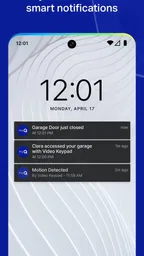
- Receive alerts when a door opens or closes.
- Set schedules to close compatible doors automatically.
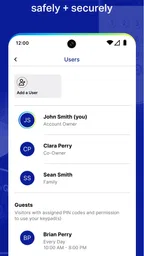
- Share access with family members or guests.
- View activity history for supported devices.
What could be better
- Requires compatible garage door hardware for remote control.
- Some features may require a paid subscription.
- Remote access depends on a reliable internet connection.
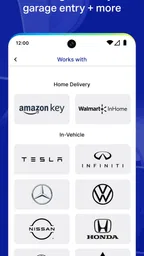
- Smart home integrations vary by device and service.
- App notifications may arrive late during network issues.





