

myChevrolet review
 Analysis by Appsdrops
I tend to judge a car companion app less by how impressive it feels on the first day and more by whether it remains useful after the setup is over. myChevrolet is aimed at Chevrolet owners who want a convenient digital place to handle parts of vehicle ownership, rather than another general-purpose driving app. In my view, its lasting value depends on a practical question: does it make a task you already have to do easier, often enough to justify keeping it on your phone?
From first-week curiosity to everyday use
During the first week, the appeal is straightforward: having an app associated with your own car feels more relevant than searching through a broad collection of automotive tools. General Motors develops this free Lifestyle app, and the store summary presents it as a way to simplify ownership. That makes it most compelling when you already own a Chevrolet and want a direct, brand-specific starting point for vehicle-related tasks.
The first useful step is to treat setup as a check, not a formality. Make sure you can identify the right vehicle in the app and that the information shown corresponds to the car you actually use. If a household has more than one driver or vehicle, take a moment to work out whose account and phone will be used for which task. That small bit of organization can save confusion later, especially when someone else in the family is trying to find vehicle information in a hurry.
I would not install it expecting an app to replace every part of owning a car. A vehicle-specific companion is useful when it helps you get to relevant ownership information or actions with less hunting around; it is not a substitute for paying attention to warning lights, keeping paperwork, or asking a qualified mechanic about a problem. This distinction matters from day one: the app can support a routine, but it cannot take responsibility for the car in your place.
There is also a sensible reason to try it even if you are unsure whether it will become a habit. It is free, rated for Everyone, and has a 4.6 average from around 325,000 ratings. Those figures suggest broad uptake, but they do not tell me whether it will fit your particular Chevrolet or routine. I would use the first few sessions to see whether the app actually helps with the ownership tasks you care about, rather than keeping it simply because it is available.
Where it can earn a place month after month
The most convincing recurring use is not constant browsing. It is having a familiar place to turn when a car-related need comes up: checking something before a drive, preparing for a service conversation, or helping a family member understand where to look for vehicle details. Those moments are intermittent, which is exactly why a dedicated app can be handy. You do not have to remember which general search or collection of saved notes you used last time.
A practical habit is to open the app when you are already dealing with the car, rather than adding a new daily check-in. For example, if you are arranging a service visit, review whatever relevant vehicle information the app makes available before calling or heading in. Keep a separate note of questions you want to ask, and compare the information you see with the car’s own displays and documentation. This turns the app into a useful preparation tool without treating it as the final authority on a mechanical issue.
For a household with a shared Chevrolet, I would also decide who is responsible for keeping track of routine ownership tasks. If one person books service while another regularly drives, a shared conversation about what has been checked or arranged is more reliable than assuming an app will automatically keep everyone coordinated. The app can be part of that system; clear handoffs are still the human part of it.
This is where the difference from a generic navigation or fuel-tracking app becomes clear. Those tools are often valuable on almost any drive, while a manufacturer’s companion app is more narrowly tied to owning a particular brand’s vehicle. That narrower focus is an advantage when the task concerns your Chevrolet, but a disadvantage if what you really need is route planning, broad vehicle comparisons, or a tool that works the same way for cars from several makers.
The app’s scale is reassuring in a limited way: it has over 10 million installs and around 46,000 written reviews. I would take that as evidence that many owners have found a reason to try it, not as a promise that every feature or workflow will suit every car. The more useful test is whether it saves you a step during your own recurring tasks. If you only open it once and then forget it, a familiar paper record or your existing service routine may be enough.
Keeping the app useful without creating another chore
My maintenance advice is simple: give the app a job. If you use it for ownership tasks, make it the place you check when those tasks arise; if it is not helping with anything you regularly do, there is no need to manufacture a habit just to keep it active. A car companion should reduce mental clutter, not add a new obligation to inspect an app every morning.
When you change phones, switch drivers, or start using a different Chevrolet, take a minute to confirm that the app still points to the vehicle and account you intend to use. That is an easy check to overlook because many people assume a transferred app will be ready to go. I would also avoid relying on memory alone for anything consequential: keep service receipts and other records where you can retrieve them independently, and use the app as a convenient reference rather than your only archive.
It is worth checking the app occasionally for updates, particularly if you depend on it for an ownership task. The current version is 8.21.0, and the minimum operating-system requirement is 10. That makes compatibility a practical consideration if you use an older phone or keep a spare device in the car. Before planning around the app, confirm that it runs on the device you intend to use; an app that cannot be opened when needed has no recurring value, however useful its idea may be.
I would also be selective about notifications and permissions. Approve only what makes sense for the way you use the app, and review those choices if you stop using a particular function. That is general good practice for a vehicle-related app, not a reason to assume it needs every access your phone offers. A restrained setup is easier to live with and makes it clearer whether the app itself is providing value.
What may wear thin, and when another option is better
The main source of fatigue is the mismatch between a broad promise of easier ownership and an owner’s very specific expectations. Someone may install a manufacturer app hoping it will be a universal dashboard for every car-related need, then find that their most frequent tasks still happen elsewhere. I would avoid that expectation. myChevrolet is most naturally suited to Chevrolet ownership; it is not automatically the best answer for a driver who wants one neutral app for several vehicle brands.
Another limitation is that a phone app should not become a substitute for the car’s own controls, warning indicators, or printed guidance. If a warning appears, read the vehicle’s instructions and seek appropriate help rather than relying on a general app check to diagnose it. Likewise, if your goal is simply to keep a record of maintenance, a calendar or notes app may be more flexible, especially if you track several makes of vehicle and do not need a manufacturer-specific experience.
There is a trade-off between convenience and dependence. Keeping relevant ownership tasks in one branded app can reduce searching, but it also means your routine is tied to your account, device compatibility, and the app continuing to serve the tasks you use. I would keep essential documents and service details somewhere independently accessible. That small backup habit protects you from being stuck if your phone is unavailable or you are helping another driver who does not use the same setup.
Owners who rarely use a smartphone for car-related tasks may not get much from installing it. If you already have a service provider’s process that works smoothly, and you prefer to manage records on paper, there is no need to change simply because a companion app exists. Conversely, if you own a Chevrolet, handle routine tasks on your phone, and often find yourself searching for vehicle-specific information, the app has a clearer case for staying installed.
My long-term verdict
With a release dating to October 27, 2010, myChevrolet is not a novelty built around a brief burst of attention; it is a long-running companion for a specific kind of ownership. That history does not guarantee a perfect experience, but it suits the app’s real purpose better than a flashy feature that demands daily use. Its strongest case is quiet utility: being available when a Chevrolet-related task comes up, then getting out of your way.
I would recommend trying it if you own a Chevrolet and want a brand-specific tool to support your existing routine. Give it a fair test during real ownership moments—before a service conversation, when checking vehicle-related details, or while coordinating with another driver—then decide whether it genuinely saves effort. Do not judge it by how often you open it; judge it by whether the occasions when you do are easier.
My final view is that myChevrolet can earn lasting space, but only when its role stays practical and modest. It is not a replacement for sound maintenance, independent records, or a mechanic’s judgement, and drivers with mixed-brand needs may prefer a neutral alternative. For Chevrolet owners who want a convenient digital companion and are willing to keep sensible backups, the free app is worth a try; for everyone else, installing it just because it is there is unlikely to create lasting value.
What we like
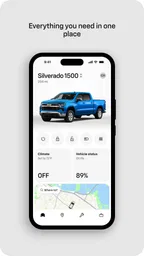
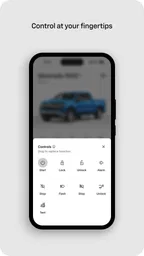
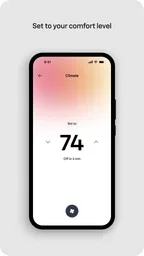
- Remote start lets you warm up or cool down a compatible vehicle.
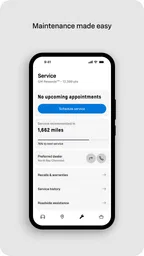
- Vehicle health alerts can flag maintenance needs and recalls.
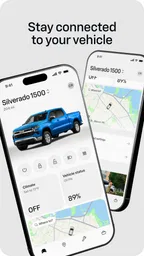
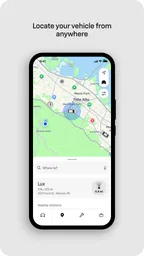
- The app can help locate your parked vehicle.
- Roadside assistance is accessible from the app for eligible owners.
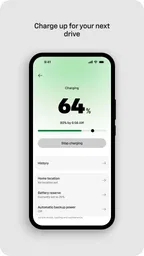
- EV owners can check charging status and manage charging remotely.
What could be better
- Remote features require a compatible vehicle and active service plan.
- Some features depend on a reliable internet connection.
- App availability and features vary by vehicle model and region.
- Remote commands may take time to reach the vehicle.
- Certain connected services require a paid subscription after a trial.





