


myAudi review
 Analysis by Appsdrops
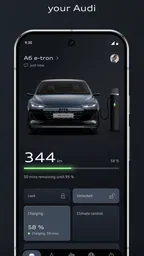
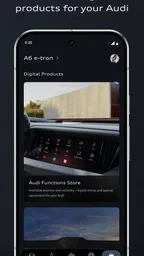
I think myAudi makes the most sense when you treat it as a companion to owning an Audi, rather than as a general driving app. Its purpose is to bring Audi-related services and connected-car services into one place, so the value depends on your car, your account, and the services available to you. If you already drive an Audi and want a dedicated place to check what the digital side of ownership offers, it is worth a look. If you simply need maps, traffic information, or a basic trip log, a familiar independent app may suit you better.
What the app is like to use
Developed by Audi, myAudi is a free Auto & Vehicles app for everyone. It has a 4.7 average from around 122,000 ratings, with more than a million installs. Those numbers suggest that many drivers find a reason to keep it around, but they do not guarantee that every connected service will be relevant to every Audi owner. I would judge it by whether it helps with your particular car and routine, not by the rating alone.
The useful distinction is between an app that helps any driver get from A to B and one tied to a specific vehicle brand. A general navigation app can be useful regardless of what you drive; myAudi is aimed at Audi drivers and its connected services. That focus can make it more relevant for ownership-related tasks, but it also means it is not a universal replacement for navigation, roadside assistance, or other tools you may already use.
The app is currently at version 5.9.0, and it supports devices running iOS 12 or later. I would check that your phone meets the requirement before planning to rely on it. The app itself is free, though that does not by itself tell you which connected services are available for a particular vehicle. Think of the download as access to the app, not a promise that every service will apply to your car.
Speed expectations: what matters more than a quick launch
For a connected-car app, perceived speed is not only about how fast the screen appears. The more meaningful question is whether the information or service you need is available when you need it. In practice, connected functions can depend on the car and the service involved, so I would not assume every screen behaves like an offline utility. If you are checking something just before leaving, give yourself a moment rather than making the app the last link in a rushed departure.
A useful habit is to explore the app while parked and when you have time. Find the parts that matter to your ownership routine, then learn where they live before you need them. This reduces the chance of searching through menus in a driveway or car park. It is a small preparation step, but it matters more in a vehicle companion than it does in an app you can casually browse whenever.
I also would not make a time-sensitive driving decision depend on a screen that you have not checked in advance. If you need directions, use a navigation tool you already know works for your trip. If you are using myAudi for an Audi-specific service, check it before setting off and keep your attention on driving once you are on the road. The app is best treated as an ownership aid, not as a reason to interact with your phone behind the wheel.
Heavy-use moments: make it part of a calm routine
The app is likely to be most useful in short visits: checking a vehicle-related detail, reviewing available connected services, or taking care of an ownership task before or after a drive. That is different from using a social feed or navigation app continuously. I would expect a more deliberate pattern—open it when there is a reason, complete the task, then close it—rather than leaving it running throughout the day.
One realistic example is getting ready for a morning trip. While still at home, I would open myAudi, check the relevant information for my car, and sort out anything that needs attention before going outside. If the app does not show what I need, I would switch to the car’s own controls or another suitable source instead of repeatedly refreshing and hoping for a different result. This keeps the app useful without turning it into a bottleneck.
For a driver who uses several connected services, grouping related checks into one visit may be more efficient than opening the app every time a small question comes up. The trade-off is that an app with several ownership functions can take a little getting used to. I recommend spending a few minutes learning its layout when you are not in a hurry, then relying on the sections you actually use. There is little benefit in trying to master every option if your car and routine only call for a couple of them.
Reliability: keep a sensible backup
My standard for reliability here is practical: can I use it as a convenient companion without assuming it is the only way to access important information? Because myAudi is built around Audi services and connected-car use, its usefulness naturally depends on the match between the app, the driver’s account, and the vehicle. That makes it sensible to confirm what works for your own car before building a routine around it.
If something does not appear as expected, I would first check the basics: that I am signed into the account I intended to use, that the phone has a working connection, and that I am looking in the right part of the app. Then I would close and reopen it, or try again later, rather than repeatedly tapping a control. These are ordinary troubleshooting steps, not a guarantee that they will resolve every issue, but they help distinguish a temporary hiccup from a service that is not relevant to your setup.
I would also keep the car’s built-in controls and any essential documents or contact details available independently. A phone app is convenient, but it should not be your sole plan for a task that must be completed immediately. That is especially true if you are travelling somewhere unfamiliar or have limited time. The best connected-car experience is one where the app saves effort when it works and does not leave you stranded when it is unavailable.
Its 2,100 reviews offer another perspective alongside the larger rating count. I would read recent comments with care and look for issues that match my own phone and car, rather than treating one person’s experience as universal. A complaint about a specific setup may not apply to yours; a recurring problem across similar situations is more useful when deciding whether to depend on a feature.
Device constraints and who should skip it
The stated minimum is iOS 12, so an older iPhone that cannot run that system is not a suitable device for the current app. Beyond that, I would keep the phone’s operating system reasonably current where possible and leave enough storage for normal app updates. I would not assume that a newer phone automatically makes every connected function faster, since the vehicle and service are also part of the experience.
myAudi is a stronger fit for an Audi driver who wants a brand-specific digital companion than for someone looking for a comprehensive toolkit for any car. If you drive another make, the central reason to install it is missing. If you mostly want navigation, live traffic, or a simple record of mileage, a dedicated app in that category may be easier and more useful. Likewise, if you prefer to handle every vehicle task through the car itself or through a dealer, you may not have a regular need for another app.
Before relying on it, I would confirm that your vehicle and account are set up for the services you want, then test those services at home. This is a practical way to avoid discovering a mismatch in the middle of a trip. It also helps set realistic expectations: downloading the app is straightforward, but the value comes from the Audi-specific connection, not from the download alone.
How it compares with everyday alternatives
Compared with general-purpose driving apps, myAudi has a narrower job. A maps app is usually the natural choice for route planning, and a broad automotive app may be preferable if you want one tool across several makes of car. myAudi’s advantage is its focus on Audi ownership and connected services. If that is what you need, a brand-specific app can be more pertinent than a generic collection of driving features.
The trade-off is flexibility. Someone who changes cars often, manages vehicles from different manufacturers, or only wants one universal driving dashboard may find that a brand-specific app adds another stop in their routine. I would keep the tools that do distinct jobs: myAudi for the Audi-related services that matter to you, and a separate navigation app if that is the one you trust for directions. There is no need to force one app to replace everything.
When deciding whether to keep it, ask a simple question after using it for a while: does it save me a step I would otherwise take elsewhere? If the answer is yes for a recurring task, it has earned a place on your phone. If you open it only to look around and never use a service, it may be more clutter than convenience.
Performance verdict: useful when the Audi connection matters
I see myAudi as a worthwhile companion for Audi drivers who want their vehicle-related digital services close at hand. Its clearest strength is its specific connection to Audi, while its main limitation is the same focus: it is not designed to be the best all-purpose driving app for everyone. I would install it, explore it while parked, and make a habit of using only the services that genuinely help with your car.
For performance, I would favor predictable use over constant checking. Prepare before a drive, use a familiar backup for time-sensitive needs, and avoid making the app the only route to important information. That approach gives you the convenience of a connected-car companion without expecting it to behave like an offline tool or a universal automotive hub.
My recommendation is straightforward: if you own an Audi and want a dedicated place to work with its connected services, myAudi is worth trying. If you need a brand-neutral navigation or vehicle app, choose a tool built for that broader job instead. The app is free, rated for everyone, and has a substantial user base, but the deciding factor is whether its Audi-specific role fits the way you actually drive.
What we like
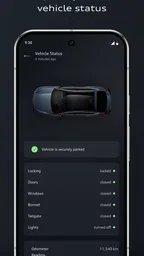
- Lets you check key vehicle details from your phone.
- Can help you locate your parked Audi.
- Provides access to selected remote vehicle controls.
- Makes service appointments easier to manage.
- Offers trip and vehicle information in one place.
What could be better
- Features vary depending on the Audi model and year.
- Some functions require an active data connection.
- Remote controls may need compatible vehicle equipment.
- Account setup and vehicle pairing can take time.
- Availability of services varies by country.





