

My Firestone review
 Analysis by Appsdrops
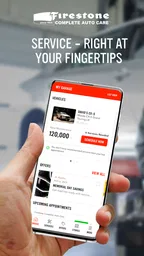
I think of My Firestone as a companion for people who want their car care tied to Firestone Complete Auto Care rather than spread across notes, reminders, and service paperwork. It is a free automotive app from Firestone Complete Auto Care, built around the company’s own service relationship. That focus is its clearest strength—and the main question to ask before installing it: will I actually use Firestone for my vehicle’s care?
My view is that My Firestone is worth trying if you already visit Firestone or plan to make it your regular service provider. It can make that relationship easier to manage from a phone. If you prefer to compare independent shops, handle maintenance entirely through a vehicle manufacturer’s app, or simply want a brand-neutral car log, the fit is less certain. The app is free, but its practical value depends on how closely its service-oriented approach matches the way you maintain your car.
What the free app is—and what that means for value
The app is free to download, so there is no purchase decision to weigh before trying it. That is useful for a driver who wants to see whether a Firestone-specific tool suits their routine without committing money up front. Free access, though, is not the same as a guarantee that every service, appointment, or repair will cost nothing; the app is a way to engage with an auto-care provider, not a promise of free vehicle work.
That distinction matters when judging value. I would treat the app as a convenience layer around Firestone service, not as a substitute for deciding whether a repair is necessary or whether a quoted job is competitively priced. The value comes from keeping the company’s car-care relationship close at hand. If that saves you time or makes it easier to follow through on maintenance, the free download can be worthwhile. If you never use Firestone, the same convenience may have little practical value.
My Firestone is listed in the auto and vehicle category and is developed by Firestone Complete Auto Care. It has a 4.7 average from around 17,000 ratings, alongside roughly 1,800 written reviews, and has passed 500,000 installs. Those figures suggest a substantial audience and generally favorable reception, but they do not tell me whether it will fit your particular car-care habits. I would use them as context, not as a replacement for checking whether the app’s purpose matches your needs.
The app is rated for Everyone, which makes its intended audience broad: ordinary drivers, not only car enthusiasts or professional mechanics. It first appeared in 2012 and is currently at version 7.3.0, with Android 10 as the minimum operating-system requirement. Those details are helpful when checking compatibility, especially if you use an older Android phone. They do not change the core value question: the app is most relevant when Firestone is part of your maintenance plan.
Where it can make everyday car care easier
The most useful role for a service-center app is helping a driver move from “I should deal with that” to a concrete next step. My Firestone is best understood in that context: it gives Firestone customers a phone-based way to stay connected to the provider they use for vehicle care. Rather than treating it as a universal mechanic’s guide, I would judge it by whether it reduces friction in that specific relationship.
Consider a familiar situation: you notice a tire looks low while getting ready for work, but you are not sure whether it needs attention immediately or can wait until later. A service-oriented app is useful when it helps you act on the concern without having to search through old paperwork or remember which provider you last used. My practical advice is to open it when a real service question comes up, rather than installing it and expecting it to manage your entire vehicle automatically.
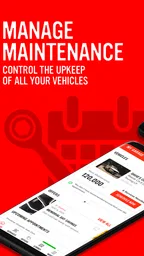
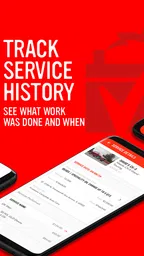
A second useful approach is to make the app part of a simple maintenance routine. When you have a service visit, take a moment afterward to keep any paper receipt, work order, or technician recommendation alongside your own notes. Even if you use the app as your Firestone touchpoint, maintaining an independent record gives you a clearer history if you later switch shops, sell the car, or need to explain previous work. Keeping your own maintenance record is a smart backup, particularly when an app is tied to one provider.
There is also a real benefit to reducing the number of places you check. If Firestone is already your regular shop, using its app as your starting point can be simpler than searching a general directory each time you need service. That does not mean you should accept every recommendation without question. I would still ask what a proposed repair addresses, whether it is urgent, and what can safely wait. Convenience should help you make an informed decision, not replace one.
A provider-specific tool, not a neutral car-care hub
The biggest trade-off is the same feature that gives the app its identity: it belongs to a specific service chain. That can be a good match for someone who wants one familiar provider, but it is less helpful if your maintenance is split between a dealership, a neighborhood mechanic, and a tire specialist. A general vehicle-maintenance log is better suited to collecting records from several businesses in one place, while a manufacturer’s app may be more relevant for a driver focused on brand-specific vehicle information.
Compared with calling a shop or visiting a service counter, a phone app can be a more convenient first stop when you are away from home. Compared with a general-purpose reminder app, however, it is not the obvious choice for someone who only wants recurring prompts and a provider-neutral service history. Those alternatives serve different purposes. I would choose My Firestone for the Firestone connection, not simply because it is in the automotive category.
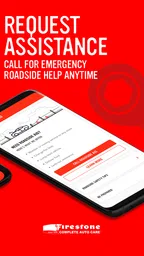
Another limitation is that an app cannot remove the judgment involved in vehicle maintenance. A warning light, unusual noise, or damaged tire may need prompt attention, and a phone-based tool should not be treated as a diagnosis. If the car feels unsafe to drive, I would prioritize a qualified assessment rather than spend time trying to solve the issue through an app. For less urgent maintenance, the app can be part of the process, but it should not be the only information you rely on.
It is also worth thinking about your own habits. If you tend to forget which shop handled a repair, a dedicated provider app may help you stay organized within that relationship. If you change service providers often, you may end up with records and reminders scattered across several apps. In that case, a single cross-provider log—or a simple folder for invoices and service notes—may be more useful than committing to one company’s app as your main record.
Who is most likely to get value from it
I would recommend trying My Firestone if you already use Firestone Complete Auto Care, expect to use it regularly, or want a more convenient way to interact with that provider. It is also a reasonable choice for a driver who prefers a familiar service chain over searching for a new shop whenever maintenance comes up. Since the app is free, trying it carries no download price, though the value still depends on whether it becomes part of a routine you actually use.
It may also suit someone who is taking more responsibility for a family car. A shared routine can be easier when the people handling the vehicle know which provider to contact and where to begin when a service need arises. I would still keep maintenance paperwork accessible to everyone who drives the car; relying on only one person’s phone can create a new bottleneck rather than solve an old one.
I would skip it if you do not use Firestone and have no reason to start. The app’s association with a particular provider is not a flaw, but it does make the app less compelling as a general-purpose tool. Drivers who want a neutral place for all service records, reminders across several vehicles, or detailed technical information should first look for tools designed around those goals. Likewise, someone who only needs occasional help may find that calling a trusted mechanic is enough.
Before making it your main car-care tool, I would check that your phone meets the Android 10 minimum requirement if you are on Android, then try the app during an actual service task. That is a more revealing test than browsing it without a purpose. See whether it makes your normal Firestone interaction easier, and keep another record of important maintenance details while you decide whether it deserves a permanent place on your phone.
My verdict: free to try, useful when Firestone is your choice
For me, My Firestone earns its place as a focused companion to Firestone Complete Auto Care, not as an all-purpose solution for every driver. Its free access makes it easy to test, and its strong average rating and established user base offer some reassurance that many people find it useful. Neither point changes the fact that the app’s value is closely tied to using the company behind it.
I would install it if Firestone is already part of my car-care routine and I want a more convenient way to stay connected to that provider. I would keep my own service records and continue asking questions about recommended work. If I used several shops or wanted a brand-neutral maintenance history, I would choose a broader tool instead. In short, My Firestone is a sensible free download for Firestone customers—but the best reason to keep it is practical use, not the appeal of an app alone.
What we like
- See policy and claim details from your phone.
- Find nearby agents and repair facilities with location tools.
- Access digital insurance cards when you need proof of coverage.
- Manage billing tasks without calling customer service.
- Contact Firestone support through the app.
What could be better
- Some features may require an eligible Firestone policy.
- You may need to register or sign in to use account tools.
- Location features require access to your device location.
- App availability and features can vary by state.
- Technical issues may temporarily disrupt account access.





