


MOTORMIA: Tune & Mod Your Ride review
 Analysis by Appsdrops
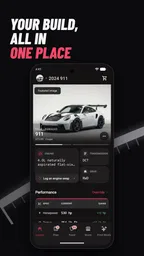
I would treat MOTORMIA: Tune & Mod Your Ride as a planning companion, not as a substitute for a mechanic, a parts catalog, or a careful fitment check. Its appeal is the promise of using AI to help connect a car owner’s goals with possible modifications and performance upgrades. That can make the early research stage feel less like searching through scattered forum posts, especially if you are new to tuning. My main question when judging an app like this is not whether it can make a car sound exciting, but whether its suggestions are understandable and useful to people with different levels of experience and different ways of using a phone.
Finding your way through modification ideas
As an Auto & Vehicles app from MOTORMIA, this is aimed at people who want to explore changes to a car rather than simply track fuel or organize service reminders. The experience makes most sense when you arrive with a specific aim: improving a daily driver’s response, considering a visual change, or comparing possible upgrade paths before spending money. That focus gives the app a clearer purpose than a general car-community feed, though it also means it is less useful if you only want routine ownership tools.
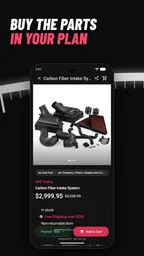
AI-powered recommendations can be a helpful starting point because they may turn a broad intention into a more manageable shortlist of ideas. In practice, I would use that shortlist to form better questions, not to make a purchase decision on the spot. Before ordering any part, I would still check the exact vehicle configuration, compatibility notes, local rules, warranty implications, and installation requirements with a qualified source. For car modifications, a confident-sounding suggestion is only the beginning of due diligence.
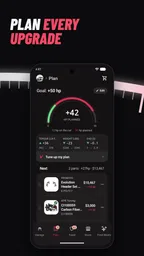
The useful workflow is to keep the goal narrow. Instead of asking for an all-purpose transformation, decide whether you care most about appearance, everyday drivability, or performance, then assess suggestions against that priority. A commuter who needs predictable handling and comfort should weigh recommendations differently from someone building a weekend project. This simple habit helps prevent a long list of exciting options from obscuring the practical question: will the change suit the way I actually use the car?
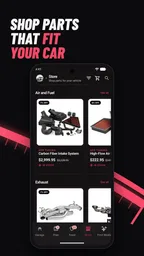
There is a trade-off compared with conventional alternatives. A parts retailer’s catalog may be better for confirming what is sold for a particular vehicle, while owner forums can provide detailed reports from people who have installed a specific component. MOTORMIA’s more interesting role is earlier in the process: helping a user explore directions and identify topics worth researching. I would not rely on it as the final authority on fitment or real-world results.
Readable guidance matters more than a long list
For a modification app to work well, its recommendations need to be easy to scan and distinguish from one another. A beginner benefits from plain explanations of what a part is intended to change, while an experienced owner may want enough context to decide whether an idea deserves further investigation. When reviewing recommendations, I would look for a clear separation between a general suggestion and details that must be checked for the exact car. If that distinction is not obvious in a given result, pause and verify elsewhere rather than assuming the app has resolved every compatibility question.
This is also where a phone-based tool can support different reading habits. Short sessions are convenient for browsing a few ideas between errands; longer sessions are better for comparing trade-offs and keeping notes. I recommend saving or writing down the reasoning behind a candidate upgrade, not just its name. Later, that makes it easier to discuss the idea with a mechanic or compare it with a manufacturer’s specifications without relying on memory.
The app is free, and its current version is 3.8.2. It has an average rating of 4.6 from around 1,100 ratings, with roughly 200 reviews. Those figures suggest that many people have found a reason to use it, but they cannot tell me whether its advice suits a particular vehicle or whether the interface works comfortably for every person. I would judge that for myself by testing a small, low-stakes research task before making it part of a major build plan.
Different abilities and sensory needs
People vary in how easily they read small text, process dense explanations, or move between screens. I would approach the app with that in mind and check whether its wording and layout remain comfortable on the device being used. If you have low vision, try the phone’s built-in text enlargement and display settings; if a screen becomes difficult to read or controls are awkward to reach, doing the research on a larger screen or asking someone to help review the suggestions may be more practical. I would not assume that an AI tool automatically makes technical material accessible.
Motor comfort matters too. A car project often involves switching between the phone, notes, and vehicle details, and repeated tapping or typing can make a supposedly quick search tiring. My practical tip is to prepare the key information you already know about the car before opening the app, then work through one question at a time. This reduces unnecessary backtracking and makes it easier to stop and resume without losing the thread. If fine touch control is difficult, the device’s own accessibility controls may help, but the app’s suitability will depend on how its individual screens behave for you.
Sensory preferences can shape the experience even when the task is only research. Someone who finds busy screens, rapid changes, or dense technical language overwhelming may prefer to use the app in a quiet setting and review just one recommendation at a time. A user who relies on spoken feedback should test the relevant phone settings with the actual screens they need, rather than assuming every control will be announced clearly. For a shared decision, reading a suggestion aloud together can also expose jargon or ambiguity before it influences a purchase.
For users who are new to modifications, one particularly useful habit is to separate “interesting” from “appropriate.” An attractive upgrade might affect comfort, noise, maintenance, or legality in ways that matter more on a daily commute than in a showcase build. I would write down the intended benefit and the possible inconvenience beside each idea. That small comparison makes the app’s suggestions more actionable and helps a novice avoid treating a performance-oriented recommendation as an automatic improvement for every driver.
Using it in the right setting
A realistic use case is researching a daily driver at home before a service appointment. You might be curious about a modest change, browse possible directions in MOTORMIA, and bring a short list of questions to the mechanic. That is a sensible division of labor: the app helps you explore, while the professional checks the vehicle, installation, and consequences. It is also less stressful than trying to make a decision in a workshop while someone is waiting for an answer.
I would avoid relying on the app while driving or in a noisy, time-pressured setting. Modification research involves comparing details, and attention should remain on the road. At a parts counter, use it only as a prompt for discussion; the exact vehicle identification and supplier documentation should take precedence. If the phone is shared, consider whether you are comfortable entering or displaying any vehicle details before doing so, and keep sensitive information out of notes that others can see.
The same app may serve a different role for an enthusiast preparing a project car. It can help organize early ideas and reveal questions to investigate before buying components. But for a carefully engineered build, community experience, specialist advice, and verified technical documentation are still important. The more consequential the change, the less I would treat an automated suggestion as a complete plan. This is a useful distinction for both new and experienced owners: brainstorming is low commitment; installation is not.
Because it is designed around modifications and performance upgrades, it is not the best fit for everyone who owns a car. If you mainly want maintenance schedules, roadside help, insurance tools, or a straightforward list of compatible replacement parts, a dedicated app or service may be more direct. Likewise, a driver who wants a fixed, professionally validated build recommendation should speak to a specialist rather than expect a general AI-led discovery process to replace that expertise.
Where I would slow down
The biggest limitation is the gap between a personalized idea and a verified recommendation for a specific vehicle. Cars can differ by model year, trim, engine, market, and previous changes; a suggestion that sounds appropriate in broad terms may still need careful checking. I would confirm part fitment with the manufacturer or a reputable supplier, ask about installation and maintenance, and check relevant local regulations before committing. That extra work is not a flaw unique to this app, but it is essential when recommendations concern real mechanical changes.
Another friction point is that AI language can feel decisive even when a user still needs to supply context or verify assumptions. Beginners may not know which details matter, while experienced owners may find broad suggestions too general. A good way to manage this is to treat each result as a research lead: ask what benefit it is meant to provide, what trade-offs may come with it, and what evidence would confirm it is suitable for your car. If those answers are unclear, do more research before spending.
It also helps to be realistic about the difference between performance and everyday usability. A modification can bring a change someone values while making a car less comfortable, less convenient, or more demanding to maintain. For a vehicle used for commuting, school runs, or long trips, those costs deserve as much attention as the headline benefit. I would compare every idea against the ordinary situations the car must handle, not just the most exciting scenario.
The app is rated for Everyone, and it runs on Android starting with version 7.0. It has passed 100,000 installs, which makes it a fairly established option in this niche, but broad adoption does not guarantee that its suggestions will fit every car or user. Those figures are useful context, not a reason to skip personal checks. For an individual decision, the most important test remains whether you can understand the recommendation, verify its assumptions, and use it safely as part of a larger research process.
Who I would recommend it to
I would recommend MOTORMIA: Tune & Mod Your Ride to curious owners who want help turning a vague interest in modifying a car into a more focused set of questions. It is especially worth trying if you enjoy exploring options but are willing to verify compatibility and seek professional advice before buying or installing anything. The free price lowers the barrier to trying it, and the Everyone rating makes its intended audience broad, though neither point changes the need for responsible research.
I would be more cautious if you are not comfortable checking technical claims, if you need an accessibility experience that you have not yet tested on your device, or if you expect a recommendation to function as a guaranteed parts match. In those situations, a specialist, a trusted supplier, or a community of owners with the same vehicle may be the better first stop. If you do try the app, start with one modest question, compare its suggestions with independent information, and note what still needs confirmation.
Released on November 1, 2024, MOTORMIA has a clear niche: helping car owners explore possible modifications rather than replacing the people and sources needed to validate them. I like that role when it encourages a more informed conversation and gives a newcomer a manageable way into a technical topic. My verdict is positive but measured: it can be a useful idea generator for the right driver, provided you keep the final decision grounded in vehicle-specific evidence, personal comfort, and the realities of daily use.
What we like
- Lets players personalize cars to match their preferred style.
- Offers a creative outlet for experimenting with vehicle designs.
- Provides an accessible way to explore car customization.
- Appeals to players who enjoy collecting and modifying vehicles.
- Makes car design the central focus of its gameplay.
What could be better
- Customization options may feel limited compared with dedicated design tools.
- Players looking for deep racing gameplay may find little to enjoy.
- Progress may take time if desirable cars or parts are locked.
- The experience may become repetitive after many design sessions.
- Performance can vary depending on the device and game version.





