

Mirror App - Makeup Mirror review
 Analysis by Appsdrops
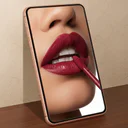
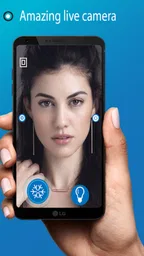
Mirror App - Makeup Mirror turns a phone screen into a simple beauty mirror, with a few practical touches that make it more useful than opening the camera and hoping for the best. The first impression is easy to understand: look at yourself, adjust the brightness, and use a magnified mirror view when a closer look matters. I like that focused approach. It doesn’t try to turn a small everyday task into a complicated beauty routine.
A handy mirror for the first week
When you first try a makeup mirror app, its appeal is immediate. You open it when you want a quick check before heading out, while applying makeup, or when ordinary room lighting makes it hard to see details. Mirror App keeps its central purpose clear: it offers a mirror view on your phone, along with image capture, brightness control, and magnification.
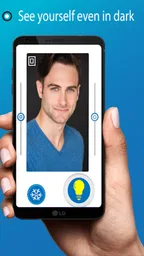
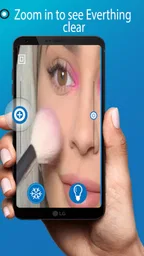
Those options address common little annoyances. Brightness control can help make the screen easier to use in different surroundings, while magnification gives you a closer view for detail work. Capturing an image adds a way to keep a visual reference rather than relying on memory. None of this asks you to learn a complex interface, and that simplicity is a real part of the app’s appeal.
The app’s short description is simply “Mirror App,” and that says a lot about its straightforward identity. It isn’t presented as a full makeup lesson, a product recommender, or a beauty community. I see it as a pocket mirror with a few helpful controls. If that is what you need, the first-use experience is likely to feel pleasantly direct.
Useful in everyday moments
A phone is already something many of us carry throughout the day, so a mirror app can be convenient when a physical mirror isn’t nearby. You might use it for a quick appearance check, to tidy up a makeup detail, or to see your face more clearly before taking a photo. These are small moments, but they’re exactly where a simple utility can earn its place.
The capture feature is worth considering in that context. It gives the mirror experience a little more flexibility, because you can take an image instead of only looking at the live view. I’d treat that as a practical extra rather than a reason to expect a sophisticated photo-editing tool. The core experience remains about viewing your reflection, not transforming it.
For someone who likes uncomplicated tools, that boundary is welcome. There is less to figure out before getting to the useful part. I can imagine the app being especially handy as a backup when a regular mirror is inconvenient, or as a dedicated option for quick grooming checks. The best first-week apps are often the ones that solve a small problem without demanding much attention, and this one fits that pattern.
Does it remain useful month after month?
The test for a utility like this comes after the novelty wears off. A mirror on a phone may feel clever the first time, but long-term value depends on whether it becomes part of a real routine. If you regularly check makeup or grooming details while away from a full-length or well-lit mirror, brightness control and magnification can keep the app relevant. If you rarely need those things, it may gradually become an occasional fallback.
That makes its lasting value personal rather than universal. People who often get ready on the go may appreciate having a dedicated beauty mirror ready to open. Others may find that their phone’s ordinary camera is enough for a quick glance. Mirror App’s focused controls give it a clearer purpose than a general camera view, but the habit of using it still has to come from your day-to-day needs.
Its scale suggests that many people have found the idea useful: it has over a million installs, and its average rating is 4.6. Those figures can offer context, but they don’t tell you whether it will fit your own routine. For me, the better question is simple: do I repeatedly reach for a mirror when I’m away from home or working on small details? If the answer is yes, a lightweight app can deliver recurring value without needing constant new features.
A small tool, not a beauty platform
It helps to set expectations fairly. This is a mirror-focused app, not an all-in-one beauty assistant. Its usefulness comes from the basic tasks it supports: seeing yourself on screen, changing brightness, magnifying the view, and capturing an image. I wouldn’t judge it by whether it offers the depth of a makeup tutorial service or the creative options of a photo editor. That would be asking it to solve a different problem.
Instead, I’d judge it by how quickly it gets out of the way. If the mirror view is the reason you installed it, the app’s narrow purpose is an advantage. There’s no need to browse through unrelated content before checking your appearance. This can make a difference in a routine that is usually quick and practical, where extra steps would be more irritating than helpful.
People who want a very polished beauty workflow may eventually want more than a mirror. But for a simple check, the restrained feature set makes sense. I find that kind of clarity refreshing: the app has an obvious job, and its main controls support that job rather than distracting from it.
Maintenance and the everyday effort
A mirror app should be easy to keep around because it doesn’t require the kind of ongoing care associated with physical equipment. There’s no separate mirror to pack or clean, and the phone is already part of most people’s daily carry. The app itself is free to download, which keeps the initial decision straightforward. It also offers in-app purchases, so it’s sensible to review any purchase choices in the app store before spending money.
In practical terms, the main maintenance is simply remembering that the app exists and opening it when the situation calls for it. That sounds obvious, but it is often what decides whether a small utility survives on a phone. If the icon is easy to find and the need comes up regularly, the app can settle into a routine. If not, even a useful feature can be forgotten after a few days.
Mirror App is listed for devices running Android 8.0 or later, and its current version is 1.2.3.2. Those details matter when deciding whether it fits a particular device, but they don’t change the central question of whether you’ll use it. The app is also rated for Everyone, which reflects its general-purpose nature as a beauty utility rather than a niche professional tool.
There is no elaborate upkeep implied by its basic role. You aren’t being asked to maintain a collection, build a profile, or keep up with a stream of content to get the central benefit. That’s a plus for anyone who prefers apps that remain useful without becoming another chore. The most meaningful maintenance is keeping your phone available and the app accessible when you want a quick look.
Where repetition might wear thin
The very simplicity that makes the app approachable can also limit how exciting it feels over time. A mirror view is inherently repetitive: you open it, look, perhaps adjust brightness or magnification, and close it. If you expect every session to offer something new, the experience may feel plain after the initial curiosity passes. That isn’t necessarily a flaw; it’s the nature of a tool designed for a specific task.
Another possible source of fatigue is having a separate app for something your phone may already approximate through its camera. The dedicated mirror controls can be convenient, but convenience matters most when they make the task easier than your existing habit. If you already have a quick way to check your appearance, you may not feel a strong reason to switch. The app has to earn its space through repeated usefulness, not just the novelty of seeing a mirror function on a screen.
It is also worth remembering that a phone screen is not a replacement for every kind of mirror. A magnified view is useful for close inspection, but the experience is still tied to holding and positioning a device. For quick detail checks that may be perfectly comfortable; for longer grooming sessions, some people will naturally prefer a conventional mirror. That makes the app best understood as a convenient companion, not a universal substitute.
The developer, o16i Apps, released the app on June 2, 2019. Its long presence and established audience help make it feel like a familiar, purpose-built utility, but longevity alone doesn’t guarantee that it suits every user. What matters is whether its controls solve a recurring annoyance for you. A practical app can be worth keeping even if you only open it briefly and never think about it otherwise.
Final verdict: a useful habit if the need is real
Mirror App - Makeup Mirror is a focused choice for anyone who wants a phone-based mirror with brightness control, magnification, and image capture. Its strongest quality is that the purpose is easy to grasp. I don’t have to treat it as a whole beauty system; I can see it as a convenient option for a quick check when a regular mirror isn’t close at hand.
Whether it earns lasting space depends on your routine. If makeup touch-ups and close appearance checks are part of your day, the app may become a low-effort habit. If those moments are rare, the first-week novelty might fade and the app may remain an occasional backup. That’s a fair outcome for a small utility, and it doesn’t take away from the convenience it can offer when the need does arise.
Overall, I’d recommend it to people looking for a straightforward mirror app for makeup rather than a feature-packed beauty platform. It keeps its scope modest, offers practical controls, and doesn’t ask for much attention once installed. The lasting verdict is simple: it earns its place when it saves you a little time in the moments you actually need a mirror. If that sounds like your routine, Mirror App - Makeup Mirror is an easy one to try.
What we like
- Quick access makes it handy for touch-ups on the go.
- Screen brightness can help in dim indoor settings.
- Pinch gestures make it easy to inspect small details.
- The simple layout is approachable for first-time users.
- It can be useful when carrying a separate mirror is inconvenient.
What could be better
- A phone screen offers less detail than a quality physical mirror.
- Front camera quality can affect how clearly features appear.
- Reflections may look distorted at certain viewing angles.
- Using the camera can drain battery during longer sessions.
- The app may request camera access to provide its main function.





