




MGM+ review
 Analysis by Appsdrops
For me, trust in a streaming app starts with a practical question: can I tell what I’m choosing, what it will cost, and how much control I have over continuing? MGM+ is an entertainment app from MGMPlus Entertainment LLC, built around watching films and series. It is free to install, but access to its entertainment offering involves in-app purchases, so I would treat the download and the viewing commitment as two separate decisions.
The app has a 4.7 average from around 37,000 ratings, with roughly 4,500 written reviews and over 5 million installs. Those figures suggest that many people have tried it, but they don’t settle whether its catalog, subscription terms, or privacy choices suit you. My recommendation is to approach it as a service to evaluate for your own viewing habits, rather than assuming that a strong rating guarantees a good fit.
What the app is asking you to trust
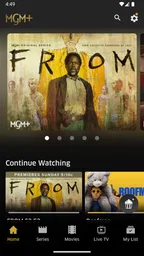
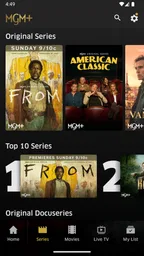
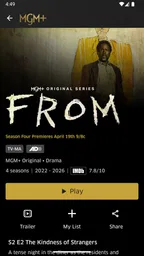
MGM+ is in the entertainment category, and its central promise is straightforward: watch movies and series through one dedicated app. That focus can be convenient if you already know you want to explore MGM+ programming. It is less compelling if you are looking for a general-purpose platform that combines many services or gives you a single place to manage a broad mix of subscriptions.
I would also separate the developer’s identity from the content experience. The app is published by MGMPlus Entertainment LLC, but a recognizable name does not answer every question about account handling or data use. I wouldn’t infer privacy protections or practices from the brand alone. If those details matter to you, read the current privacy and account terms in the app store or within the app before signing in or paying.
The app is rated for teens, which is a useful starting point for families, not a substitute for checking individual titles. A broad age label can’t tell you whether a particular film or episode is appropriate for a specific viewer. If a young person will use the service, I’d review the available account and viewing choices with them rather than relying on the rating alone.
Separate installation from a paid commitment
The download is free, while in-app purchases range from $5.99 to $61.99 per item. That span is a reason to pause at each purchase screen and check what is being offered, its duration, and whether it renews. I would not treat “free” as meaning that the full service is free to watch; it describes the install, not necessarily the content access you want.
The app’s message that you can cancel anytime is reassuring as a general idea, but I would still confirm the exact subscription terms before starting. In particular, check the billing period, the renewal date, and where cancellation must be managed. A useful habit is to save the confirmation screen or note the renewal date immediately, so you don’t have to reconstruct the terms later.
If you prefer not to create an account or enter payment details until you have made a decision, take time to inspect the purchase flow before proceeding. Read each screen rather than tapping through on autopilot. I can’t responsibly promise what account controls or payment options will appear for every device or region, so the current choices shown on your own screen should guide you.
Where a little caution saves trouble
Streaming apps can bring together account details, viewing activity, and payment choices in one experience. That makes the moment before signing in or subscribing a sensible time to review permissions and privacy notices. I wouldn’t grant a permission simply because the app requests it: ask whether it is necessary for the action you’re trying to take, and decline or defer anything you don’t understand if the app allows you to continue.
On a shared television or family device, account access deserves extra thought. Before leaving the app signed in, consider who can open it and whether purchase prompts could be reached by other household members. If the app offers a sign-out or account-management option, use the controls actually visible in your version rather than assuming that a particular lock, profile, or purchase restriction exists.
Travel and switching devices are also worth planning for. If you expect to watch away from home or move between screens, check the app’s current playback and account options before relying on it for a trip. I would not assume that every title is available in every location, or that an existing sign-in automatically carries over in the way I expect. A quick check before departure is more useful than discovering a limitation when you are ready to watch.
How I would judge the viewing experience
Compared with a general streaming app that aggregates a wide range of providers, MGM+ is a narrower choice: it makes most sense when its own selection is the reason you opened it. That focus can reduce browsing friction if you have a specific film or series in mind. If you mainly want the largest possible variety in one subscription, or you already pay for a service with the titles you watch, another option may be better value.
I’d use a short trial period of my own attention—not necessarily a paid trial—to answer a simple question: can I find enough titles I genuinely want to watch to justify the ongoing cost? Browse with a shortlist of shows or films in mind, and note whether the catalog fits your taste rather than judging by the first screen of recommendations. This is more reliable than subscribing because a familiar title caught your eye once.
One practical workflow is to decide on a single viewing goal before opening the app. For example, if you want a film for a quiet evening, search for that specific kind of watch first, then compare the time and cost involved with what you already have access to. This keeps a focused service from becoming an impulse subscription that sits unused after one weekend.
Another useful trade-off is convenience versus account exposure. Keeping a service ready on a personal device makes spontaneous viewing easier, but signing in on a shared or borrowed screen can leave access behind. I’d avoid entering account credentials on a device I don’t control, and I’d sign out after use if the interface provides that option. Those are small habits, but they help keep the decision to subscribe separate from the decision to share access.
When I would choose it—and when I would skip it
I can see MGM+ working well for someone who wants a dedicated place to browse its movies and series, is comfortable reviewing a subscription before paying, and expects to watch often enough to make the expense worthwhile. It is also a reasonable candidate for a focused household viewing choice, provided an adult checks title suitability and the account’s purchase controls before handing over a device.
I would skip it if your priority is avoiding recurring subscriptions, if you want one app that gathers several competing services, or if you have no particular interest in what MGM+ offers. I’d also hold off if you cannot verify the billing terms or privacy choices that matter to you. A compelling catalog is not a reason to rush past terms you haven’t read.
The app requires Android 7.1 or later, and it was released on February 7, 2019. That makes compatibility worth checking before downloading on an older device. If your phone or tablet is near the minimum requirement, I’d also consider whether you prefer watching on a larger screen and confirm that your intended device supports the app before making a paid commitment.
A cautious recommendation
My overall view is positive but measured. MGM+ is easy to understand as a dedicated entertainment destination, and its free install gives you a low-friction way to begin evaluating it. The meaningful decision comes later: whether the available viewing is worth the purchase shown to you, and whether you are comfortable with the account and privacy choices presented along the way.
I’d recommend trying it only after checking the current subscription terms, reviewing any requested permissions, and deciding what you actually want to watch. If the service matches a regular viewing habit, it may earn a place in your rotation. If you’re only tempted by a single title or would rather avoid another account and recurring bill, compare it with services you already use before committing. That is the clearest way to keep control of both your viewing and your spending.
What we like
- Offers a strong selection of MGM films and series.
- Includes originals and exclusives alongside licensed titles.
- Supports downloads for offline viewing on compatible devices.
- Profiles help keep recommendations and watchlists separate.
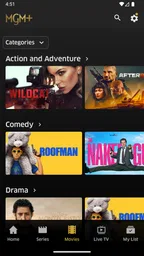
- The interface makes it easy to browse by genre and collection.
What could be better
- The catalog can vary by country and over time.
- A paid subscription is required to stream most content.
- Some titles may leave the service without much notice.
- Video quality depends on your connection and device.
- Offline downloads can expire or become unavailable.





