



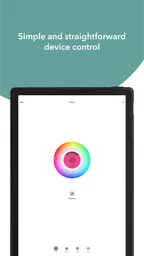
Merkury Smart review
 Analysis by Appsdrops
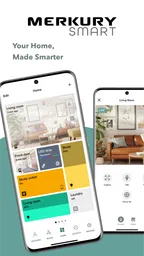
I think a smart-home app earns its place on my phone when it makes a small daily task simpler, not when it adds another complicated routine to maintain. Merkury Smart is aimed at that practical role: it gives compatible smart devices a single place to control them. That makes it most appealing if your home already includes Merkury gear, or you are choosing devices from the same ecosystem and want one straightforward control point.
It is a free House & Home app from Merkury Innovations, rated for Everyone. Its average rating is 4.0 from around 17,000 ratings, and it has been installed over 500,000 times. Those figures suggest a well-used app, though they do not guarantee that every device or home setup will feel equally smooth. The useful question is whether its everyday approach suits the way you want to manage your home.
Start with a reliable everyday routine
The sensible way to use Merkury Smart is to begin with one device and one clear purpose. Set up the device, confirm that its basic controls work, and try the app in the room where you expect to use it. That first pass tells you more than adding several devices at once: if something behaves unexpectedly, you can focus on one connection and one set of controls rather than sorting through a whole home setup.
For a simple example, imagine you have a compatible smart light in a living room. You might use the app when you arrive home, when you want to switch the light off without crossing the room, or when you notice it was left on after going upstairs. The benefit is modest but real: a familiar control on your phone can be more convenient than walking back to a switch. I would treat that as the core value, rather than expecting the app alone to transform how the home works.
Once basic control is dependable, build a repeatable habit around it. I would keep the device name clear and tied to its location, so it is easy to distinguish a living-room light from a bedroom one. If you add devices over time, consistent names become more valuable than they seem at first. A label that makes sense to you months later is better than a vague name chosen during setup in a hurry.
It also helps to decide which actions truly need an app. A phone is convenient when your hands are occupied, you are in another room, or you want to check a device without getting up. For a task that is already faster at a wall switch, opening an app may add friction instead. Using the app selectively keeps it useful rather than turning every ordinary action into a screen interaction.
Make the first setup easy to troubleshoot
If you are bringing a device into the app for the first time, avoid changing several parts of your home network or device setup at once. Work through the device’s own setup instructions, then use Merkury Smart to complete and test the connection. If the device does not appear or respond as expected, pause and check the device and home connection before repeating the entire process. That method is less frustrating than making multiple changes without knowing which one helped.
For a shared household, it is worth agreeing on device names and who will manage the setup before the list grows. A second person should be able to understand what a control does without guessing. If you are setting up the app for someone who prefers simple routines, demonstrate the one or two actions they are likely to use rather than walking them through every screen at once.
The app’s appeal is its role as a direct control point, not a substitute for every other way of operating a device. Keep the ordinary physical controls available where the device provides them. That gives you a practical fallback if your phone is elsewhere or the app is not the quickest route at a particular moment.
Check the settings that affect daily use
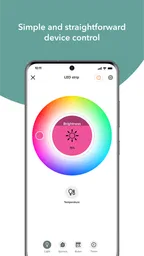
Settings are most useful when they solve a specific annoyance. Before relying on a device for a routine, look through its available controls and learn how to return to the basic on-and-off action. If there are device-specific options, change them one at a time and try the result during an ordinary day. This makes it easier to tell whether a setting genuinely helps or merely adds another step to remember.
One useful trade-off is convenience versus predictability. A setting that changes how a device behaves may suit a regular schedule, but a simple manual control can be better when your household routine changes often. I would avoid setting up an elaborate pattern just because the option seems appealing. Start with what you will actually use, then add complexity only after the basic workflow has become familiar.
It is also sensible to review the app and device settings after making a change, rather than assuming the new behavior will be obvious later. In particular, make sure the device still responds as you expect from the app and from any physical control. This small check can prevent confusion when someone else in the home uses the device without knowing that its behavior was adjusted.
The app is on version 3.22.0, and it supports Android 7.0 or later. If you are considering an older phone, check its Android version before planning a setup around it. The version detail is especially practical in a shared home: a device-control routine is only convenient if the people expected to use it have compatible phones and can comfortably access the app.
Build faster patterns without overcomplicating them
Experienced users tend to get speed from consistency, not from memorizing a maze of controls. Keep related devices easy to recognize, and use the same naming logic from room to room. When you open the app to make a quick change, clear labels reduce the chance of selecting the wrong device. This is a small organizational choice, but it matters more as the number of controls grows.
A practical habit is to test the most common action at the moment you are already near the device. If you are leaving a room, try the app once and confirm that the device responds; if you are settling in for the evening, use it for the control you expect to repeat. These checks help you learn whether the app is genuinely saving effort in your own home, rather than assuming it will be more convenient simply because it is on your phone.
For a household with different routines, keep the shared workflow modest. If one person wants a light adjusted from the sofa while another prefers a physical switch, there is no need to force both people into the same habit. The app works best as an additional route to control, not as a rule that every member of the household must use it for every action.
Another useful pattern is to make changes when you have time to observe them. If you are experimenting with a device setting, do it while you are home and can check the result. That is more dependable than changing behavior just before leaving and discovering later that it did not fit the situation. The approach is deliberately cautious, but smart-home convenience depends on trust: a control is only helpful when you know what it will do.
Where the app and ecosystem can feel limiting
Merkury Smart is most compelling when the devices you want to manage are compatible with it. If your home already relies on several different brands, using another brand’s app may mean splitting controls between apps. In that case, a broader smart-home platform may be more convenient if it supports the devices you own. I would compare compatibility and the controls you actually need before buying hardware solely to keep everything in one place.
There is also a difference between basic device control and a more elaborate home-automation setup. If you want deep customization across many brands, detailed routines, or one unified interface for a mixed collection of devices, this app may not be the best center of your system. Its straightforward role is a strength for simple use, but it may feel narrow to someone who enjoys fine-tuning a complex setup.
Connectivity is another practical consideration. App-based control depends on the phone, device, and home setup working together, so I would not make the app the only way to operate something essential. If a device is important for immediate access, keep its normal control method usable and test the app before you depend on it in a time-sensitive situation.
People who dislike managing accounts, apps, or connected devices may also prefer a traditional switch or a simpler standalone product. There is no need to add smart control to a task that already works well. Conversely, someone who often wants to adjust a compatible device from another room may find the phone-based option worthwhile even if they use it only a few times a day.
Who should try it, and how I would judge it
I would recommend Merkury Smart to someone who owns compatible Merkury devices and wants a straightforward way to control them, especially when phone access solves a real everyday inconvenience. Its free price makes it easy to try, and its Everyone age rating makes the audience broad, though younger users should still follow the household’s usual rules for devices and phone access.
I would be more cautious if you are still choosing a smart-home ecosystem, own a mix of brands, or expect advanced automation to be the main attraction. In those cases, compare the available device support and the actual control experience with the broader alternatives in the category. The best choice is the one that keeps your regular tasks simple, not the one with the longest feature list.
The app was released on November 19, 2022, and its 4.0 average across around 17,000 ratings gives a useful sense that many people have tried it, while leaving room for mixed experiences. I would read that as a reason to approach it with realistic expectations: start with a single compatible device, learn the basic controls, and decide whether the routine feels easier in your own home.
My verdict is that Merkury Smart is worth considering as a practical companion to compatible devices, especially if you value uncomplicated, repeatable control over an elaborate smart-home dashboard. The best results come from thoughtful setup, clear naming, and using the app where it saves a step. If your needs are basic, that can be enough; if you want one powerful control center for a diverse or highly customized home, a broader alternative is likely a better fit.
What we like
- Control compatible Merkury Innovations devices from one app.
- Adjust smart lighting remotely when you are away from home.
- Set schedules to automate lights and other supported devices.
- Group compatible devices for simpler room-by-room control.
- Works with voice assistants for hands-free commands.
What could be better
- Features depend on owning compatible Merkury smart devices.
- Some devices require a 2.4 GHz Wi-Fi network for setup.
- Remote control depends on a stable internet connection.
- Device compatibility may vary across product models.
- Initial setup can require patience if a device fails to pair.





