

Mechanical Keyboard: RGB Theme review
 Analysis by Appsdrops
I tend to notice a phone keyboard most when it gets in the way: the keys feel dull, the sound is irritating, or a shared device has been personalized so heavily that nobody else can comfortably use it. Mechanical Keyboard: RGB Theme is aimed at the opposite kind of change. It gives typing a more expressive look and feel, with illuminated keyboard styling and mechanical-style sound. I see the appeal, especially on a phone used around the house, but the practical question is whether that extra character is worth making the keyboard less neutral for everyone.
A keyboard that feels personal on a shared phone
In a household where people take turns using the same phone or tablet, a keyboard theme is a small customization with a visible effect. One person may enjoy bright RGB colors and audible key sounds; another may prefer a quiet, restrained setup for messaging or filling in a form. This app belongs to the personalization category, so its purpose is not to replace a full productivity suite. It changes the everyday surface of typing.
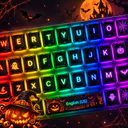
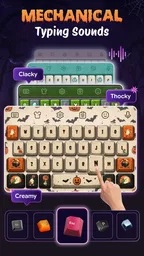
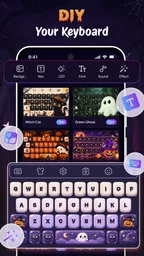
Mechanical Keyboard: RGB Theme is a free Android app from Neli Creative, and its focus is easy to understand: give the on-screen keyboard the look and sound associated with mechanical keys. The lighting can make typing feel more lively, while the audio feedback adds a more tactile impression than silent taps. Those are aesthetic choices rather than a promise of faster typing, so I would approach it as a way to make routine phone use more enjoyable, not as a tool that will improve accuracy by itself.
A realistic shared-device use case is a family tablet left in the kitchen for quick messages, lists, and searches. A colorful theme can make the device feel less generic, but a sound that seems fun to one person may be distracting to someone nearby. I would try the keyboard in the actual room and at the times people use the device, rather than judging it only during a short setup. The best theme is one that feels pleasant without turning every message into a source of friction.
What changes, and what stays the same
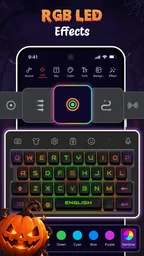
The core appeal is the combination of RGB effects and realistic typing sounds. That pairing makes the keyboard feel more like a deliberate interface choice than a simple background image. It may suit someone who likes a gaming-inspired phone setup, enjoys customizing small details, or spends enough time typing that a new visual style makes ordinary tasks feel fresher.
It is still an on-screen keyboard, not a physical mechanical keyboard. The sound and appearance can suggest that experience, but they do not give the fingers the travel or physical feedback of separate keys. If your main goal is a genuinely tactile typing surface, a hardware keyboard is the more relevant alternative. If you simply want a more distinctive phone keyboard, this app is a much lighter way to experiment.
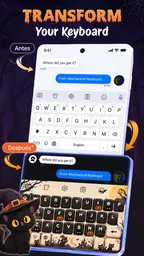
The difference matters when deciding whether the app fits a shared device. A personal phone can reflect one person’s taste without much negotiation. A household tablet has a different job: it needs to remain comfortable for several people. I would treat the theme as a reversible preference, not as a household-wide improvement that everyone is bound to appreciate.
Setting it up without taking over someone else’s phone
Keyboard personalization involves a boundary that is easy to overlook: the keyboard is where people type messages, searches, addresses, and other private information. Before changing the active keyboard on a shared device, I would make sure the device owner understands what is being installed and chooses whether to use it. That is a sensible habit for any keyboard app, not a claim about this app’s specific data practices.
On a device used by more than one person, it also helps to agree on who can change the keyboard setting and whether the change is meant to be temporary. A child might enjoy a bright theme, while an adult may want the device returned to a quieter layout for work. Keeping that conversation simple prevents a minor cosmetic choice from becoming an argument about who changed the phone.
A useful workflow is to test the theme during a low-stakes activity, such as typing a short note, before relying on it for an important message or a long form. That gives you time to decide whether the sound is comfortable and whether the visual style remains readable in the lighting where the device is normally used. It also makes it easier to switch back if the new presentation does not suit the shared setting.
One practical trade-off is that a vivid keyboard can draw attention to typing. That may be welcome when customizing a personal phone, but it can feel conspicuous in a quiet room or during a meeting. I would start with the setting that feels least intrusive and increase the visual or audio presence only if it remains enjoyable after everyday use. A theme should make typing feel nicer, not demand attention each time it appears.
Coordinating preferences in a household
When several people use one device, the easiest approach is to make the keyboard choice explicit rather than assuming everyone will like it. Ask whether the sound should be on when the device is used around others, and whether a bold color scheme is comfortable for routine tasks. This is especially useful for a tablet passed between adults and children, where one person’s playful setup can become another person’s distraction.
I would also separate device ownership from app preference. A person who enjoys customizing the keyboard can choose the look on their own phone, while a shared household device can stay closer to a neutral setup. That avoids treating a single theme as a compromise that must satisfy everyone. The app is most compelling when the person choosing it is also the person who does most of the typing.
Compared with the usual alternative—a standard keyboard that comes with the device—this app offers a more characterful visual and sound experience. The default option is often the practical choice for people who want familiar, unobtrusive typing. A plain wallpaper or home-screen theme, meanwhile, changes the look of the phone but not the feel of composing a message. Mechanical Keyboard: RGB Theme sits in that narrower space where the keyboard itself becomes part of the phone’s style.
That focus is also a limitation. Someone looking for a broad customization toolkit, a better writing workflow, or a way to improve typing through physical feedback should compare other options that serve those purposes. I would skip this app if you dislike keyboard sounds, prefer a minimal interface, or share a device with people who do not want their typing experience changed. Its appeal depends on wanting this particular kind of personalization.
Age, trust, and sensible expectations
The app has an Everyone content rating, which makes it suitable for a general audience from the store-rating perspective. In a household, that does not remove the need for an adult to guide a child through changing keyboard settings. A child may focus on the colorful effects and sounds, while an adult should remain responsible for deciding which keyboard is active on a shared device and whether it suits the way the device is used.
For trust, I would use the same care I use with any keyboard: install it through the app store, read the system prompts, and make an informed choice before enabling it. A keyboard is a particularly sensitive part of a phone because it is used to enter text. The app’s visual theme is the reason to consider it; it should not be treated as a reason to skip ordinary privacy awareness.
The app has a 4.6 average from around 9,200 ratings, with roughly 391 written reviews, and more than one million installs. Those figures suggest it has found an audience among people who want a themed keyboard, but they cannot tell you whether you will like the sound or whether the style will suit your own device. I would use them as context, then judge the experience by trying it in the situations where I actually type.
It is free to install, with in-app purchases ranging from $3.99 to $24.99 per item. That makes it possible to approach the app without an upfront purchase, while still being worth checking what is offered before spending anything. I would first decide whether the basic keyboard experience fits your taste and household routine; there is little point paying for extras if you find the sound or visual treatment distracting.
Who should try it—and who should keep things simple
Mechanical Keyboard: RGB Theme is a good fit for someone who likes customizing a phone beyond its wallpaper and wants typing to have more visual personality. It may also suit a person who enjoys mechanical-keyboard aesthetics but mostly types on a phone. The current version is 1.9.8, and it requires Android 9 or later, so the device’s operating system is a straightforward thing to check before installing.
It is less suited to people who share a device with little room for negotiation, type frequently in quiet environments, or want an understated keyboard that disappears into the background. It is also not the right substitute for a physical keyboard if your priority is real key travel and touch feedback. In those cases, keeping the default keyboard or choosing hardware designed for typing will probably be more satisfying.
My household verdict is that this is a fun, focused personalization app rather than a universal keyboard upgrade. I like the idea of making the keyboard itself feel more expressive, and the mix of lighting and sound gives the choice a clear identity. On a personal phone, I would be comfortable trying it and seeing whether that extra character stays enjoyable after the novelty wears off. On a shared device, I would make the choice together and keep a simple fallback in mind.
Released on April 9, 2026, the app is best approached as an optional change to one of the most frequently used parts of a phone. If you value a more vivid typing experience and the people who use the device are happy with it, it is worth a look. If calm, quiet, familiar typing matters more, the standard keyboard is not a lesser choice—it may simply be the better fit for your home.
What we like
- Offers a broad range of colorful keyboard themes.
- Lets users personalize the keyboard's appearance.
- Provides a distinctive visual style for typing.
- Can make an ordinary keyboard feel more engaging.
- Theme-focused design is easy to explore.
What could be better
- RGB effects may not work with every keyboard app.
- Some themes may require in-app purchases.
- Bright colors can be distracting while typing.
- Keyboard permissions may raise privacy concerns.
- Theme options may not suit users who prefer simple layouts.





