Marathon Rewards review
 Analysis by Appsdrops
I see Marathon Rewards as a practical fuel-savings tool for people who already stop at Marathon and want rewards to fit into an ordinary errand. Its household value is less about managing a family account and more about making sure the person buying fuel knows how to use their own membership. That distinction matters: this is a rewards app, not a shared-expenses or family-coordination service.
When one driver handles the fuel stop
Picture a familiar routine: one person in a household is sent out to fill the car, while someone else usually keeps track of errands and spending. The app can make that stop more useful if the driver is a Marathon Rewards member and can apply their rewards toward fuel savings. In that situation, I’d treat it as a personal tool carried by the person who actually visits the pump, rather than something every household member needs to open.
The benefit is straightforward, but it depends on the trip being a good fit. If Marathon is already a convenient stop, checking rewards before paying can become part of the same routine as choosing a pump and getting a receipt. If the driver typically goes elsewhere, or chooses a station based on whichever route is easiest, installing a brand-specific rewards app may add little. I would not change a regular fuel plan just because an app exists; the stop needs to make sense on its own.
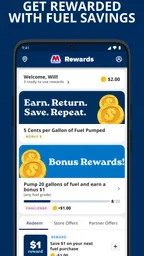
That is where the app’s focus is both its strength and its boundary. It is built around Marathon Rewards membership and fuel savings, rather than broad household budgeting, price comparisons across brands, or tracking every vehicle expense. I find that narrow purpose easier to understand than a crowded all-in-one car app, but it also means the app is most relevant to a driver who can use Marathon rewards in practice.
A personal account is the sensible starting point
I would begin by having the person who will use the rewards install the app and work from their own membership account. The developer is PAR Retail, and the app is free to download. That makes trying it low-friction in monetary terms, though it still asks for a little attention and a place in the driver’s phone routine.
For a shared car, it helps to agree on a simple boundary before anyone starts using the app: whose membership is being used, and who is responsible for checking or applying rewards on a fuel run. That is not a special app control; it is a household habit. Clear expectations prevent an awkward assumption that everyone can use one person’s account or that a second driver automatically receives the same benefits.
I would also avoid treating a shared phone as a convenient substitute for separate accounts. If more than one person uses the same device, make sure the person at the pump can tell which membership is active before relying on it. That small pause is useful for any loyalty app, but especially one tied to a specific rewards member. Account access should remain with the person who owns the membership unless they have chosen another arrangement themselves.
There is a practical trade-off here. A driver who handles nearly all fueling can keep the process simple by checking rewards on their own phone. In a household where drivers rotate, each person may need to understand which account they use and how the household wants rewards handled. If that sounds like more coordination than the savings are worth, it may be better for only the regular Marathon customer to use the app.
Coordination that works without extra machinery
I would not rely on the app to settle household questions such as who paid, whether a fuel purchase should be reimbursed, or which car needs filling next. Those are separate coordination tasks. A useful routine is to decide that the person making the stop checks their membership before the purchase and tells the household afterward if the trip changed the shared fuel budget. That keeps the app in its lane and avoids expecting it to replace a notes app, shared calendar, or conversation.
A less obvious tip is to make the rewards check part of the decision to stop, not something remembered only after fueling. If the driver is already approaching a Marathon station, a quick look at their membership status can help them avoid discovering too late that they did not prepare the account they intended to use. I would still keep the process simple: don’t turn a routine fill-up into a lengthy phone session, and don’t assume that a displayed reward has been applied until the checkout process confirms it.
For a household with two regular drivers, agree on a default rather than improvising every time. One person might be the usual member and handle most Marathon stops, while the other uses their own preferred method when driving alone. If both have separate memberships, they can each make their own choice. The important point is not to presume that rewards transfer between people or that a shared vehicle means a shared account.
This app is less compelling for a driver who wants a single dashboard for multiple cars, fuel receipts, maintenance, and shared costs. Marathon Rewards has a defined job: rewards for members and the ability to apply those rewards toward fuel savings. I’d pair it with whatever household method already tracks expenses rather than expecting it to do that broader work.
Age context and trust at the pump
The app is rated for Everyone, which makes its age context broad, but that should not be confused with a reason for children to manage a rewards account. Fuel purchases and membership decisions are best handled by the adult or other household member responsible for the vehicle and payment. A younger passenger might be curious about the app, but the account holder should remain in charge of the membership and the final transaction.
Trust here is mostly about sensible account handling. Before a shared-device user opens the app at a station, they should know whose account is signed in. If the phone is passed between people, checking that detail can prevent confusion about which membership is being used. I’d also keep the payment decision with the person authorized to make the purchase; rewards should not blur who is paying or who owns the account.
In day-to-day use, the most reliable workflow is to handle the app before reaching the payment moment: confirm the right account, review the available rewards, and then follow the station’s normal purchase process. That reduces distraction around the pump and makes it easier to notice if anything does not match expectations. I would not assume the app removes the need to follow the station’s instructions or to verify the final fuel transaction.
For someone choosing whether to install it, the scale of adoption offers a little reassurance without proving that it will suit every driver. Marathon Rewards has a 4.8 average from around 59,000 ratings and over 1 million installs. I take that as a sign that many people find the core rewards purpose useful, not as a promise that every station visit or household setup will feel effortless.
What the app is—and isn’t—good for
Compared with a general fuel-price finder, this app is aimed at making Marathon rewards useful rather than helping you compare every nearby brand. Compared with a bank or budgeting app, it is focused on fuel rewards rather than recording household spending. That difference should guide the decision. If your main question is “Can I use my Marathon membership for savings on this stop?”, the app has a clear role. If your main question is “Which station is cheapest today?” or “How much did our household spend on fuel this month?”, another tool is a better match.
It is also worth considering how predictable your routes are. A commuter who regularly passes Marathon stations has more chances to build the app into a habit than someone whose fuel stops vary by trip. For the latter, the app may sit unused until the right location comes along. I would install it when Marathon is already part of the route, then judge its value by whether checking and applying rewards feels easy enough to repeat.
The current version is 26.7.0, and it requires Android 9 or later. That makes device compatibility a concrete thing to check before relying on it, especially if an older phone is shared among household drivers. The version number alone does not tell me how a particular device will behave, so I’d test the basic account and reward workflow before making it part of a regular fueling routine.
Marathon Rewards was released on October 5, 2022, and it is an app in the auto-and-vehicles space. For me, that context fits: it is not trying to be a complete vehicle companion, but it can serve a specific moment in car ownership, the recurring fuel stop. The clearest way to get value is to use it where its membership and the household’s usual route already overlap.
My household verdict
I’d recommend Marathon Rewards to the person in a household who regularly fuels at Marathon and is willing to check their rewards as part of the stop. It is free, its purpose is easy to grasp, and a dedicated member can keep the routine tidy without asking everyone else to learn another app. For a shared car, one clearly responsible account holder may be all the household needs.
I would skip it, or at least avoid making it a household priority, if your drivers rarely use Marathon, if you need cross-brand fuel comparisons, or if your real goal is shared expense tracking. Those needs are different from redeeming rewards through a Marathon membership. The app cannot make an inconvenient station convenient, and a rewards balance is only useful when the member can apply it during a suitable purchase.
My practical recommendation is to let the regular Marathon driver try it first, keep account ownership clear, and establish a quick pre-fuel check. If that small habit fits naturally, it can make recurring stops more rewarding. If it creates confusion over shared devices or who should use which account, keep the setup personal and leave the rest of the household’s coordination to the tools and habits they already trust.
What we like
- Earn rewards for completing eligible walking and running activities.
- Activity tracking can encourage users to stay active.
- A free option makes it easy to try the rewards program.
- Progress tracking helps users monitor their activity.
- Rewards offer an extra incentive to meet fitness goals.
What could be better
- Reward availability may depend on your location.
- Some activities may need to be verified before earning rewards.
- Rewards can take time to accumulate.
- Tracking may use extra battery while activities are recorded.
- The app may require personal information to manage rewards.





