




Lumy-AI Photo Video Generator review
 Analysis by Appsdrops
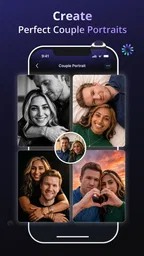
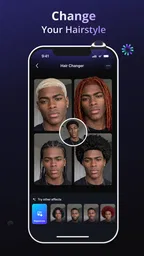
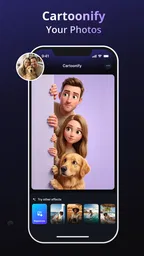
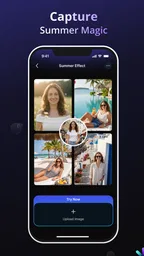
Lumy brings together AI photo editing, video generation, image creation, and artistic portraits in one app. That’s a broad creative toolkit to explore, especially if you like experimenting with AI visuals without starting from a complicated desktop workflow. I find its appeal easy to understand: rather than focusing on just one kind of image, it promises several ways to turn an idea or photo into something more expressive.
As an art and design app, Lumy is best approached as a place to try creative possibilities, not as a guaranteed shortcut to a finished masterpiece. AI-generated results can vary, and the experience of using any visual editor depends on what you want to make and how much time you’re willing to spend refining an idea. Still, having photo, video, image, and portrait tools under one roof gives the app a clear identity for casual creators and curious beginners alike.
Creative tools, with speed in perspective
The app’s central promise is a mix of AI photo editing, AI video generation, and AI image generation, alongside art and portrait creation. That combination gives you room to move between different types of projects instead of committing to a single format. If you arrive with a photo to transform, a visual concept to explore, or simply a desire to see what AI can make, Lumy is positioned to meet those different starting points.
Speed is a natural question with AI creative apps, but it’s worth keeping expectations practical. A tool that generates or transforms visual material may involve more than tapping once and immediately getting a polished result. The final pace can depend on the task, the complexity of what you ask for, and the time you choose to spend adjusting your direction. I’d treat Lumy as an interactive creative process rather than assume every idea will be completed instantly.
That mindset matters because a fast first result is not always the same as a useful one. For a playful portrait or a quick experiment, an early output may be enough to enjoy. For an image you care about, you may want to try different approaches and judge which result fits your taste. The app’s broad set of creative categories makes that exploration part of the attraction, while also meaning that the experience is likely to feel different from one project to another.
Moving between images, portraits, and video
What stands out to me is the range implied by the app’s focus. Photo editing suggests working with existing visuals, while image generation points toward creating something new. Portraits add a more personal, character-led angle, and video generation extends the creative idea beyond a still image. Together, those options make Lumy feel suited to people who enjoy switching formats and seeing how an idea might look in more than one style.
That breadth can also shape the pace of a session. One moment you might be exploring an image concept; another, you may be thinking about a portrait or a video. Rather than treating every feature as a separate professional workflow, I’d approach Lumy as a flexible creative playground. It can be appealing when you want to test ideas and discover a direction, while a focused specialist app may still suit you better if you already know exactly what kind of editing process you need.
The short store description is simply “Lumy,” while the broader product identity comes from its AI-powered photo, video, image, art, and portrait focus. That contrast makes the app’s purpose fairly easy to grasp: it is designed around visual creation, with AI as the common thread. If you’re searching for an AI art and portrait app, this mix is more informative than a tool limited to one narrow effect.
What heavier creative sessions may feel like
Longer sessions are where a multi-purpose creative app has to prove its day-to-day comfort. Moving among different kinds of visual work can be fun, but it can also make a session feel demanding if you’re repeatedly generating, comparing, and refining results. I wouldn’t assume that every task places the same load on a phone or takes the same amount of time. Instead, it makes sense to explore one project at a time and see how the app feels on your own device.
For casual use, the best rhythm may be to start with a clear idea and then make small creative decisions as you go. That keeps experimentation enjoyable instead of turning it into endless trial and error. When an output doesn’t match your first thought, you can decide whether to revise the concept, try a different direction, or simply move on to another kind of project. This is a sensible way to use AI tools, since creative results are not always predictable.
I also like that the app’s scope leaves room for different levels of ambition. You can approach it as a quick source of inspiration or spend more time exploring visual possibilities. The important distinction is that a wide menu of creative uses does not automatically mean every result will be production-ready. If you need precise control over every detail, keep that expectation in mind; if you enjoy discovering unexpected interpretations, the open-ended character may be part of the fun.
Reliability and a sensible workflow
Reliability is more than whether an app opens. For a creative tool, it also means being able to stay oriented, understand what kind of result you’re pursuing, and recover your flow when an experiment doesn’t work out. Lumy’s collection of related visual tools gives it a coherent theme, but the most comfortable way to judge it is through your own typical tasks: try the kind of photo, image, portrait, or video idea you’re most likely to make and see whether the experience suits your habits.
I’d avoid building a complicated project around any single early result. Instead, treat each experiment as a draft and keep your expectations flexible. That approach makes it easier to deal with an output that feels different from what you imagined. It also gives you a natural recovery path: return to the idea, simplify it, or switch to another creative direction rather than expecting one attempt to solve everything.
The app has a 4.6 average from around 57,000 ratings, with more than 500,000 installs. Those figures suggest that many people have taken an interest in it, but they don’t replace trying it for yourself. Personal preferences matter a lot in AI art: one person may love a bold transformation, while another may want a more restrained edit. I’d use the app’s overall reception as a reason to take a look, not as a promise that every result will match your taste.
Device fit and practical expectations
Lumy is listed for devices running Android 7.0 or later, giving it a clearly stated baseline for Android compatibility. That’s useful when deciding whether it can be considered on an older phone, but operating-system support alone doesn’t tell the whole story of performance. Device age, available resources, and the kind of creative task you’re attempting can all affect how comfortable a session feels. If your phone is older or already feels strained by demanding apps, it’s sensible to begin with modest experiments.
Resource demands are especially worth considering when an app combines several kinds of AI-assisted visual work. I can’t treat every tool as equally demanding, so I’d avoid making assumptions about battery use, storage, or processing speed. A practical approach is simply to notice how your own device behaves during ordinary use and adjust your session accordingly. If you’re planning a longer creative session, keeping your work focused and giving the phone a break when needed is reasonable advice for any visually intensive app.
The app is free to install, with optional in-app purchases ranging from $1.99 to $44.99 per item. That structure lets you start by exploring without an upfront purchase, while making it worth paying attention to any paid options before deciding to use them. I appreciate being able to approach a creative app cautiously: try the basic experience, work out whether it fits your style, and only then consider whether an optional purchase makes sense for you.
Its Everyone content rating also makes the stated age suitability broad. That does not change the usual common-sense advice for any app: younger users should have appropriate guidance around purchases and how they use creative services. For adults, the main practical point is to understand which parts of the experience are free and which may involve a purchase, so the creative process remains comfortable and predictable.
Who may enjoy Lumy
Lumy is an appealing option for people who like exploring AI visuals without limiting themselves to one format. Photo editors may be drawn to transformations, while portrait fans may enjoy the artistic direction. People curious about generated images or AI video can also see the attraction of having those ideas grouped within the same creative app. Its broad scope is the main reason to give it a try, particularly if you enjoy experimenting more than following a rigid editing routine.
On the other hand, anyone seeking a highly controlled professional workflow should think about what they need from an editor before committing to it. Lumy’s identity is built around AI-assisted creation, so its strongest appeal is the chance to explore and generate visual ideas. If your priority is exact, predictable control over every stage of a project, you may prefer a tool designed specifically for that work. That isn’t a flaw so much as a matter of matching the app to the kind of creative process you enjoy.
The developer is Ocean Float Mobile, and the current version is 2.0. The app was released on April 28, 2026. These details place it as a defined product with a current version to explore, while the day-to-day verdict still comes down to whether its creative range feels useful on your device. I’d focus less on chasing a particular output and more on whether the app makes it enjoyable to try ideas, compare results, and find a style you like.
Final performance verdict
For me, Lumy’s strongest point is its all-in-one creative pitch: AI photo editing, video generation, image creation, art, and portraits all belong to the same visual playground. That variety gives curious users several ways to get started, and the free entry point makes it approachable for an initial trial. Its broad appeal is clear, especially if you enjoy experimenting and don’t mind that creative results may take some exploration to get right.
My performance verdict is deliberately practical: expect a creative process, not guaranteed instant perfection. The app may suit quick inspiration just as well as longer sessions, but how smooth and comfortable it feels will depend on your device and the task you choose. Begin with a small idea, see how your phone handles it, and build from there. That’s the best way to assess speed, stability, and resource demands without making assumptions before you use it.
Overall, Lumy looks worth considering if you want a flexible AI photo and video generator with image and portrait creation in the mix. It’s not the right fit for every creative workflow, but its range gives it an inviting starting point for casual creators and AI-art enthusiasts. If you’re comfortable exploring, refining, and occasionally changing direction, it has the ingredients for an enjoyable visual playground.
What we like
- Turns text prompts into stylized images and short videos.
- Offers a quick way to explore creative concepts.
- AI effects can give ordinary photos a distinctive look.
- Useful for creating social media visuals.
- Results can be generated without advanced editing skills.
What could be better
- AI may misinterpret prompts or produce inconsistent details.
- Free access may be limited by credits or daily quotas.
- Some outputs can look artificial or repetitive.
- Video generation may take longer than image generation.
- Review privacy terms before uploading personal photos.





