



Loopit - Make Playables review
 Analysis by Appsdrops
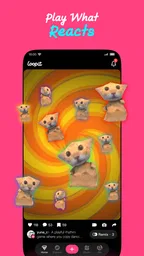
I’m drawn to apps that let me make something playful rather than just scroll through other people’s posts. Loopit is built around that idea: it gives creation a more interactive, experimental feel, with the possibility of turning a quick joke or visual thought into something someone can play with. That makes it an intriguing entertainment app, though it also means I’d approach it differently from a conventional meme editor or a ready-made game library.
Making things is the point, not just watching
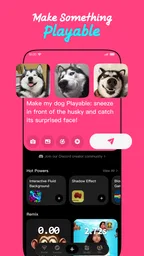
Loopit is an entertainment app from SeedLeap Intelligent Technology Co., Ltd. The central appeal is the creative loop: start with an idea, shape it into a playful piece, then remix or share the result. I like that this framing invites small experiments instead of demanding a polished project. A tiny interactive gag can be worthwhile on its own; it doesn’t have to become a full game.
That distinction matters if you’re deciding whether to install it. A typical social app is mainly about consuming a feed, while a standard meme editor is geared toward producing a static image. Loopit sits closer to a creative playground, where the output can be a meme, toy, game, or interactive artwork. If you enjoy tinkering with formats and seeing how a joke changes when someone can respond to it, that sounds more appealing than simply adding text to a picture.
The app’s audience response is encouraging: it has a 4.8 average from around 69,000 ratings, with more than five million installs. Those figures suggest that the concept has found an audience, but they don’t tell me whether every creation tool will suit every person. The more useful question is whether you enjoy making and adjusting things, rather than expecting a finished entertainment experience the moment you open an app.
Trust starts with knowing what you are choosing
For a creative app, trust is not an abstract concern. A playful creation may involve personal humor, a recognizable face, an inside joke, or an idea that feels more private than a public post. I’d think about the material I choose to work with before I share anything, especially if it involves other people. The sensible approach is to treat a shareable creation as something that could travel beyond the small circle I first imagined.
I also look for clear choices at the moments that matter: when an app asks for access, when it offers a way to publish, and when it gives me control over an account or a creation. I won’t assume particular permissions or privacy settings without seeing them in the app itself. Instead, I recommend reading each prompt before accepting it and checking the available choices when you begin creating or sharing. That is a better basis for trust than guessing from an app’s playful presentation.
Loopit is free to download, but it includes in-app purchases ranging from $0.49 to $150.00 per item. That broad span makes it worth pausing before confirming any purchase, particularly if you’re handing the phone to a teenager or letting a younger family member experiment. I’d check what an offered item actually does and whether the purchase is optional for the task at hand, rather than treating every prompt as part of the basic experience.
Where personal material can change the decision
The most sensitive part of using a remix-focused app is often not the editing itself; it is the source material. A family photo, a friend’s message, or a private joke can feel harmless while you are making it, but a playful result can become more revealing once shared. I’d use fictional characters, objects, or harmless everyday situations for experiments I may want to pass around. That keeps the fun while reducing the chance of turning someone else’s private moment into content.
A practical workflow is to make a rough version first, inspect it as if you were seeing it without the backstory, and only then decide whether it is ready to share. Humor that works in a group chat can land differently with a wider audience. This extra check is especially useful when a creation depends on a name, an image, or a reference that only a few people understand. The more identifiable the material, the more cautious I would be.
There is also a creative trade-off: remixing can help you get past a blank page, but it can pull your attention toward changing someone else’s idea instead of developing your own. I’d use remixes as prompts rather than as a shortcut to a finished piece. Change the setup, the timing, or the interaction so the result reflects what you meant to make. That approach is more satisfying and makes the creative process feel less like copying a template.
Small experiments work better than big ambitions
One useful way to approach Loopit is to keep the first project deliberately small. For example, while waiting for a friend at a café, I might try turning a familiar everyday annoyance into a quick interactive joke, then decide whether it is worth refining. A short session with a clear idea is less frustrating than opening a creative tool with the vague goal of making something impressive. If the result is amusing, I can keep going; if not, I have spent only a little time exploring.
For a more thoughtful workflow, I’d separate the idea from the format. First decide what the audience should notice or do. Then choose whether the idea works better as a meme, a simple game-like interaction, or a small digital toy. That decision helps avoid adding interaction merely because the app makes it possible. A static joke may be stronger as an image; an idea built around a surprising response may benefit from being playable.
Another useful habit is to make a private test version before preparing something for other people. It lets you spot confusing wording or an interaction that doesn’t communicate the joke. If a creation needs a long explanation, the concept may be too complicated for a quick share. I’d simplify the setup until the point is clear, then decide whether the interactive element adds anything. That is a practical way to get more from a creative playground without turning every session into a project.
Who will enjoy it—and who may not
I can see Loopit working well for people who like playful design, internet humor, and experimenting with ideas in more than one format. It may also suit friends who enjoy making something together and reacting to each other’s creations. The best fit is someone who sees the process as part of the entertainment, including the occasional rough draft or failed joke.
It is less suited to someone who only wants a polished game to play, a fast photo editor, or a predictable collection of finished content. If your main goal is to create a clean static graphic with precise editing controls, a dedicated image editor may be a better choice. If you want an established game with defined rules and progression, a conventional game will be more direct. Loopit’s appeal is the freedom to make playful things, not a promise that every idea will become a compelling game.
The age rating is Teen, so I would keep that in mind when deciding whether it is appropriate for a younger user. For a teenager, the creative format may be more engaging than passive browsing, but it still calls for sensible judgment about what to make, what to share, and whether to spend money. The app is free to start, yet optional purchases mean that a parent or guardian may want to discuss purchase approval before use.
Version, compatibility, and everyday expectations
The current version is 1.3.58, and the minimum operating-system requirement is 7.0. That makes the app accessible across a broad range of supported devices, although a compatible operating system does not guarantee that every creative task will feel equally comfortable on every screen. I’d expect the best experience from a device where it is easy to view, adjust, and test a creation, rather than one used only for quick messaging.
Because creative apps can evolve, I’d take a moment to look over the available controls in the version installed on my device before committing to a larger project. I’d also avoid assuming that a saved draft, account option, or sharing choice works in a particular way until I can see it. This is not a reason to avoid the app; it is simply good practice when a project matters to you. For an experiment, the stakes are low. For something you intend to keep or distribute, check the available options first.
The developer’s identity is useful context, but it is not a substitute for checking the choices presented inside the app. When I’m deciding whether to use a creative platform, I pay attention to whether prompts are understandable and whether I can make a considered choice at the point of sharing or purchasing. If a screen is unclear, I would pause instead of tapping through. That small habit is more reliable than inferring how the app handles a situation from its broad creative pitch.
A cautious recommendation for curious creators
My view is that Loopit is worth trying if you’re curious about making playful, interactive content and don’t mind learning by experimentation. Its strongest idea is that a creation can be more than a finished image: it can invite someone to engage with the joke or concept. I’d start with something low-stakes, use material I’m comfortable sharing, and treat remixing as a way to spark an original idea rather than a replacement for one.
I would not recommend it as a default choice for anyone seeking a conventional game, a focused photo editor, or a tool whose appeal depends on precise, professional output. The creative freedom is also the main uncertainty for a new user: you need to bring an idea and decide how far to take it. For someone who enjoys that open-ended process, it can be refreshing; for someone who wants immediate structure, it may feel less satisfying.
My practical recommendation is to explore before investing.
What we like
- Builds interactive mini-games from simple prompts.
- Lets creators customize playable content without coding.
- Offers a quick way to prototype game ideas.
- Supports sharing playables with other users.
- Provides a playful format for testing creative concepts.
What could be better
- Generated games may need refinement before they feel polished.
- Prompt results can vary in quality.
- Creating engaging playables may take repeated attempts.
- Some features may require an account or paid access.
- The experience depends on a reliable internet connection.





