

Live Wallpapers - VibeWalls review
 Analysis by Appsdrops
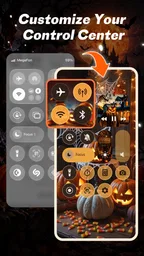
I look at wallpaper apps as small daily tools: they should make a phone feel more personal without turning a simple change into a chore. Live Wallpapers - VibeWalls is aimed at people who want more than a static background, with animated, depth-effect and time-responsive styles alongside themes, icons and custom designs. Its appeal is clear, but the experience also depends on whether motion and visual effects suit your device, your habits and your comfort.
Choosing a look without losing your way
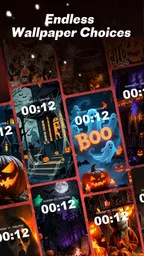
As a personalization app, VibeWalls is built around visual choice rather than complicated phone setup. The practical question is whether you can find a look that fits your screen and then live with it comfortably. I would approach its collection with a purpose in mind: decide whether you want a calm background, a striking animated scene or a coordinated set of visual changes before browsing. That makes it easier to judge options by how they will work on your home screen, not just how eye-catching they look in a preview.
For readability, the wallpaper itself matters as much as the app’s menus. A detailed image can compete with app labels, widgets and notification badges, while a busy moving scene may make the screen feel even more crowded. I’d favor backgrounds with an uncluttered area where icons sit, and check the result on the actual home screen before committing. A design that looks polished by itself may be less useful once your everyday shortcuts cover it.
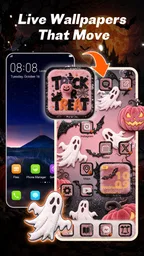
The app’s range of themes and icons suggests a broader makeover than changing one picture. That can be appealing if you want your screen to feel intentional, but it also creates a useful stopping point: changing only the wallpaper is often enough. If you try a theme or icon set, assess whether familiar apps remain easy to recognize. A cohesive appearance is not worth slowing down routine actions, especially for someone who relies on visual familiarity to open essential apps quickly.
There is no single best visual setup for everyone. Someone who enjoys changing their phone’s appearance often may welcome a wide choice of looks; someone who wants a stable, instantly recognizable screen may prefer one quiet background and leave the rest alone. I’d treat customization as optional layers rather than an all-or-nothing makeover. That approach reduces the chance of making the home screen harder to scan just to achieve a more dramatic style.
Motion, contrast and comfort are personal
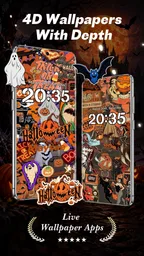
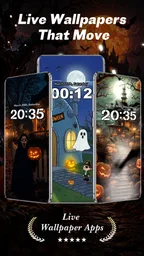
Live and 4D-style wallpapers put movement and depth at the center of the experience. Those effects can make a device feel more expressive, but they are not automatically an improvement. If motion distracts you, causes discomfort or makes it harder to focus on icons, a static design is the better choice. I’d start with a restrained image and see how it feels during ordinary use rather than judging only from an animated preview.
A practical test is to use the wallpaper during a normal day: unlock the phone, check a message, return to the home screen and open a frequently used app. If the movement draws your attention away from those actions, it is doing too much. This is especially relevant for people who use a phone in brief bursts or need to read screen content quickly. The background should support the interface, not ask to be watched.
Visual comfort also depends on contrast and detail. A bright or intricate image can make labels harder to pick out, while a darker, simpler design may leave more visual breathing room. I’d check the background with the icons and widgets you actually use, rather than assuming that a preview tells the whole story. If you use larger text or rely on strong visual separation, avoid designs where the most active or detailed area sits directly behind important shortcuts.
One useful trade-off is to keep a more animated look for a screen you enjoy browsing, while choosing a calmer background for the home screen where you need to act quickly. That may not suit every setup, and the app’s available controls determine how much you can separate those choices. Still, thinking in terms of task and comfort helps prevent the common mistake of choosing a wallpaper solely because its effects look impressive.
Making it fit real routines
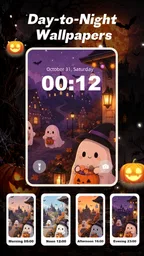
The time-responsive wallpaper idea is suited to people who like their screen to change character through the day. In a realistic routine, a person might prefer a subdued look while checking messages at work and a more expressive scene when using the phone at home. Before choosing a design of this kind, consider whether changing visuals will feel helpful or simply make the interface less predictable. If consistency matters more than novelty, a fixed wallpaper is likely the more comfortable option.
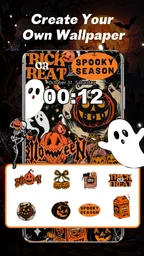
Custom designs are another route for people who already have a particular image or visual style in mind. Rather than browsing endlessly, I’d begin by choosing something personally meaningful and then check whether it leaves enough clear space for icons. This is a more deliberate workflow than selecting a ready-made look, but it can produce a screen that feels less like a template. The key is to make the image work with the phone’s layout, not force the layout to compete with it.
For quick access, it helps to decide what the screen needs to communicate at a glance. If you depend on a few essential apps, keep their positions familiar and avoid changing every visual element at once. If you are exploring themes and icons, make one change, use the phone normally, and only then decide whether to continue. This gives you a clearer sense of what improved the experience and makes it easier to undo a choice that reduces legibility.
VibeWalls is less suitable for someone who wants the bare minimum: one plain background, no motion and no interest in themes or icon styling. A basic wallpaper picker may be quicker for that job. Likewise, if visual consistency is important for work or accessibility, a static image with restrained contrast may serve better than an animated scene. The app’s breadth is a benefit only when those extra choices are something you will actually use.
Who benefits, and what to keep in mind
The strongest reason to try VibeWalls is the combination of visual variety and personal control. It is for someone who sees the home screen as part of their phone’s personality and wants options beyond a single static image. The mix of live scenes, depth effects, themes, icons and custom designs gives different kinds of users a starting point, whether they prefer a complete visual refresh or one carefully chosen background.
Its developer is Hong Kong Mishi Technology Co., Limited. The app is free to install, with optional in-app purchases listed from $0.49 to $39.99 per item. I’d treat the free starting point as a way to judge whether the visual approach suits you, and check the price shown for any specific item before purchasing. People who only want a wallpaper now and then may not need paid extras; regular customizers may find more value in exploring the available options.
VibeWalls has a 4.7 average from around 4,300 ratings, with roughly 563 written reviews and over 100,000 installs. Those figures indicate that other users have tried it, but they cannot tell you whether its motion, visual style or customization choices fit your own needs. I’d use them as context, not as a substitute for checking whether the app’s approach is comfortable on your screen.
It is rated for Everyone, runs on Android 7.0 or later, and its current version is 1.0.98. That makes the compatibility threshold worth checking before installing, particularly if you use an older device. The release date is December 24, 2025, so this is a relatively new app; I would not assume that every preference or accessibility need is covered just because the interface offers several kinds of customization.
Where the experience may still fall short
The central limitation is inherent in the product’s emphasis: animated, dimensional and changing wallpapers can add visual noise. Someone sensitive to motion, someone who needs a highly predictable screen, or someone who prioritizes quick icon recognition may find the most distinctive options tiring rather than enjoyable. In those cases, a conventional static wallpaper or the phone’s built-in background settings may be a better fit, even if they offer fewer decorative choices.
There is also a difference between a visually appealing preview and a usable home screen. Widgets, labels and app icons can alter how a design reads, so expect to spend a little time checking combinations. If you prefer not to adjust your layout or revisit choices, this kind of personalization may feel like extra maintenance. A restrained setup is often the more inclusive one when a phone is shared, used in a hurry or relied on for tasks where visual predictability matters.
From an access perspective, I would not treat customization as a replacement for the phone’s own display and accessibility settings. A wallpaper can improve the background behind icons, but it cannot by itself solve every issue involving text size, contrast, motion comfort or navigation. The sensible approach is to keep the operating system’s settings that help you, then select an image that works alongside them. If an effect makes the screen harder to use, skip it rather than trying to adapt to the effect.
A personal choice, not a universal upgrade
I’d recommend VibeWalls to people who enjoy making their Android home screen feel distinct and are willing to test how a design behaves in everyday use. Its range is most useful when you have a clear preference—perhaps a calm background with a coordinated theme, or a changing look that you genuinely enjoy seeing. Making one change at a time, checking icon legibility and paying attention to motion comfort are simple ways to get more from it without turning customization into a project.
I would steer away from it if you want a completely static, low-distraction screen or need the most consistent visual layout possible. In those situations, a built-in wallpaper option or a plain background is likely to be easier. For everyone else, the app is worth considering as a flexible personalization tool, with the important caveat that the best-looking effect is not always the most usable one. My inclusive verdict is to choose the design that helps you feel at home on your phone while keeping the screen clear, familiar and comfortable to use.
What we like
- Offers a wide selection of animated wallpaper styles.
- Lets users preview wallpapers before applying them.
- Can give a home screen a more personalized look.
- Includes options suited to different visual tastes.
- Makes wallpaper changes quick and straightforward.
What could be better
- Animated backgrounds may use more battery than static images.
- Some wallpapers may require an internet connection to load.
- The app may include ads during browsing.
- Live effects can affect performance on older devices.
- Wallpaper availability may vary by device or screen size.





