






Live Wallpaper - Wallpapers 4K review
 Analysis by Appsdrops
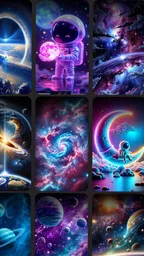
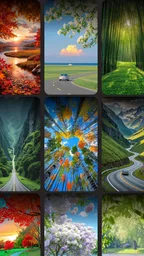
I like changing a phone’s look, but wallpaper apps can be a mixed bag: some are little more than a directory of static images, while others push motion and effects that may not suit every screen or routine. Live Wallpaper - Wallpapers 4K sits between those expectations, bringing high-resolution still images and animated backgrounds together in a personalization app. My main takeaway is that it makes sense for someone who enjoys refreshing their home screen and is willing to choose wallpapers thoughtfully rather than simply switching on the most elaborate option.
What the app is like to use
The appeal is straightforward: browse for a look that fits your phone, then use a still or moving background to make the screen feel more personal. The app’s focus on 4K imagery suggests a sharper visual direction than a collection built around low-resolution pictures, while live wallpapers add motion that a regular image cannot. In practice, the best choice depends on what you want from your screen: a striking lock screen, a calm background behind icons, or a little movement when you unlock your phone.
I would treat the two wallpaper types as different tools, not as a simple quality ladder. A detailed still image can give the screen a strong look without drawing attention every time you glance at it. A live wallpaper is more expressive, but motion can compete with notifications, widgets, and app icons. If you prefer a tidy home screen, a restrained image may feel better than animation, even if the animated option initially looks more impressive.
The app is developed by Trusted by Thousands and is listed in the personalization category. It is free to install, with optional in-app purchases ranging from $0.99 to $19.99 per item. That makes it easy to try before spending, but I would still browse with a clear idea of what you want; optional purchases can add up if you treat every attractive image as an essential upgrade.
Choosing a wallpaper that works beyond the preview
A wallpaper preview is only part of the decision. On a real home screen, icons and widgets cover sections of the image, and the clock or notifications can obscure the part that looked best in a full-screen view. I recommend checking whether the subject stays visible once the interface is layered over it. A bright focal point behind app labels may look less polished than a darker or less busy composition.
One useful approach is to choose the wallpaper around your layout rather than rearranging everything to accommodate it. If you keep several widgets at the top, look for an image whose important detail sits lower down or toward a side. If you use a sparse home screen, a more complex design has room to breathe. This small bit of planning can make a greater difference than picking the most dramatic thumbnail.
For live backgrounds, I would also favor motion that feels calm when seen repeatedly. A subtle effect can add personality without turning every unlock into a visual interruption. Fast or busy movement may be exciting at first, but it can become tiring during a workday when you check your phone dozens of times. Think of the lock screen as something you see in brief bursts, not as a video you sit down to watch.
When browsing and switching take more effort
Wallpaper apps are most useful when they help you narrow down choices, but a large visual selection can also make browsing feel endless. I find it helps to decide on a mood before opening the gallery: dark and understated, colorful, nature-inspired, or energetic. That gives each choice a purpose and makes it easier to stop scrolling once you find something that suits the screen.
A realistic everyday example is changing your background before a busy week. You might pick a still image with open space for your calendar and work shortcuts, then reserve an animated style for a weekend or a secondary screen. That approach lets you enjoy the app’s variety without making your everyday interface harder to read. It also avoids the common trap of choosing a wallpaper for its preview alone and then replacing it because the home screen feels cluttered.
There is a trade-off between novelty and comfort. Switching wallpapers often keeps a phone feeling fresh, but frequent changes can make the interface feel less familiar, especially if you rely on visual cues to find apps. I would use the app to find a small number of favorites rather than constantly hunting for a new background. A wallpaper you enjoy after several days is more valuable than one that is striking for a few minutes.
Motion, battery expectations, and heavy-use moments
Live wallpaper is the feature most likely to affect how the phone feels, but I would not assume that every animated design has the same impact. Motion can demand more from a device than a static picture, and the result depends on the phone, the wallpaper, and how the screen is used. If battery life is a priority, a still background is the sensible starting point. It keeps the visual refresh while avoiding animation as an everyday extra.
When the phone is already busy—navigation, calls, music, and several apps open at once—I would avoid adding a demanding visual effect simply for decoration. That is a practical precaution, not a claim that this app causes slowdown. If you notice the phone becoming warm, less responsive, or draining faster after choosing a moving background, switch back to a still image and see whether the experience improves. It is an easy comparison and gives you a direct answer for your own device.
Animated wallpaper is also something you may want to test during ordinary use rather than judge from a brief preview. Unlock the phone repeatedly, check whether the motion distracts from reading notifications, and see whether the home screen remains comfortable to look at. A design that feels smooth and tasteful in isolation may be too active when it appears throughout the day.
Reliability and what to do if the look changes
For a personalization app, reliability is less about a long session and more about whether the wallpaper continues to look right when you return to the phone. I would check the result after setting it, then again after locking and unlocking the screen. If the image or motion does not appear as expected, first revisit the wallpaper choice and apply it again; a simpler still background is also a useful way to tell whether the issue is tied to animation rather than the image itself.
That sort of basic recovery is worth keeping in mind because a wallpaper is part of the phone’s everyday interface. You do not want to spend time repeatedly troubleshooting a decoration. If a particular live design proves unreliable on your device, there is little downside to choosing a static alternative and moving on. The app’s two visual approaches give you that practical fallback, though the best option is always the one that behaves consistently on your own phone.
I would not judge stability from one moment of browsing alone. Check the selected background in the places you actually use it, including a busy home screen and the lock screen if you customize both. If the image remains clear and motion feels unobtrusive through normal checks, that is a better sign than a flashy preview. This is a simple way to assess comfort without turning wallpaper selection into a technical project.
Device fit, version, and who should choose it
The current version is 3.16.10, and the minimum operating-system requirement is version 7.0. The app is rated for Everyone, so its audience is broad; the more important question is whether your phone and habits suit live backgrounds. If you use an older or less capable device, or you are careful about battery use, start with a static wallpaper. If you have a newer phone and enjoy motion, test an animated option and keep it only if the screen remains responsive and comfortable.
There is no universal performance verdict for animated backgrounds because phones differ, and a person’s tolerance for motion differs too. I would not promise that a live wallpaper is invisible to battery or device resources. Instead, make the choice reversible: try one, use the phone normally, and change it if you notice a drawback. That cautious approach is more useful than assuming the most elaborate design will work equally well for everyone.
The app has an average rating of 4.5 from around 34,000 ratings, with more than 10 million installs. Those figures point to a widely used option, but they do not guarantee that every wallpaper or motion style will suit your device. I would use its popularity as a reason to consider trying it, not as a substitute for checking how a selected background looks on your own screen.
How it compares with simpler wallpaper choices
Compared with using a single photo from your gallery, a dedicated wallpaper app is appealing when you want more variety and are specifically interested in animated backgrounds. A photo you already own is simpler and gives you complete control over the image, but it will not provide the same browsing experience or the option to explore motion-focused designs. If you only want one personal photograph, your gallery may be enough; if you like changing styles, this app is a more natural fit.
Against a basic static-wallpaper collection, the key distinction is the combination of high-resolution imagery and live options. Static collections are often the better match for minimalism and resource-conscious use. Here, the extra appeal is visual variety and movement, with the corresponding need to choose carefully. I would not install it expecting every animated choice to be better than a still image. The value is having both directions available and deciding which one makes sense for the moment.
The app is a good fit for people who enjoy personalization, like browsing for a fresh look, and do not mind testing a live background before settling on it. It is less suitable if you want a completely hands-off wallpaper setup, are highly sensitive to motion, or prefer to avoid optional purchases altogether. Since installation is free, trying the selection costs nothing, but paid items should be treated as optional rather than necessary for a good-looking phone.
My verdict after weighing the trade-offs
Live Wallpaper - Wallpapers 4K is worth a look if you want more than a static image and like having the choice to bring motion to your screen. Its strongest point is that it serves two different personalization habits: a crisp still background for a calm interface, or an animated one for a more lively feel. I especially like the practical flexibility of being able to fall back to a still image when motion is distracting or does not suit the device.
The main caution is not complicated: live effects are not automatically the best choice for battery-conscious users, older phones, or busy home screens. Preview a design in context, keep important icons readable, and pay attention to how the phone feels during normal use. The app is free to try, though individual in-app purchases can cost from $0.99 to $19.99. Released on January 17, 2025, it offers a clear reason to install for wallpaper fans, but the right result comes from selecting a style that fits your routine rather than chasing the most eye-catching animation.
My recommendation: try it if you enjoy refreshing your phone’s appearance and want live wallpaper as an option, not an obligation. Begin with a static background if you value simplicity, then experiment with motion only if it adds something you genuinely enjoy. That measured approach lets the app personalize your screen without letting decoration get in the way of using it.
What we like
- Offers a large selection of 4K and animated wallpaper options.
- Lets users preview wallpapers before applying them.
- Can give a home screen a more personalized look.
- Provides wallpaper choices for different styles and themes.
- Makes it easy to refresh a device's appearance.
What could be better
- Live wallpapers can use more battery than static backgrounds.
- High-resolution images may take up considerable storage.
- Some wallpapers may require an internet connection to load.
- Animated backgrounds can affect performance on older devices.
- Wallpaper availability and features may vary by device.





