

LaserAway review
 Analysis by Appsdrops
When I’m considering a beauty treatment, the hard part is often not choosing a service; it’s figuring out how to move from a first question to a real appointment without losing track of the details. LaserAway is a free beauty app from LaserAway Medical Group, INC., built around the company’s services rather than the wider beauty world. I’d look at it as a companion for people already curious about LaserAway, not as a general beauty planner or a substitute for speaking with a clinician.
From a beauty question to a first step
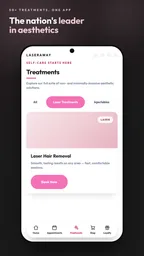
The useful starting point is knowing what kind of help you want. If you’re exploring laser hair removal or another treatment offered by LaserAway, having the company’s app on your phone gives you a focused place to begin. Its store summary, “Ignite The Potential Within,” is an invitation, but the practical question for me is whether the app fits into the decisions and follow-up around an actual service.
That focus is also the main trade-off. Unlike a broad beauty app that might cover products, makeup, or routines from many brands, this one is tied to a single provider. That makes it more relevant if you’re considering LaserAway, but less useful if you want impartial comparisons across clinics or a general reference for skin care.
I would start by using it to orient myself and identify what I need to ask, rather than treating an app screen as a personal treatment recommendation. Beauty services can depend on individual circumstances, so a conversation with the provider remains important. The app is most valuable when it supports that conversation, not when it is expected to replace it.
The app is listed in the Beauty category, is rated for Everyone, and has a 4.6 average from around 270 ratings. It has over 10,000 installs, which suggests a real audience while still making it a more specialized option than a mass-market beauty platform. Those figures can help set expectations, but they don’t tell me whether a particular treatment or location is right for an individual.
Making the first visit more useful
A small but practical habit is to decide what you need from the app before opening it. For example, are you trying to learn about a service, keep the next step in mind, or handle something related to an existing relationship with the company? Being clear about that prevents a common frustration with service-provider apps: browsing without knowing whether the next action is informational or requires a direct handoff to staff.
If you’re new to LaserAway, I’d jot down the exact area or concern you want to discuss and any questions that could affect your decision. That might include what to expect before an appointment, what follow-up involves, or whether your circumstances need a provider’s input. The app can help you stay oriented, but those questions are better answered by the people responsible for your care.
This is also where I’d avoid assuming that an app devoted to a treatment provider works like a social beauty app. It is not the place I’d go for community reviews of every clinic in town, an open-ended product catalogue, or independent medical advice. If those are your priorities, a broader research route is more appropriate, followed by direct confirmation with a qualified provider.
Following the steps without losing the thread
For an existing or prospective client, the workflow is less about a single dramatic feature and more about keeping the process coherent: start with the service you’re considering, use the app as a company-specific point of contact, and carry unresolved questions into a conversation with staff. I find that approach more reliable than expecting a mobile interface to settle every decision on its own.
One useful way to prepare is to separate questions into two groups. The first contains things you can answer by reviewing the app’s available information; the second contains anything personal, clinical, or dependent on your appointment. That distinction saves time. It also helps prevent a polished digital experience from creating the impression that general information is tailored advice.
For an everyday scenario, imagine you’re considering a treatment while planning a busy week. You can use the app as part of your research at home, then decide what must be clarified before committing time to an appointment. If a question needs a person, make that handoff deliberately instead of repeatedly searching the app for an answer it may not be designed to provide. The value is in arriving at the next conversation prepared.
That workflow is especially useful when you’re comparing convenience with confidence. A dedicated provider app can keep your attention on one company’s services, but it cannot make a meaningful comparison with another clinic by itself. I’d use it to understand the LaserAway side of the decision, then independently consider whether the provider, treatment, and practical arrangements suit me.
Where the human handoff matters
Beauty treatments often involve details that are specific to a person, so the most important handoff is from general app information to a member of the provider’s team. I would not rely on an app alone to answer questions about suitability, expected outcomes, or what a particular course of treatment should involve. Those are precisely the points where the provider needs to understand the individual situation.
There is a second handoff too: from deciding that a service sounds interesting to understanding what happens next. Before setting aside time or making plans, I’d confirm the practical details directly with LaserAway, including anything that could affect scheduling or preparation. This is not a knock against the app; it is sensible boundary-setting for a service where personal circumstances matter.
If you already visit LaserAway, the app’s company-specific focus may feel more convenient than searching through unrelated beauty tools. If you are still choosing among providers, however, I would not let the convenience of one app settle the larger decision. Compare the information that matters to you and speak with the provider before treating an in-app journey as a complete picture.
That distinction also answers a common question: can the app replace a consultation? I would not treat it that way. It can be part of the path toward a service, but individual questions and decisions call for direct interaction with the provider. Similarly, someone seeking broad education on skin health or advice from an independent source should use other resources as well.
What a good outcome looks like
For me, success here is not simply completing a digital task. It is knowing what I’m considering, understanding which questions remain, and reaching the right person to resolve them. A service-focused app can be useful when it reduces the mental load of keeping a provider’s process in view, even if the final decision still happens through a human conversation.
LaserAway’s rating is encouraging, but ratings are only a rough signal. With 59 written reviews, there is some feedback to consider, yet no aggregate score can tell me whether the app will suit my particular needs or whether a treatment is appropriate for me. I’d read feedback as context, not as a substitute for asking specific questions or judging my own experience.
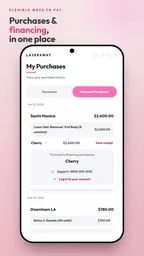
The app is free, so trying it carries no listed purchase price. That makes it an easy option to explore if you’re already considering LaserAway. The more meaningful cost is attention: if you only need a neutral comparison of local providers, a dedicated app for one company may not be the best place to spend your research time.
It runs on devices using Android 7.0 or later, and its current version is 2.0.81. It was released on November 17, 2022. I’d keep the app updated through the app store so I’m using the current build, while remembering that an updated app does not change the need to confirm service details directly.
Where the flow can break
The biggest limitation is the narrow scope. If you expect a complete beauty hub, you may find the single-provider focus restrictive. It is not a neutral directory for comparing every treatment option, and it should not be confused with a general skin-care guide. Its usefulness depends heavily on whether LaserAway is already part of your plans.
Another possible friction point is the gap between finding information and getting a personal answer. When a question depends on your health, treatment history, schedule, or goals, generic app content may not be enough. My advice is to stop searching once you reach that boundary and ask the provider directly. Repeating the same browse-and-guess cycle is unlikely to make the decision clearer.
There is also a risk of planning around an assumption. Before arranging your day around a service, confirm the relevant appointment details and any preparation guidance with LaserAway. The app can support your workflow, but a user should not infer that every logistical or personal question is resolved simply because the company has a mobile app.
I’d skip it if you are not interested in LaserAway’s services, if you want recommendations across competing providers, or if you need independent medical guidance. I’d also avoid using it as the sole basis for deciding whether a treatment is right for you. In those situations, a general comparison resource or a direct conversation with an appropriate professional is a better starting point.
Who I’d recommend it to
I’d recommend LaserAway to someone who is already exploring the company’s beauty services and wants a focused mobile companion for the steps around that interest. It makes the most sense when you have a concrete question or a reason to stay connected to the provider, rather than when you’re casually browsing beauty content with no particular clinic in mind.
The app is maintained by LaserAway Medical Group, INC., and that relationship is both its strength and its limit: the experience is tied to the provider, not designed as an independent marketplace. If you understand that distinction, it is easier to use the app for what it can do while reserving personal decisions and important clarifications for direct contact.
My overall view is positive but measured. The free download and focused purpose make it worth trying for people considering LaserAway, and the 4.6 average gives a useful, though not decisive, indication of user sentiment. I would keep expectations grounded: use it to support a real-world process, prepare better questions, and stay focused on the next step. For broad beauty discovery or a provider-neutral decision, choose a wider resource instead.
What we like
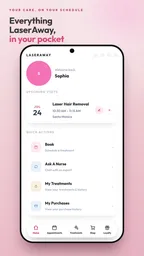
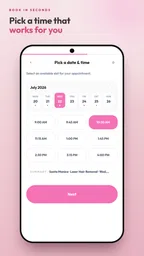
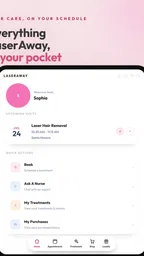
- The app lets you request appointments without calling a clinic.
- You can review treatment details before contacting a provider.
- A saved account can make future appointment requests quicker.
- Clinic information helps you find a nearby LaserAway location.
- The interface is straightforward for common booking tasks.
What could be better
- Appointment availability depends on your chosen clinic.
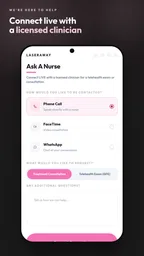
- You may need to contact staff for questions not covered in the app.
- Some features may require creating an account.
- Treatment options can vary by location.
- The app is most useful to people near a LaserAway clinic.





