
KWGT Kustom Widget Maker review
 Analysis by Appsdrops
I like home-screen customization best when it makes the phone more useful, not just more decorated. KWGT Kustom Widget Maker gives me room to build widgets around the information I actually check, from a clock to weather or activity details. The first appeal is obvious: I can make a home screen feel distinctly mine. The more important question is whether I still want to keep those widgets once the novelty wears off. My answer is yes, if I enjoy tuning a layout and have a few recurring needs; less so if I want a polished widget without setup.
From a fresh home screen to a useful habit
KWGT is a free personalization app from Kustom Industries, designed for making custom widgets on Android. It has a 3.9 average from around 52,000 ratings and has been installed over 10 million times. That reach makes sense: it serves people who want more control than a fixed row of clock or weather options, while still centering the home screen rather than asking users to learn an entirely new launcher.
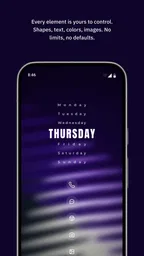
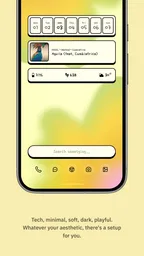
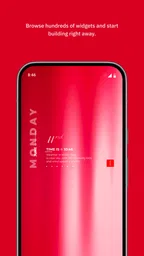
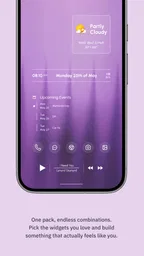
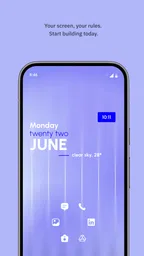
In the first few days, the attraction is the freedom to shape a widget’s appearance and contents to suit a particular screen. I might want a compact clock above my everyday apps, or a larger panel that brings weather and step information into view. Instead of accepting the layout a phone or another app happens to offer, I can work toward a design that fits my wallpaper, icon arrangement, and habits. That creative control is KWGT’s strongest reason to try it.
There is a trade-off, though: KWGT is a maker, not simply a shelf of ready-made widgets. The process involves choosing or building a design and then fitting it to the home screen. People who enjoy adjusting spacing, visual hierarchy, and what a widget displays will find that satisfying. If I only want to add a clock quickly and never touch its appearance again, the built-in widget from the phone’s clock or weather app is usually the simpler starting point.
One practical way to avoid turning customization into an endless project is to begin with a single widget that solves a real annoyance. For example, I could place a clock and the day’s weather where I already look when unlocking the phone, then leave the rest of the screen alone. If that small change proves useful during the first week, I have a reason to refine it. If it does not, adding more elaborate panels is unlikely to create a lasting habit by itself.
What makes it worthwhile after the first week
A good custom widget can become part of a daily routine precisely because it puts familiar information in a consistent place. I may check the time before leaving, glance at the weather while deciding what to wear, or look at step count later in the day. Those are modest moments, but a home-screen element earns its place when it saves me from opening another app or searching for a specific detail.
The useful trick is to design around a decision, not around a list of available data. If I often decide whether to take a jacket, weather deserves space; if I never look at a health number on my home screen, including it just because it can be displayed adds clutter. A small, focused widget is often easier to read and more likely to stay than a crowded dashboard. This is a more durable approach than building a striking design first and trying to invent a reason to use it afterward.
KWGT’s flexibility also makes it better suited to gradual changes than to a one-and-done makeover. I can start with a basic layout and adjust it when I notice a real problem: perhaps the clock competes with app icons, or the widget takes up more room than the information deserves. That iterative approach is useful for people who enjoy tailoring a phone, but it does mean the app’s value depends partly on whether customization itself is enjoyable.
For a realistic everyday setup, I would keep the widget modest: a time display, a brief weather cue, and perhaps an activity detail if I genuinely check it. I would put the apps I use most in their usual places and avoid making the widget carry every fact about my day. After several days, I would ask whether I look at it without thinking. If I do, it has become a useful fixture; if I keep forgetting it exists, I would simplify or remove it rather than keep polishing for appearance alone.
Where the extra control asks for effort
Because KWGT is a widget-making tool, the initial setup can take longer than placing a standard widget supplied by the phone or a dedicated weather app. A design must work within the space available on the home screen, and a layout that looks balanced in one arrangement may need adjustment if I change widget size or move surrounding icons. That makes experimenting part of the experience, not an inconvenience that disappears entirely after installation.
A useful maintenance habit is to keep the purpose of each widget clear and check it after changing the home-screen layout. If the phone’s grid, wallpaper, or nearby icons change, a carefully composed design may no longer feel as readable. I would make one change at a time—first size, then placement, then visual details—so it is easy to identify what improved the screen. This also prevents a common trap: repeatedly redesigning everything when the real issue is simply that the widget is too large.
Content can matter as much as appearance. A widget that shows a detail I rarely act on can become decorative noise, while a simple clock may remain useful every day. I would treat health or step information as optional rather than automatically valuable: seeing a number at a glance is helpful only if it supports a habit I already care about. The strongest setup is not the one with the most fields; it is the one that earns a glance.
There is also a difference between enjoying the editor and wanting to maintain a finished result. Some people like changing colors and rearranging elements as their taste shifts; others want the home screen settled and untouched. KWGT fits the first group more naturally. If I fall into the second, I would keep the design simple and resist building a widget that depends on constant aesthetic attention to feel worthwhile.
What can cause customization fatigue
The same freedom that makes KWGT appealing can make it tiring. A user can spend more time adjusting a clock’s look than benefiting from seeing the time. I have found that a useful boundary is to decide in advance what the widget needs to accomplish, then stop when it does that job clearly. Without that boundary, a project can turn into a cycle of tiny visual tweaks that feel productive but do not make the phone more useful.
Another source of fatigue is trying to make every part of a home screen match. A custom widget may look excellent beside one wallpaper and feel out of place after a change. Keeping a restrained design—clear text, a limited set of details, and enough empty space—makes it easier to live with through ordinary changes. It also reduces the urge to rebuild from scratch whenever the phone’s look shifts.
For comparison, built-in widgets and focused weather or clock apps usually win on speed and simplicity. Their ready-made layouts are often the right choice when I want a reliable glanceable detail with minimal tinkering. KWGT wins when those standard options do not fit the screen or do not show the combination of information I want. I would not call it a universal replacement: it is a creative layer for users who value control, not an essential upgrade for everyone.
It is also worth considering how much of the setup process sounds enjoyable before choosing it. Someone who likes experimenting can treat the first version as a draft and learn by adjusting it. Someone who dislikes fiddling may be better served by one of the phone’s existing widgets, even if it offers fewer layout choices. The better option is the one that gets checked regularly, not the one with the theoretically greatest flexibility.
Cost, compatibility, and who should try it
KWGT is listed as free, with in-app purchases at $6.99 per item. I would start with the free app and see whether its making-and-adjusting approach suits me before paying for anything. The listed current version is 3.82b621115, and the minimum Android requirement is 8.0, so checking the phone’s Android version before installing is sensible. Its content rating is Everyone, which makes the app broadly suitable by age, though the hands-on customization style still will not appeal to every user.
I would recommend giving it a try if you use Android, enjoy shaping your home screen, and can name at least one piece of information you want to see more easily. It is especially promising for someone who wants a clock or small information panel to fit a particular arrangement rather than accepting the default look. Conversely, I would skip it if I need an instant, no-adjustment widget, dislike visual tuning, or rarely look at home-screen information in the first place.
My long-term test is simple: does the widget still help after I stop admiring the design? If it continues to make a routine glance easier, it deserves the space. If I only notice it when I am editing it, it is decoration that I no longer need. That distinction is the best way to get lasting value from a customization tool: build for a habit, then let actual use—not the excitement of making something new—decide what stays.
KWGT Kustom Widget Maker earns its place for people who see the home screen as something they can shape around their day. I like that it can turn a personal preference into a practical layout, but I would not recommend it as the fastest route to a ready-made clock or weather panel. Start small, keep the information purposeful, and give the design time to prove itself. If you still glance at it weeks later, the effort has paid off; if not, a simpler alternative is probably the better fit.
What we like
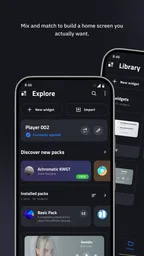
- A large library of community-made widgets offers plenty of starting points.
- Widgets can be resized to fit different home screen layouts.
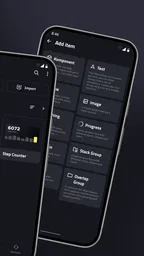
- Built-in tools support dynamic data such as time and battery level.
- Users can create reusable widget presets for consistent designs.
- The free edition lets users explore the editor before upgrading.
What could be better
- The interface can feel overwhelming for first-time users.
- Advanced widget designs may require substantial setup time.
- Some community presets depend on external fonts or images.
- A KWGT Pro upgrade is needed for key import and export features.
- Widget updates may be delayed by Android battery restrictions.





