
Kling AI: AI Image&Video Maker review
 Analysis by Appsdrops
I see Kling AI as a creative workshop for people who want to explore images and video without starting from a blank canvas. It belongs to the art and design category, and KLING AI is its developer. The app is free to install, with paid in-app purchases, so the first question is not simply whether it costs anything: it is whether its creative tools fit the way you like to work. My view is that it is most appealing when you enjoy experimenting, refining ideas, and accepting that an AI-generated result may need more than one attempt.
What the free starting point does—and does not—tell you
The app’s free price makes it easy to try, but it is worth separating free access from paid value. In-app purchases range from $0.59 to $3,863.99 per item, a very broad spread. That range alone does not tell me which tools or amounts of use are included in a particular purchase, so I would check the current in-app purchase details before paying. I would not assume that every creative workflow is unlimited just because installation is free.
That distinction matters especially with AI art tools, where a person may want to test several prompts before finding a result worth keeping. If you are curious, install it and see whether the creation experience suits you before considering a purchase. If you already know you need frequent generation for work, look closely at the options presented inside the app and decide whether their terms match your expected use. The sensible approach is to judge the free experience first, then pay only for a clear, recurring need.
Kling AI has a 4.5 average from around 644,000 ratings, and it has passed 10 million installs. Those figures suggest that many people have tried it, but they cannot guarantee that its particular style or workflow will suit you. It is rated Teen, so it is not positioned as an app solely for young children. The current version is 3.10.20.420, and it requires Android 9 or later on Android devices.
Where the creative value comes from
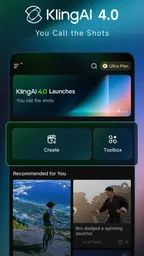
The useful idea behind this app is the combination of image and video creation with editing in one AI-focused studio. That combination can help when a visual starts as a rough thought rather than a polished brief. Instead of switching immediately between separate tools for a still image and a moving concept, you can explore both kinds of output within the same creative context. For someone developing a look for a social post, a personal project, or an early concept, that can make experimentation feel less fragmented.
I would treat the first prompt as a sketch, not a final instruction. A more productive workflow is to decide what the image or clip needs to communicate, then keep the prompt focused on the subject, setting, mood, and one or two visual details that matter most. If you describe every element at once, it becomes harder to tell which part of the instruction shaped the result. Changing one idea at a time gives you a clearer way to steer the next attempt and learn what the tool responds to.
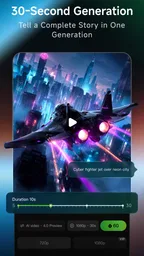
A practical example: imagine you need a visual for a small event announcement and have only a loose idea of its atmosphere. I would first explore a still image to settle on a color and composition direction, then use the video side to test whether that visual language works in motion. The point is not to expect a finished campaign at the tap of a button. It is to use generated material to make decisions sooner, then select and refine what is genuinely useful.
There is another small but valuable habit: keep a short note of prompts that produced a promising result, including what you changed between attempts. When a generation looks close but misses one detail, it is tempting to rewrite the whole prompt. That can move the image or clip in several directions at once. A small, deliberate revision is easier to evaluate and may preserve the parts you already like. This kind of prompt discipline is more useful than endlessly adding adjectives.
For creators who make both still and moving content, the app’s scope may reduce the friction of trying a visual idea in more than one format. For casual users, it offers a way to turn a vague concept into something concrete enough to share or discuss. In either case, I would value it most as a partner in ideation, rather than as a substitute for every step of design or video production.
Tradeoffs I would keep in mind
AI generation is inherently iterative. A prompt can be clear to a person and still produce something that misses the intended emphasis, so the time saved on starting from scratch can be offset by time spent reviewing and adjusting results. If you need precise control over every visual detail, a conventional graphics editor or a timeline-based video editor may be a better main tool. Those alternatives are built around direct manual adjustments; an AI studio is better suited to exploring possibilities and shaping a result through instructions.
That difference becomes important when the output has to meet a strict brief. A particular layout, exact brand treatment, or carefully controlled sequence may require more dependable hands-on editing than prompt-led generation can provide. I would use Kling AI to build an initial direction or create material to refine elsewhere, rather than promise a client that every generated result will be ready to publish unchanged. The app’s broad creative scope is attractive, but it does not remove the need for a final human check.
There is also a learning curve in discovering how to describe a visual idea. A prompt that is too general can leave too much to interpretation; one that is overloaded can make the outcome difficult to steer. The best compromise is to give the tool a clear central subject and a few purposeful details, then revise based on what actually appears. If that back-and-forth sounds frustrating rather than enjoyable, you may prefer a conventional editor with direct controls.
The purchase range deserves careful attention too. A low-cost entry point and a very high maximum item price can coexist without making the app a bad value, but they do mean you should not treat all purchases as interchangeable or assume that a particular tier is right for you. Before spending, identify the specific limitation you are trying to solve and check that the in-app option addresses it. If you cannot name the benefit you need, waiting is the better decision.
Who is likely to get the most from it
I would recommend trying it if you like visual experimentation, need a quick way to explore an idea, or want to compare a still concept with a moving one. It can also suit people who make informal creative content and are comfortable judging several outputs rather than expecting the first one to be exact. Its strengths are less about replacing an established professional pipeline and more about opening up directions that might be difficult to sketch or produce quickly by hand.
It is a weaker fit for anyone who needs guaranteed consistency across a large batch of assets, has strict control requirements, or wants a standard manual editor above all else. It may also be a poor match if you dislike prompt iteration or prefer to know exactly how each layer and motion element is being adjusted. In those cases, use a conventional design or video-editing app as your primary tool, and consider AI generation only if you want an additional source of concepts.
For a personal project, I would keep the workflow simple: describe the core idea, generate a few directions, choose the one that communicates best, and then make focused changes. For a business task, I would add a review step before publishing, checking that the result actually matches the intended message and that no distracting detail slipped in. This is a useful distinction: experimentation can be relaxed, while material representing a business or public event deserves a more deliberate final pass.
My buy-or-skip verdict
My recommendation is to try the free app first and treat spending as a decision made after testing, not a requirement for getting started. Kling AI has a large audience, a strong average rating, and a useful combination of AI image and video creation and editing. Those qualities make it worth exploring if you want a flexible place to develop visual ideas. They do not make it the right choice for everyone, particularly people whose work depends on exact, repeatable manual control.
I would skip a purchase until I had identified a specific benefit I wanted and checked the available in-app terms. If you mainly want a conventional editor, choose one designed around direct controls. If you enjoy shaping prompts and are happy to review and refine the results, this app offers a compelling creative starting point. I would describe its value as potential: it can help turn an idea into something visible, but the best results still depend on your judgment, patience, and willingness to make a few thoughtful adjustments.
Released on January 20, 2025, Kling AI is a free-to-install creative app for Android users on version 9 or later, with in-app purchases available. Its 3.8K written reviews add another sign of active interest, though no rating count can replace trying the workflow yourself. For me, the decision is straightforward: explore it for visual discovery, keep expectations realistic, and spend only when the paid option clearly supports the way you plan to create.
What we like
- Text prompts make it easy to start creating without editing experience.
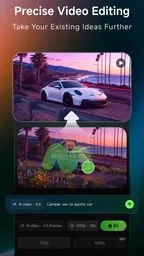
- Image-to-video tools can add motion to existing artwork.
- Multiple creative styles offer room to explore different looks.
- Generated clips can help bring concepts to life quickly.
- The interface makes AI creation approachable for beginners.
What could be better
- Results may differ from the details described in a prompt.
- Complex scenes can produce inconsistent movement or objects.
- High-quality generations may require more time to process.
- Free usage may be limited by credits or generation caps.
- Uploading personal images may raise privacy concerns.





