

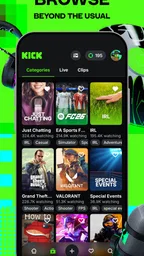






KICK: Live Streaming review
 Analysis by Appsdrops
I see KICK: Live Streaming as an entertainment app that makes the most sense when you treat it as a place to drop into live broadcasts, rather than as a general video library. That difference matters in a shared home: a stream is happening now, so someone else may want the screen, the sound, or a say in what gets watched. I’d recommend it to people who enjoy live personalities and spontaneous viewing, but I’d be more deliberate about how it fits into a family’s shared devices and routines.
When one screen becomes everyone’s screen
A realistic use is a quiet evening when one person opens KICK to check whether a familiar streamer is live, while another person is already using the television or tablet. Live viewing can feel more like joining a moment than selecting a finished episode, which is part of its appeal. It can also make stopping awkward: the stream continues whether or not the household is ready to give it attention.
For that reason, I’d start with a simple household agreement: who is using the device, whether the audio can be on, and whether a live broadcast is suitable for the room. These are practical habits, not special app features. They help avoid the common shared-device problem of one person’s entertainment suddenly becoming everyone else’s background noise.
KICK is an entertainment app from KICK - Live Streaming. It is free to install, which makes trying it relatively easy, although in-app purchases range from $1.59 to $384.99 per item. I’d keep that distinction clear if several people share a device: free access does not mean every optional purchase is free, and the person watching should know whose account or payment method is involved before buying anything.
Setting boundaries before handing over the device
On a shared phone or tablet, I would avoid treating a signed-in app as a neutral household screen. If more than one person uses the same device, decide whose account is active and who is allowed to make purchases. A useful routine is to check the account before opening a stream and to return the device in the same state afterward. That small step prevents confusion about whose viewing history, interactions, or spending are connected to the session.
I also wouldn’t assume that handing the app to a child is equivalent to handing over a curated video playlist. Live broadcasts are unfolding in real time, so the household has less control over the timing and nature of what appears than it does when an adult chooses a specific, previously reviewed video. If a parent is deciding whether a young person should use it, I’d make that a supervised choice rather than relying on the app’s entertainment label alone.
The app is rated Teen, a useful starting point for age discussions, but an age label is not a substitute for knowing how a particular person handles live media. I’d consider maturity, viewing habits, and whether an adult can be nearby. The right decision may differ between a teenager watching with a parent in the room and a younger child browsing alone on a shared device.
Coordinating viewing without turning it into a chore
Live entertainment works best when the household agrees on a time and a screen. If I know someone else needs the tablet for homework or a call, I’d plan around that rather than beginning a stream and expecting others to wait. This is especially useful when the attraction is a one-off live moment: decide beforehand whether the stream is worth reserving the device for, and have a natural stopping point in mind.
Another practical approach is to treat audio as the first coordination issue. A live broadcast can be distracting even when the viewer is not actively interacting with it. Headphones can make shared spaces easier, but they also reduce awareness of what is happening around the viewer. In a household with younger users, I’d favor a common room and occasional check-ins over letting someone disappear into a long session with headphones on.
If one person recommends a streamer to another, I’d share the name and let the other person decide whether to watch, instead of taking over the device and leaving the app open. That keeps the recommendation social without blurring account boundaries. It also helps distinguish a personal account from a household viewing session, which matters when different people have different tastes or expectations.
What it does well, and where live viewing asks more of you
The strongest reason to try KICK is the immediacy of live content. Compared with conventional on-demand video apps, where I can pause, choose a specific episode, or pick up later, a live stream is tied to the moment. That can make watching feel less polished and more participatory, which some people will find refreshing. It is also less convenient if the household wants predictable length, quiet viewing, or content selected in advance.
I would not choose it as a replacement for a family streaming service when the goal is to put on a known film or an age-appropriate show for everyone. Those services are usually better suited to planned, shared viewing because the content is selected before the screen is turned on. KICK is a better fit for someone who already enjoys live creators and is willing to browse within that format. The trade-off is that spontaneity brings less certainty about what will be on at any particular moment.
One useful habit is to decide what the session is for before opening the app: checking whether a particular creator is live, watching for a short break, or settling in for a longer session. That intention helps prevent aimless scrolling and makes it easier to put the phone away when another household task comes up. It also makes the app easier to recommend honestly: a friend who wants a fixed-length episode may be happier elsewhere, while someone who likes live personalities may appreciate the format.
The Teen content rating should inform expectations, but I would still make the household’s own rules explicit. In practice, that means agreeing on whether younger family members can browse independently, whether a parent should be present, and whether the app is allowed on a shared device. I wouldn’t present those choices as controls that KICK necessarily provides; they are decisions the household can make around its use.
Trust, account ownership, and optional spending
KICK has an average rating of 4.6 from around 333,000 ratings, and it has been installed over 50 million times. Those figures suggest that many people have tried it, but they don’t tell me whether a particular stream will suit my household. I’d use popularity as a reason to consider the app, not as a guarantee that every viewing session will be a good match.
It is free to download, but optional purchases deserve a deliberate approach. The stated in-app purchase range runs from $1.59 to $384.99 per item, a broad spread that makes it especially important not to let a shared device become a shared payment decision. I’d make sure everyone knows who can approve purchases and would avoid leaving a payment method available to a child or guest without clear permission.
For trust, I’d focus on the actual viewing context rather than making assumptions from the app’s scale. Watch together at first if you are unsure how it fits, and talk about what to do if a broadcast feels uncomfortable or simply isn’t appropriate for the room. That is a more useful plan than assuming that an app’s overall reputation will predict every live moment.
Who should try it—and who may prefer another option
I’d recommend KICK to adults and older teens who actively enjoy live-streaming culture and want to discover or follow broadcasts as they happen. It can also suit a household where one person watches on a personal device with headphones and everyone understands that the stream is their session, not automatically shared programming. The app’s Teen rating and free entry point make it approachable for people considering it, while the optional purchases call for sensible account boundaries.
I’d hesitate to recommend it as a default app for younger children, a shared living-room choice that must suit every age, or a reliable way to keep a child occupied without supervision. I’d also steer someone toward on-demand video if they need a predictable runtime, carefully chosen content, or the ability to pause and resume around household routines. Those are not faults in live streaming so much as consequences of choosing a format built around broadcasts happening in real time.
KICK was released on March 31, 2023, and its scale has made it a familiar name in live entertainment. Still, what matters most in a home is not how many people have installed it but whether its live format fits the way the household shares screens, accounts, and attention. My advice is to try it on a personal account first, agree on purchase boundaries, and be intentional about when and where it plays.
My household verdict
I’d keep KICK in the category of personal live entertainment, not household background TV. It can be an enjoyable choice for someone who likes watching creators in real time, but shared use needs a little coordination: clarify whose account is open, who can approve spending, and whether the viewing is appropriate for the people nearby. With those expectations in place, it is easy to see why the app appeals to live-streaming fans. Without them, the spontaneity that makes it engaging can also make it a poor fit for a shared screen.
Overall, I’d recommend giving KICK: Live Streaming a try if you already know you enjoy live broadcasts and can set reasonable boundaries around a shared device. I would not install it simply to provide universal family entertainment. Its best use is specific and personal: finding a live stream that interests you, watching on your terms, and making sure everyone else in the home knows when the screen is yours.
What we like
- The interface makes it easy to find live channels.
- Viewers can chat with streamers in real time.
- Creators can broadcast directly from mobile devices.
- A range of categories helps viewers discover new streams.
- Live notifications can help you catch favorite creators online.
What could be better
- Stream quality depends heavily on your internet connection.
- Some channels may contain mature or unsuitable content.
- Busy chats can be difficult to follow.
- Notifications may feel intrusive if many channels are followed.
- Availability of creators and content can vary by region.





