
KeyConnect Digital Car Key review
 Analysis by Appsdrops
I can see why a digital car key is appealing: it promises fewer moments spent digging through a bag or wondering whether the car is locked. KeyConnect Digital Car Key is an Auto & Vehicles app from Apponfire Co. Ltd. built around remote car access, with car-play functionality also mentioned in its store summary. My overall impression is that it is worth considering when its controls match your car and your routine; the idea alone is not enough to make it a lasting daily tool.
Where the first-week appeal comes from
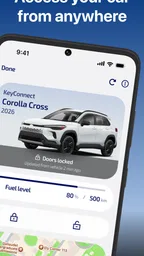
The first benefit is easy to picture. You are carrying shopping, walking back to the car in the rain, or approaching it with your hands full, and the phone becomes the place you turn for access. Remote locking and unlocking can make that familiar chore feel simpler, especially if you already keep your phone close throughout the day.
That convenience is also the app’s main test. A remote key is useful only when the connection and the car’s compatibility work in your particular setup. Before building a habit around it, check that your vehicle is supported and that the app’s controls behave as you expect. I would keep the physical key available during the early trial rather than treating a new phone-based routine as dependable from day one.
For an ordinary outing, the sensible workflow is to test the app at home, where a failed attempt is an inconvenience rather than a problem. Try locking and unlocking while you can see the car, then repeat the process from the kind of distance where you expect to use it. That simple check tells you more than the novelty of tapping a button once: it shows whether the app fits the places you actually park.
The car-play element may be relevant to people who want the app to sit alongside their in-car habits, but I would not assume that every vehicle or setup handles it in the same way. Treat it as a reason to investigate compatibility, not as a guarantee of a particular dashboard experience. If your main need is only to lock the car remotely, judge the app on that task first.
A useful trial, not an instant replacement
KeyConnect is free to download, though it offers in-app purchases ranging from $3.99 to $99.99 per item. That wide spread makes it sensible to establish what the free experience does for your own car before spending anything. I would look at the purchase details in the app and ask whether a paid option solves a regular need, rather than paying because the concept feels promising.
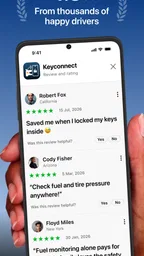
The app has a 4.6 average from around 86,000 ratings, and it has passed a million installs. Those figures suggest that many people have tried it, but they cannot tell you whether your exact vehicle, phone, or parking environment will be a good match. I use that kind of popularity as a reason to take the app seriously, not as a substitute for a practical test.
What remains useful after the novelty
Remote access earns its place through repetition. If you regularly forget to lock the car, share access routines with family, or want to handle a lock check without walking back to the vehicle, a phone-based control can remain useful after the initial excitement wears off. The key question is whether those situations happen often enough to justify keeping the app in your everyday routine.
A good way to judge that is to notice when you reach for it over several weeks. Do you use it because it genuinely saves a trip, or do you open it only to demonstrate the feature? If the answer is mostly the latter, the app may be interesting without being essential. If it removes a recurring annoyance, its value is clearer even if you use it only for a narrow task.
One practical tip is to decide in advance which jobs belong to the app and which still belong to your regular key. For example, you might use the phone for a quick lock check but retain the physical key for driving and as a fallback. Separating those roles avoids the awkward assumption that a digital control must replace every part of the established routine.
That fallback matters most when your phone is unavailable, its battery is low, or you have no convenient connection. I would not make a phone-only plan unless I had tested the relevant behavior and had a backup I could reach. This is not a criticism unique to KeyConnect; it is the trade-off built into relying on a phone for access to a physical vehicle.
Compared with a traditional key, the app can save a small amount of effort and make remote control more convenient, but it adds a digital layer that needs to work. Compared with a car maker’s own companion app, the important question is not which one sounds more modern; it is which option supports your vehicle reliably and gives you the controls you actually need. If the manufacturer’s app already handles your use case well, switching may offer little lasting benefit.
Maintenance is part of the convenience
KeyConnect is not the sort of app I would install and then forget about entirely. Its current version is 2.6.2, and it requires Android 9 or later. Keeping the app and phone software in a workable state is part of maintaining a digital-key routine. If you change phones, update your operating system, or adjust how you use your car, it is worth checking that access still works before depending on it away from home.
The maintenance burden is modest when everything stays compatible, but it can feel disproportionate if you use the app only once in a while. A rarely used access tool is easy to forget, and then the first time you need it becomes a test under pressure. I would make a brief periodic check part of a natural routine, such as when you are already beside the car, rather than waiting for an urgent moment.
There is also a distinction between the app being installed and the whole setup being dependable. Your phone, the car, and the connection all play a part in the experience. If one link is unreliable in your normal parking location, repeated retries can erase the time saved by remote control. Testing from your usual home or workplace parking spot is therefore more useful than testing only in ideal conditions.
The app is rated for Everyone, and its free entry point makes trying it relatively straightforward. Still, “free” does not mean every possible use is included: in-app purchases are available, and the listed price range reaches $99.99 per item. I would read each purchase description carefully and avoid assuming that a paid item is necessary until you know what the base app can already do with your car.
Where routine can turn into fatigue
The main source of frustration is the gap between the promise of instant access and the reality of a setup that may depend on compatibility and connectivity. If you have to repeat an action, check whether it went through, or switch back to the physical key often, the phone stops feeling like a shortcut. In that situation, the conventional key may be the calmer option, even if it lacks remote convenience.
A second risk is paying for convenience before you know how frequently you will use it. The purchase range is broad, so I would not treat an upgrade as an automatic part of getting started. First identify a specific recurring problem—such as needing remote lock control—then confirm that the app addresses it in your vehicle. If the benefit is vague, waiting is the more sensible choice.
People who rarely drive, share a car in a way that already depends on handing over a physical key, or prefer not to rely on a phone for essential access may not get enough value. The same applies if your vehicle is not supported or if your routine involves places where the app’s connection is consistently poor. In those cases, a standard key or a well-matched manufacturer app is likely to be a better fit.
It is also worth being honest about habit. Many of us already have a reliable sequence: park, lock, check the handle, and walk away. A digital alternative can improve that routine, but it can also add another screen and another decision. I would keep using it only if it removes a step or solves a real problem, not simply because the technology is new.
Who should keep it installed
I would recommend giving KeyConnect a careful trial if your car is compatible, you value remote locking and unlocking, and you are comfortable keeping a physical backup. It is especially promising for someone who can name a regular moment when walking back to the car or checking its lock is a nuisance. That specific use case is a better reason to install it than a general interest in digital keys.
I would be more cautious if you expect it to replace the car’s original key immediately, need a guaranteed experience in every situation, or are considering a costly purchase before testing the free version. Drivers who already have a dependable solution from their vehicle maker should compare the day-to-day workflow rather than assume a separate app will be better.
KeyConnect has a clear, practical purpose, and its sizable audience and strong average rating make it a credible option to investigate. But its lasting value comes down to one personal question: does it make your regular car routine noticeably easier without creating new checks and workarounds? Try it alongside your usual key, test it in your real parking conditions, and let repeated use—not first-week excitement—decide whether it deserves a permanent place on your phone.
My long-term verdict is cautiously positive. KeyConnect Digital Car Key can earn its space when remote access is something you genuinely use and your car works smoothly with it. If it becomes a backup convenience that you rarely open, there is no need to force the habit. Keep it for the jobs it handles well, maintain a fallback, and spend only when a paid feature clearly earns its place in your routine.
What we like
- Lets you lock or unlock a compatible car using your phone.
- Can share digital keys with trusted people on supported vehicles.
- May work even when your phone battery is nearly empty.
- Avoids carrying a separate physical key for supported cars.
- Key access can be revoked without collecting a physical key.
What could be better
- Requires a compatible vehicle with digital key support.
- Setup may require a working physical key and access to the car.
- Phone compatibility can vary by model and operating system.
- Some features may depend on the car brand or subscription plan.
- A dead or lost phone can make access difficult without a backup key.





