
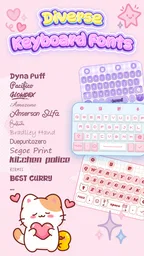
Keyboard Themes: Emoji Fonts review
 Analysis by Appsdrops
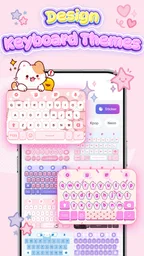
Keyboard Themes: Emoji Fonts makes sense if you want your typing screen to feel more personal without changing how you use your phone. My view is that it is best treated as a visual customization app, not as a reason to replace a keyboard that already serves you well. Its appeal is straightforward: choose a look that suits you, then bring that style into everyday messages. The trade-off is equally important: a themed keyboard earns its place only if it remains comfortable and dependable when you are typing quickly.
What the customization is really for
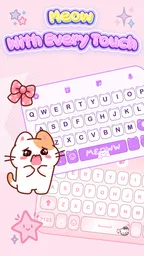
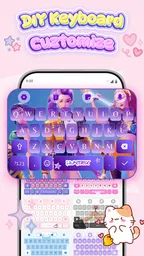
This is a free personalization app from FunGear inc, built around changing the appearance of a keyboard with themes, fonts, and emoji-related styling. That focus gives it a clear audience: people who notice their keyboard every time they text and would rather see something more expressive than the default layout. It is rated for Everyone, so its intended appeal is broad rather than limited to a niche group.
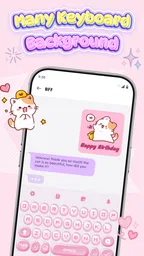
In practical terms, the value is not just having a pretty screen to look at once. A keyboard appears across many small moments—replying to a friend, searching for a place, writing a note, or entering a quick message—so a visual change can make a familiar routine feel more like your own. I would approach the app as a way to refresh that everyday interface, while keeping readability and typing comfort ahead of novelty.
The app’s audience is already substantial: it has over five million installs, with an average rating of 4.4 from around nineteen thousand ratings. Those figures suggest that the basic idea has broad appeal, but they do not answer the question that matters most to an individual user: whether a particular theme is easy to read and comfortable on their own device. I would judge it by trying a style during ordinary typing, not by choosing the most striking preview.
A useful way to test a theme
When I try a keyboard customization app, I do not judge it from the selection screen alone. I use the chosen look for a few different tasks: a short chat, a longer message, and a search query where I need to move quickly. That simple test catches a common mismatch: a design can look attractive in a preview but make keys harder to distinguish at a glance.
For this app, I would pay particular attention to contrast and visual clutter. Decorative fonts can be fun in casual messages, but legibility matters more when entering an address, a password, or a work note. If you find yourself slowing down to identify keys, the theme is taking more from the experience than it adds. Choosing a calmer style for regular use and reserving a more playful look for occasional changes is a sensible compromise.
There is also a practical distinction between personalizing a keyboard and changing the way you communicate. A font or emoji treatment may give messages a more distinctive tone, but the recipient’s device and app can affect how that styling appears. I would not rely on a decorative look to convey important information; use it as flavor, not as a substitute for clear wording.
Where it fits among keyboard alternatives
Compared with leaving the phone’s default keyboard untouched, Keyboard Themes: Emoji Fonts is for users who want appearance to be part of the experience. Compared with a general-purpose keyboard chosen primarily for typing tools, this app’s strongest reason to install it is its visual emphasis. That makes the choice fairly easy: if your priority is a keyboard that looks more like your taste, a dedicated personalization app is a natural place to start; if you mainly want productivity features or a familiar, minimal layout, your existing keyboard may be the better fit.
I would also think about how often you change your mind. Someone who enjoys refreshing a phone’s look may appreciate having a purpose-built way to explore keyboard styles. Someone who sets a theme once and never revisits it may get less lasting value. In that case, a built-in appearance option on a keyboard they already use could be simpler than adding another app just for visual variety.
One useful workflow is to choose a theme based on where you type most, rather than choosing a different look for every mood. If most of your typing happens in dim rooms, a high-contrast design may be easier to use than a pale or heavily decorative one. If you mostly send casual messages, a more expressive style may feel right. This is a small decision, but it helps avoid switching styles repeatedly because the first choice looked better than it worked.
The friction I would keep in mind
A keyboard is a particularly sensitive part of a phone: it handles nearly everything you type, so changing its appearance can introduce a little adjustment even when the change is only visual. It may take time to get used to key shapes or text styling, and a design that looks charming can become tiring during longer sessions. I would give a new theme a real trial before deciding it is a keeper.
There is a further trade-off with any keyboard-focused customization: comfort and confidence matter more than decoration. Before making a themed keyboard your daily choice, consider what you type and where. If you regularly enter confidential or work-related text, read the keyboard’s setup and privacy information carefully and make a deliberate choice about whether you want to use it for that typing. A visual makeover is not worth uncertainty about a tool that sees so much of your written input.
Cost is another point to consider. The app is free to install, while optional in-app purchases range from $4.99 to $29.99 per item. I would explore the free experience first and decide whether the available customization is enough before spending anything. The existence of paid items does not mean you need them to decide whether the app’s central idea suits you.
The version listed is 1.4.0, and the minimum operating system requirement is version 9. If your device meets that requirement, the remaining question is less about raw capability and more about your tolerance for changing a familiar keyboard. I would avoid making a permanent switch on the strength of one attractive theme; test whether it stays comfortable in your normal messaging and search habits.
Who is most likely to enjoy it
I would recommend Keyboard Themes: Emoji Fonts to someone who enjoys personalizing their phone beyond its wallpaper and icons, especially if the standard keyboard feels bland. It is also a reasonable option for people who send a lot of casual messages and want their typing interface to feel more playful. The app’s personalization-first focus makes it easier to understand than a keyboard that tries to be a toolbox for every possible task.
It is less suited to someone who values an unchanged, familiar keyboard above all else, or who wants a new keyboard mainly for advanced typing assistance rather than appearance. It may also be a poor match if decorative styling makes text harder for you to read. In those cases, staying with the default keyboard—or choosing a keyboard you already trust and adjusting its built-in appearance settings—may be more comfortable.
A realistic everyday scenario is a person who sends short messages throughout the day and wants a keyboard that feels cheerful without turning every sentence into a visual performance. I would suggest picking one readable theme, using it for a full day of ordinary typing, and checking whether it still feels pleasant when you are in a hurry. If it does, the customization is doing its job. If you keep noticing the design because it distracts you, switch back rather than forcing yourself to adapt.
My verdict
My overall impression is positive, with a clear caveat: this app is valuable when its visual changes improve the small, repeated experience of typing, not simply when a theme looks impressive in isolation. Its free entry point makes it approachable, and the strong install and rating figures show that keyboard personalization has wide appeal. Still, neither popularity nor a polished-looking theme can replace a personal test of readability and comfort.
I would start with a restrained style, check how it looks in both short replies and longer text, and keep the option to return to a familiar keyboard if the change becomes distracting. That approach lets you enjoy the app’s personality without sacrificing the practical part of typing. For people who want their keyboard to reflect their taste, it is worth a look; for people who want their keyboard to disappear into the background, it is probably not necessary.
What we like
- Offers a range of themes to personalize the keyboard.
- Emoji access makes expressive messages easy to create.
- Font styles can give messages a more distinctive look.
- A familiar keyboard layout helps keep typing straightforward.
- Theme previews can help you choose a style before applying it.
What could be better
- Some themes or features may require in-app purchases.
- Custom fonts may not display consistently across apps.
- A themed keyboard may take time to set up and customize.
- Third-party keyboards can request access to sensitive typing data.
- Extra visual effects may distract from fast typing.





