
Kasa Smart review
 Analysis by Appsdrops
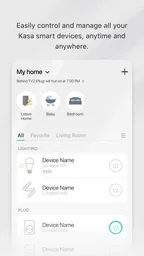
I judge a smart-home app less by how polished its screens look than by what happens when I need a light or plug to respond right now. Kasa Smart is TP-LINK SYSTEMS INC.’s lifestyle app for managing a TP-Link smart home, and its appeal is practical: it gives compatible devices one place to control them rather than making each gadget feel like a separate project. My overall impression is that it is most useful when you already own, or plan to build around, compatible Kasa hardware. It is not a universal remote for every smart-home brand.
Everyday control, without expecting magic
The first thing I would set expectations around is speed. This is a control app, not a tool that can make a slow network or an unresponsive device react instantly. When the connection and hardware are behaving, the basic idea is straightforward: open the app, choose the device, and make the change. I would not treat a momentary delay as proof that the app itself is broken; the phone, home network, cloud connection, and device can all affect the experience.
That distinction matters most when you are using a smart device for something immediate. If I want a lamp on before entering a dark room, a phone-based control is convenient when it works, but a physical switch or another local control can be a better fallback. I like smart-home apps most when they reduce routine effort, not when they become the only way to operate something essential.
For a quick check or a simple adjustment, the app’s value is less about flashy speed and more about having a clear place to manage the compatible equipment. If you are comparing it with the separate apps that often accompany individual connected gadgets, Kasa’s advantage is having its own devices gathered together. The trade-off is equally clear: that convenience depends on staying within the supported hardware family.
Where it fits in a busy day
A realistic use is getting home with groceries and switching on a connected light or plug from the phone before you settle in. Another is checking a device that you meant to turn off after leaving a room. These are modest jobs, but they are the sort of repeated moments where centralized control can make a smart-home setup feel worthwhile.
I would also think about who else needs to use the devices. If several people in a household expect to control the same equipment, test the arrangement with the people who will actually rely on it rather than assuming an app-based setup will be self-explanatory. A smart-home system is only convenient if the people around it can use it comfortably and there is a sensible alternative when a phone is unavailable.
Busy moments and the limits of the phone
The app is more demanding in practice when you are managing several devices, switching between rooms, or trying to diagnose why something did not respond. That is when a neat list of controls matters more than a single successful tap. I recommend naming devices in a way that makes sense to everyone in the home. “Hall lamp” is easier to identify at a glance than a vague label, especially when you are moving quickly or helping someone else troubleshoot.
A useful habit is to test an important device from the place and under the conditions where you expect to use it. A control that works while you are standing beside your router may not feel equally dependable from another floor or away from home. This is not a special trick so much as a realistic check: it helps separate an app-navigation problem from a connection or device problem before you are counting on it.
When a command seems to stall, I would avoid repeatedly tapping it without checking the result. A delayed response can make it hard to tell whether the first instruction went through, and repeated attempts may leave you unsure of the device’s final state. Pause, check the device itself if practical, and then try again. That small workflow is more useful than assuming every slow response is an app failure.
Reliability, recovery, and sensible fallbacks
My standard for reliability is not that a connected device never hiccups; it is that the setup remains understandable when one does. With a phone-controlled home, a response problem could come from the device, Wi-Fi, the phone’s connection, or the service path between them. The app is the visible part of that chain, so it is easy to blame it first, but a little troubleshooting discipline saves time.
If a device stops responding, first check whether the phone itself has a working connection and whether the device is powered. Then try a simple control again and give the result a moment to become clear. If only one device is affected, I would focus on that device and its connection rather than immediately rebuilding the whole setup. If several devices fail together, checking the home network is a more sensible first step. These are practical troubleshooting principles, not a promise that the app can repair every interruption by itself.
For any device that affects safety, access, or a routine you cannot afford to interrupt, keep a non-app fallback. That might be a physical control or simply a household agreement about what to do if the phone or network is unavailable. I would not recommend relying on a lifestyle app as the sole way to operate something important.
Hardware, phone, and setup considerations
The most important constraint is compatibility. Kasa Smart is aimed at TP-Link’s smart-home devices, so someone whose home is already built around another manufacturer’s products should not assume this app will bring everything together. If you are starting from scratch, choose the hardware first and confirm that it suits the rooms and routines you care about; the app cannot compensate for buying a device that does not meet your needs.
On the software side, the current version is 3.4.703, and the stated minimum operating-system requirement is 7.0. That gives prospective users a concrete compatibility check before installing. The app itself is free, though using it as intended involves compatible hardware, so I would judge the overall value by the devices you actually want rather than by the download alone.
I would not assume that a larger number of devices automatically means a better experience. More equipment can make names, locations, and troubleshooting more important, while a small setup may be easier to understand at a glance. Start with the devices that solve a real daily annoyance, learn how they behave in your home, and expand only if the app-and-hardware combination is genuinely helping.
What the adoption figures tell me—and what they do not
The app has a 4.7 average rating from around 144,000 ratings, with more than 38,000 written reviews and over 5 million installs. Those figures suggest that many people have tried it and that user feedback is substantial, but they do not guarantee that your particular phone, network, or devices will behave identically. I would treat the broad reception as reassuring context, then make the decision based on your hardware and expectations.
It is free, rated for Everyone, and was released on November 7, 2015. Those details make it approachable for a general household, but age suitability is not the same as suitability for every user: anyone who finds phone-based setup or troubleshooting frustrating may prefer simpler controls or a different arrangement. The best fit is someone who wants to manage compatible devices from a phone and is comfortable with the ordinary dependencies of a connected home.
Who should choose it, and who should look elsewhere
I would recommend Kasa Smart to someone who owns TP-Link smart-home equipment or is deliberately choosing that ecosystem and wants a single app for its devices. It is also a reasonable option for people who value remote, phone-based convenience for everyday tasks and are willing to keep their device names and setup organized.
I would look elsewhere if your main goal is to control devices from several unrelated brands in one place, or if you need a system that never depends on a phone or network connection. A platform built around the hardware you already own may be less frustrating than trying to make a new app serve as a universal solution. Likewise, if you only need one simple control and prefer a wall switch, the app may add more setup than value.
My performance verdict
In my view, the strongest case for this app is focused rather than broad: it offers a central phone-based way to manage compatible TP-Link smart-home devices. I would expect ordinary controls to feel convenient when the device and connection are in good shape, while treating delays as something to diagnose rather than as a guaranteed app defect. The practical limits are ecosystem compatibility and the need for a fallback when connectivity or phone access is not available.
TP-LINK SYSTEMS INC. has been offering this free lifestyle app since 2015, and its large audience makes it an established choice, but popularity alone is not the reason I would install it. I would choose it when Kasa hardware is already part of my home, test the controls where I actually use them, and avoid depending on it for tasks that need an immediate, fail-safe response. With those expectations, it can be a useful everyday companion; without compatible devices or a tolerance for connected-home troubleshooting, another control method will likely suit you better.
What we like
- Control compatible devices remotely from the Kasa app.
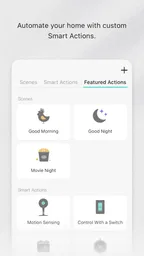
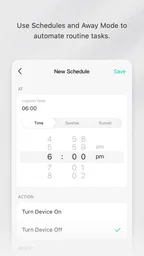
- Schedules and timers help automate everyday routines.
- Device sharing lets family members manage smart home products.
- Energy monitoring is available on select Kasa plugs.
- Many Kasa devices work with Alexa and Google Assistant.
What could be better
- Features vary depending on the Kasa device you own.
- Some functions require a stable 2.4 GHz Wi-Fi connection.
- Remote access depends on an internet connection.
- Energy reports are limited to compatible devices.
- Smart home integrations may require extra setup.





