

IP Camera Viewer review
 Analysis by Appsdrops
I like a camera viewer best when it helps me check a familiar feed without making me manage a whole security platform. IP Camera Viewer is aimed at that straightforward job: viewing an IP camera and playing back footage from a Wi-Fi camera or home CCTV setup. It is a free House & Home app from kapron-ap, and its appeal is practical rather than flashy. Whether it suits you depends less on the label “camera viewer” than on how your cameras are set up and how much control you want in one place.
What you get without paying
The basic choice is clear: the app is free to install, while optional in-app purchases range from $1.99 to $15.99 per item. That makes it reasonable to try before deciding whether any paid option is worthwhile. I would treat the free access as a chance to test the most important question first: can it show the camera or system you actually use?
That compatibility check matters more than a low starting price. A viewer can sound like a fit for any home camera, but IP cameras and CCTV systems differ in how they expose a live stream and recordings. Before relying on this app, I would try it with the camera in the room where I need it most, then check whether playback is useful as well as the live view. A working live image alone may not be enough if reviewing earlier footage is the main reason you want the app.
I also wouldn’t assume that an optional purchase is essential, or that paying for one will solve a camera-compatibility problem. The in-app purchase range tells you that paid items are available; it does not by itself say which item is useful for a particular setup. My advice is to test the core viewing experience first and consider a purchase only after you understand what it adds for your own use.
Value depends on the setup you already own
For someone who already has a Wi-Fi camera or home CCTV system, the potential value is convenience: one place on the phone to look at a camera and revisit footage. That can be more useful than buying additional equipment just to get a quick view, provided the existing system works with the viewer. For a person who has not chosen cameras yet, the app is not a substitute for comparing camera systems. I would pick hardware and its recording arrangements first, then check whether this viewer fits that choice.
The app has an average rating of 3.9 from around ten thousand ratings, with 169 written reviews. More than a million installs suggest that many people have tried it, but those figures cannot tell me whether it will connect to a specific camera in your home. I’d read user feedback with that distinction in mind: comments about a matching device or a similar CCTV setup are more relevant than a general reaction to the app.
It is rated for Everyone, and the current version is 11.1.7. It supports Android 5.0 and later. Those details make it accessible to a broad range of Android devices, though a supported operating system is only one part of the experience. The camera and its connection still need to cooperate with the app.
Where a viewer can save time
A useful way to judge this kind of app is to think beyond the first launch. If you want to check a camera while away from home, the key test is whether your normal setup gives you a dependable view in that situation. I would try it before a trip, not for the first time after leaving. Open the feed on the home network, then try the same routine from the place where you expect to check it. That simple rehearsal can reveal whether the app is genuinely convenient for your circumstances.
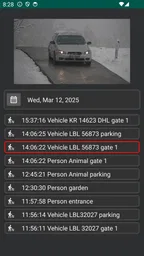
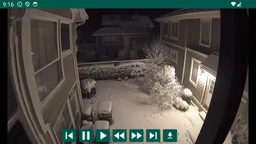
Playback deserves its own test. If a delivery is left near the door or you want to review what happened in a room, you need more than a live picture: you need to find the relevant footage without guesswork. I would test playback with a short, known event, note how I reach it, and see whether the result is clear enough to answer a real question. This is more useful than judging the app only by how quickly a live image appears.
There is also a trade-off between a focused viewer and a manufacturer’s own camera app. A dedicated camera app may be the better choice when your system relies on its own setup tools, notifications, device settings, or recording controls. A viewer like this is more appealing when your priority is simply to look at a feed and review footage. I would not replace a manufacturer’s app until I had confirmed that the everyday tasks I rely on still work.
Small checks that make the trial more useful
First, identify what you need most: a live check, playback, or both. Then test each one separately. A person who mainly wants to see whether a pet is in the room may be satisfied with a quick live view; someone who needs to understand when an event occurred should give playback much more weight. Separating those needs avoids mistaking a good live image for a complete surveillance workflow.
Second, try the app at the times and places that matter. A camera that works while you are standing beside the router has not yet proved useful from another room or while you are out. I would also repeat the check after closing and reopening the app. This is a practical reliability test, not a claim about a special feature: it helps you decide whether the viewer fits your real routine.
Third, keep your existing camera app available during the trial. Compare the same feed and the same playback task in both. If this viewer makes those tasks simpler, it may earn a place on your phone. If the original app offers controls you need and this one does not fit your system as well, there is little reason to switch just for the sake of using a separate viewer.
Trade-offs and situations where I’d pass
The biggest limitation is that the app’s usefulness depends on compatibility with the camera or CCTV arrangement you already have. The phrase “IP camera” covers a broad range of products, and a general-purpose viewer is not automatically a universal one. I would not buy a camera on the assumption that this app will support it unless you have checked that pairing through a practical test.
Another possible friction point is managing two apps. If you need the camera maker’s app for setup or other routine controls, adding a separate viewer can create one more place to check. That is worthwhile only if it makes viewing or playback noticeably easier. If you already have a reliable way to do both, this app may add little.
I would also skip it if you expect a complete home-security service rather than a way to view camera feeds and footage. A viewer is not automatically a replacement for the broader tools bundled with a camera system. If your priority is choosing hardware, configuring alerts, or managing a full security setup, compare those capabilities directly in the apps designed for your equipment instead of assuming this one covers them.
Who is most likely to get value
I can see this being a sensible trial for someone with an existing Wi-Fi camera or CCTV system who wants a phone-based way to check live video and revisit recordings. It is especially worth exploring if the current routine involves opening an app only to see a feed, and you want to find out whether a dedicated viewer can make that task feel more direct.
Consider an ordinary evening: you hear a noise near the entrance while settling in for the night. If your camera is already configured and the viewer can show its feed, you can check the area without going to the door. If you later need to review what happened, playback is the second part of the value. The scenario sounds simple, but it captures the real test: the app must work with your particular camera and make both steps useful.
People who should be more cautious include anyone selecting a new camera system, anyone who depends on features beyond viewing and playback, and anyone whose current manufacturer app already handles the job comfortably. The app is not inherently better just because it is a separate viewer. Its value comes from fit: if it makes your existing camera easier to check, it has a purpose; if not, another app may be the more practical choice.
My verdict: test the camera before paying
My recommendation is to try IP Camera Viewer with your actual setup before making it part of your routine. The free starting point lowers the barrier to a compatibility test, while optional purchases give you a reason to be deliberate rather than paying first and hoping the app solves a mismatch. I would only spend on an item after confirming that the basic viewing experience works and understanding what the paid option contributes.
Overall, this is a focused possibility for Android users who want to view a Wi-Fi camera or home CCTV footage from their phone. It is not an automatic upgrade over the app supplied with a camera, and it is not the right first choice for people who need a full security-management package. If live viewing and playback are the jobs you care about, test both in your everyday circumstances. If they work smoothly, the free access may deliver worthwhile convenience; if they do not, keep using the camera’s usual app or look for an option built around your specific system.
What we like
- Supports multiple IP camera brands and models.
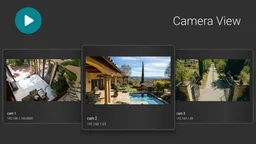
- Offers a grid view for monitoring several cameras.
- Can connect to cameras on a local network.
- Provides adjustable video resolution settings.
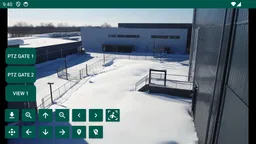
- Includes pan and tilt controls for compatible cameras.
What could be better
- Camera setup may require technical network knowledge.
- Remote access can require router configuration.
- Some features depend on camera compatibility.
- Video quality depends on the camera and network.
- The interface may feel dated compared with newer apps.





