


InstaVision: Smart & Safe Home review
 Analysis by Appsdrops
I judge a home-monitoring app by what it helps me do when I’m away, not by how impressive its feature list sounds. InstaVision: Smart & Safe Home puts its emphasis on seeing and hearing what is happening at home, with event detection intended to draw attention to activity. That makes it worth considering if you want a phone-based way to check in, though it is not a substitute for choosing suitable camera hardware or planning how you will respond to alerts.
Why event detection matters
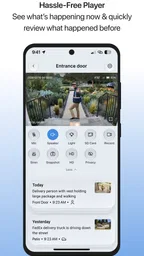
The most useful idea here is the combination of video, two-way audio, and event detection. In a home-monitoring routine, those functions address different needs: video lets you look, audio can help you communicate, and event notices can prompt you to check at a relevant moment rather than opening a live view repeatedly.
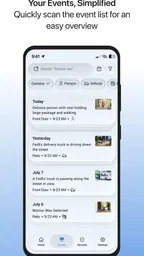
That last part is the capability I would focus on when deciding whether the app fits. A camera that simply streams video is most useful when I already know I want to watch. Event-based monitoring can be more practical when I am busy and want a cue that something may need attention. It does not mean every detected event is important, however. A notification is a reason to check, not proof that something is wrong.
The app is in the House & Home category and is developed by InstaVision Inc. Its focus is home security, but the same kind of check-in can be useful for ordinary household situations: confirming that a room is as expected, or seeing whether a person at home needs a quick word. I would treat those as monitoring use cases, rather than assume the app replaces a dedicated alarm service.
The two-way audio is a meaningful companion to the video. If I see something that calls for a simple response, being able to speak through the setup may be more convenient than switching to a separate call. The practical value depends on the camera and the environment as well as the app: a camera placed too far away, or in a noisy room, may make a spoken exchange less useful. Placement is therefore part of getting value from the feature.
What checking in can feel like
In day-to-day use, I would approach the app as a quick decision tool. An event notice arrives, I open the video view, and I decide whether the activity needs a response. If it does, I can try the audio function; if it does not, I can return to what I was doing. That is a more sensible workflow than treating every notification as an emergency.
There is also a useful habit to build before relying on alerts: test the camera’s view and sound in the actual room where it will be used. Check what appears in the frame from the phone, and try speaking from the places where you are likely to be. This simple setup check can reveal whether a doorway is out of view or a voice is hard to hear. It helps distinguish an app limitation from a placement problem.
I would also think carefully about where a camera points. A view that captures the area you genuinely need to monitor is more useful than a broad angle that includes private spaces unnecessarily. This is especially worth considering in shared homes. Before treating the app as part of a household routine, agree on where monitoring is appropriate and who should have access to the view.
The app’s store summary describes HD video, although the experience a person gets will still depend on the camera and network conditions. A sharp image can help when checking a scene, but video quality alone does not guarantee that a moment will be easy to interpret. Lighting, distance, and camera position all affect what is visible. I would not make a security decision based only on the promise of a clear picture; I would first check the view during the conditions when I expect to use it.
A realistic reason to use it
Picture leaving home while a family member is in another room and wanting a discreet way to check whether everything is all right. An event notification can give you a prompt, video can help you understand the situation, and two-way audio can let you ask a brief question. In that situation, the app’s value is not constant surveillance; it is reducing the number of steps between noticing a possible need and checking for yourself.
The same flow can suit someone checking on a pet while away, provided the camera is positioned to show the relevant area and the person understands that a notification may call for interpretation. A pet moving through the frame might be routine rather than a reason to intervene. I would use event detection as a filter for attention, not as a reliable judge of intent.
For a household with several people, the practical question is who will respond when an event appears. If everyone assumes someone else is checking, alerts may not lead to action. A simple agreement—who watches during the day, and what kinds of events merit a response—can make monitoring less distracting. That is a small workflow improvement, but it matters more than constantly checking the app without a plan.
Where the trade-offs show up
Event notifications can reduce the need to watch continuously, but they can also interrupt you. If an alert arrives during work or at an inconvenient time, you still have to decide whether to open the app. I would be cautious about enabling a routine in which every notice feels urgent. Monitoring is most helpful when the household has a clear idea of what deserves attention and when a quick look is enough.
There is a related trade-off between convenience and confidence. A remote view can reassure you, but it is not the same as being physically present, and a camera can only show what it sees. If the scene is obscured or the relevant area is outside the frame, the app cannot answer the question you had in mind. For a higher-stakes security need, I would compare this kind of camera-based approach with a dedicated alarm setup or professional monitoring rather than rely on a phone app alone.
Two-way audio is useful for a short check-in, but I would not assume it is ideal for a long conversation or a sensitive discussion. The camera’s location and the room’s acoustics can make speaking awkward, and a person at home may not want to be addressed through a camera. For ordinary household coordination, a phone call or message may be more comfortable. The audio feature is best thought of as a quick, situational tool.
There is also a difference between monitoring a space and managing a home. InstaVision’s described focus is security-oriented viewing and event detection; I would not choose it expecting a broad smart-home control center. If your main goal is to automate lights, manage appliances, or coordinate many kinds of connected devices, a platform built around those tasks may be a better match. The app makes more sense when checking video and responding to activity are the central jobs.
Before making it part of a routine, I would test the complete chain: whether the camera shows the area you care about, whether an event brings your attention at the right time, and whether the audio is useful from your phone. That test is more informative than judging the app from a single glance at the live view. It also helps set realistic expectations about what the setup can and cannot tell you.
How it compares with common alternatives
Compared with a basic camera viewer, the appeal here is the event-led approach paired with two-way audio: instead of opening a feed just to see whether anything has happened, you can use an alert as a cue to check. Compared with a dedicated alarm system, however, a camera-focused app is a different kind of tool. It can help you observe and communicate, but I would not treat observation as equivalent to a monitored alarm response.
Compared with occasional phone calls to someone at home, the app can give you visual context before deciding whether to speak. That can be helpful when a quick look answers the question on its own. On the other hand, if your household mainly needs conversation rather than monitoring, calling directly is simpler and less dependent on camera placement. The better choice depends on whether the problem is “I need to see what is happening” or “I need to talk to someone.”
InstaVision is free, and its content rating is Everyone, which makes it easy to consider for a general household audience. It has a 4.5 average from around 10,000 ratings, with roughly 1,300 written reviews and over 100,000 installs. Those figures suggest that it has found an audience, but they do not tell me whether it suits a particular home; the camera arrangement and the need for event-based check-ins matter more to that decision.
Who is likely to get the most from it
I would recommend giving it a look if you already have a compatible way to view the area you care about and want a more active check-in routine than opening a feed at random. It is especially plausible for someone who values a quick visual check and occasional spoken communication more than a large suite of home-automation controls.
I would skip it if you want a guaranteed response to an emergency, need broad smart-home automation, or are uncomfortable with cameras in the spaces you would need to monitor. I would also hesitate if alerts are likely to create more stress than reassurance. In those cases, a different approach—such as a dedicated alarm, direct calls, or simply not monitoring that space—may fit the real need better.
The app was released on March 12, 2024, and its current version is 2026.11.04.1955; it requires Android 10 or later. Those details are useful when checking whether an Android phone can run it, but I would still test the actual camera-to-phone workflow before depending on it. A successful install is only the starting point: good placement, a sensible alert routine, and agreement about privacy are what make home monitoring feel useful rather than intrusive.
My overall view is that InstaVision: Smart & Safe Home is most convincing when event detection leads to a quick, informed check, with video and audio available for follow-up. Its strongest practical role is helping you decide whether an event needs attention, not replacing every other form of home security or communication. If that is the specific gap you want to fill, it is a reasonable free app to try; if you need a guaranteed alarm response or a full smart-home system, I would choose a tool designed for that instead.
What we like
- Live camera feeds make it easy to check your home remotely.
- Motion alerts can help you respond quickly to unexpected activity.
- A straightforward interface is accessible to first-time users.
- Remote access is useful when you are away from home.
- Compatible smart devices can be managed from one app.
What could be better
- Some features may require compatible cameras or other hardware.
- A stable internet connection is needed for remote monitoring.
- Frequent motion alerts can become distracting.
- Video streaming may use significant mobile data.
- Privacy depends on the app's data handling and account security.





