
Hubspace review
 Analysis by Appsdrops
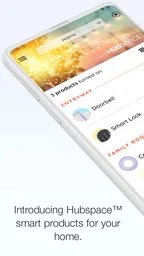
When I want to adjust something at home, I don’t want to hunt through several controls just to make one simple change. Hubspace is aimed at bringing compatible smart-home devices into one app, so the everyday job is less about managing technology and more about getting the room to feel right. Made by Afero, it sits in the House & Home category and is free to use. My overall impression is that it makes the most sense for someone building a home around devices that work with Hubspace, rather than someone expecting one app to control every smart product they already own.
From a small home annoyance to a useful routine
A realistic starting point is coming home with your hands full and realizing the lights are still off, or settling in for the evening and wanting to change the lighting without getting up. With a compatible device set up, the value of a home-control app is straightforward: it gives you a place to make the adjustment instead of relying only on a switch or a separate device control. Hubspace’s appeal is that this kind of task can become part of one home-management workflow.
The important qualifier is “compatible.” Smart-home apps are not automatically universal, and Hubspace is most useful when the devices you intend to control belong in its ecosystem. Before choosing it as the center of your setup, check that the specific products you plan to use are supported. If your household already relies on devices from several unrelated ecosystems, you may find that a broader platform is a better fit, even if Hubspace works well for the products it does cover.
I would approach the first setup as a practical project, not as a promise that the whole house will become effortless at once. Start with one device that solves a repeat annoyance. That gives you a chance to learn how Hubspace fits your home before you depend on it for a larger routine. It also makes troubleshooting less confusing: if something does not behave as expected, there is a smaller setup to inspect.
Getting from the app to a working device
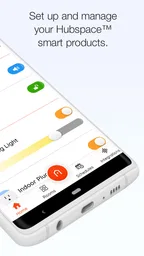
The useful test is not simply whether an app opens, but whether it helps you get from “I have a device” to “I can control it when I need it.” I’d begin by installing Hubspace, opening it, and following the in-app setup for a compatible product. Keep the product and its instructions nearby, and take the time to identify which device you are adding. In a home with similar fixtures or multiple rooms, clear names will matter more once you are making quick adjustments.
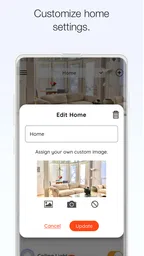
One small but valuable habit is to organize devices around how you use the home, not just around product type. A name that tells you where something is can prevent a wrong tap when you are tired or in a hurry. If you add more than one device, check each control as you go rather than setting everything up first and discovering later that you cannot tell which item is which. That is a simple way to make the app more dependable in daily use.
Hubspace is at version 2.7.0, and it requires Android 10 or later on Android. That makes the operating-system requirement worth checking before you invest time in setup, especially if you are planning to use an older phone or tablet as a household control device. The app is rated for Everyone, which is appropriate for a home utility that may be used by different members of a household.
Everyday control, without making it a project
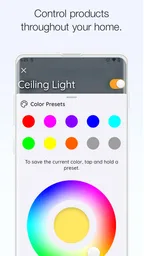
Once a device is ready, the best workflow is the one you can repeat without thinking. I’d use the app for changes that are useful but not urgent: adjusting a room before guests arrive, switching a device as part of an evening routine, or checking a setting while moving between rooms. These are modest jobs, but they are exactly where a central control app can save the small bits of effort that otherwise pile up.
For a household, the handoff between one person’s setup and another person’s daily use is especially important. The person who installs a device may know what an unclear label means; a partner or housemate may not. Use names that make sense to everyone, and show the other regular users how to reach the controls they will actually need. A smart-home setup is only convenient if the people sharing the home can operate it without asking the installer to translate.
I also recommend keeping a physical control in mind where the product provides one. An app is handy when your phone is with you, but it should not become the only way anyone can manage a basic household task if the device has an ordinary control available. Treat Hubspace as a convenient route, not necessarily as the sole route. That balance helps avoid frustration when a phone is charging, unavailable, or being used by someone else.
What the handoffs feel like in a shared home
Smart-home routines often cross several boundaries: one person adds the device, another uses it, and sometimes a guest needs to understand the room without learning the whole app. Hubspace works best when the handoff is kept simple. Give the device a clear identity, explain the normal control once, and avoid building a setup that only makes sense to the person who created it.
This is also where I would be cautious about adding devices just because they can be added. Each new control brings another item to identify and maintain. If a device is rarely used, putting it into an app may not make life easier. Start with the controls that solve a genuine recurring problem, then decide whether the next addition earns its place. That keeps the home screen and the household routine easier to understand.
For a renter or someone who moves often, the decision is slightly different. A small setup focused on portable or easy-to-reconfigure products may be worthwhile, but a system that depends on a particular home arrangement may take more effort to recreate after a move. I would choose Hubspace in that situation only if the compatible devices you want are a good match for the next home as well as the current one.
The result: convenience with a clear boundary
At its best, Hubspace turns a few repeated home adjustments into simple phone actions. The payoff is not dramatic automation for its own sake; it is having a direct way to manage compatible products without treating every adjustment as a separate task. If you already own supported devices, or you are choosing products specifically to use together in this ecosystem, that focus can be an advantage over juggling several manufacturer apps.
Its scale suggests that many people have found it useful: Hubspace has over a million installs, with a 4.7 average from around 59,000 ratings. Those figures are reassuring context, but they do not guarantee that every device combination will suit your home. I would give more weight to compatibility and to whether the app handles the particular routine you care about than to popularity alone.
Against the usual alternatives, the choice comes down to breadth versus fit. A general smart-home platform may be preferable if your devices come from many brands and you want one place to coordinate them. A manufacturer’s own app may be more direct if you only use that brand’s products. Hubspace is a sensible middle ground when the compatible products you want already align with it. It is not a reason by itself to replace working devices or rebuild a setup that already feels simple.
Where the flow can break
The first possible snag is expecting every smart device in the home to appear in one place. If a product is outside the Hubspace ecosystem, the app cannot solve that mismatch just by being installed. Check the compatibility of each device before buying, and avoid assuming that similar product types will necessarily share the same control system. This is the main practical limitation to understand before making Hubspace your default.
The next friction point is setup and naming. If you rush through adding devices, the controls can become hard to distinguish later. That is less a technical failure than a household-organization problem, but it still affects whether the app feels convenient. Take a moment to label each device by its room and purpose, then test the control while you are physically near it. A quick check at setup is easier than guessing later from across the house.
There is also a trade-off between centralization and dependence on a phone. If the person who set everything up is the only one who understands the app, the home has not really become easier for everyone. Share the basic workflow, retain familiar physical controls when available, and keep the number of app-managed devices proportional to the benefit they provide. These habits make the system more resilient without requiring you to turn home management into a hobby.
Who I would recommend it to
I would recommend Hubspace to someone who wants a straightforward way to manage compatible smart-home products and is willing to keep the setup within that ecosystem. It is especially appealing if you have a few recurring adjustments that are easier to make from your phone than by walking to a switch or finding an individual product control. The app is free, so trying it with an already compatible device is a low-commitment way to see whether its workflow suits your home.
I would skip it as the main control center if your priority is bringing a broad mixture of unrelated brands together, or if you do not want to check product compatibility before buying. In that case, a platform chosen specifically for cross-brand support may be a better starting point. I would also avoid relying on any app as the only way to operate essential household devices; a phone-based control is convenient, but convenience should not make a shared home harder to use.
Hubspace was released on December 3, 2020, and its current Android version is 2.7.0. The long-running presence and substantial user base make it a familiar option in the smart-home space, but the deciding question remains personal: do the products you want to control belong here, and will the people at home understand the setup? If the answer is yes, I think Hubspace can make everyday adjustments feel more orderly. If not, a different ecosystem will save you more effort than trying to force this one to cover everything.
What we like
- Control compatible smart devices from one mobile app.
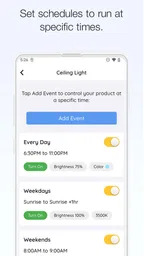
- Create schedules to automate lights and other devices.
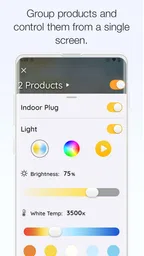
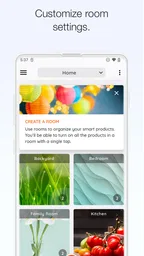
- Group devices by room for easier control.
- Set scenes to adjust several devices at once.
- Manage devices remotely when away from home.
What could be better
- Works only with compatible Hubspace devices.
- Some features depend on a stable Wi-Fi connection.
- Device setup may take several steps.
- The app offers limited value without smart home hardware.
- Device compatibility can vary by product and region.





