
HotPads Rent Apartments review
 Analysis by Appsdrops
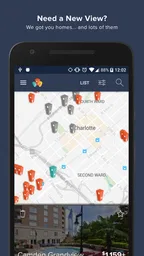
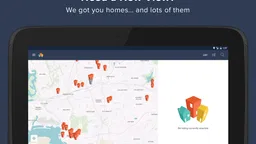
When I’m looking for a rental, I want to understand where a place sits in the neighborhood before I get attached to its photos. HotPads is built around that instinct: it makes the map the starting point for exploring apartments and homes, so I can judge location and listings together rather than bouncing between a map and a separate results page. In my view, that focus makes it especially useful early in a search, when I’m still figuring out which areas fit my commute, budget, and daily routine.
HotPads is a free House & Home app from HotPads, which is owned by ZillowGroup. It has a 4.6 average from around 45,000 ratings, and more than a million installs. Those numbers suggest it has found a broad audience, but what matters more to me is whether its map-led approach suits the way you search. It is rated for Everyone, and version 7.5.0 requires Android 10 or later.
Why the map changes the first pass
A conventional rental search can make it easy to compare rents while overlooking the practical geography around each home. With HotPads, the map gives location a prominent role from the outset. I can scan an area, notice which pockets have listings, and spot when two homes with similar appeal are actually in quite different parts of town. That perspective is valuable before I spend time weighing details that may not matter once I see the address.
The app is most helpful when your search area is flexible. If you are deciding between a shorter commute and more space, or trying to stay close to friends, transit, or familiar streets, exploring listings spatially can make trade-offs clearer. I would use it to identify promising clusters first, then compare individual homes with a more critical eye. A map is not a substitute for checking a route or visiting a neighborhood, but it can help you avoid treating every listing in a broad search radius as equally convenient.
There is a useful distinction between finding possibilities and verifying them. A pin can show that a rental is in a promising location; it cannot tell you whether the walk feels comfortable at night, whether the street is noisy, or how a commute changes during busy hours. I treat the map as a planning aid, not a complete picture of daily life. That mindset keeps the app’s strongest feature from turning into false confidence.
Search with a real routine in mind
One practical way to use the map is to begin with a fixed point in your day: your workplace, campus, or the person you regularly care for. Then explore the surrounding areas rather than choosing a radius just because it looks tidy on screen. Two homes that seem close on a map may work very differently once you account for the route you actually take. HotPads helps you narrow the geography, while a separate map or local visit can answer the route and street-level questions.
For a realistic example, imagine I need to move before a new work schedule begins. I would first look for rentals near the places I expect to travel most, then compare neighborhoods that keep those trips manageable. If one pocket has several interesting options and another has only a single tempting listing, I can decide whether the lone option is worth investigating or whether the broader cluster gives me more flexibility. That is a more useful first pass than judging homes only by their photos or rent.
A second helpful workflow is to search in stages. I would avoid trying to settle every preference at once. First I’d identify areas that work geographically; next I’d compare the available homes; finally, I’d verify the details that affect whether I can actually apply or move in. This reduces the chance of rejecting a suitable neighborhood because one listing is disappointing, or getting attached to a home before noticing that its location is inconvenient.
Where speed matters most
Rental searches often happen in short bursts: a few minutes on a commute, a quick check after work, or a longer session when a new listing catches your attention. In those moments, a map-centered layout can make browsing feel direct because location is visible while you assess options. I would expect the experience to be most comfortable when I have a reasonably clear area in mind, rather than repeatedly jumping between distant neighborhoods and changing priorities.
I can’t responsibly promise a particular loading speed or smoothness on every phone. Network quality, device age, and how much information is being displayed can all affect a map-based search. A practical approach is to give the map a moment to settle when moving around and avoid judging the whole app from one brief pause. If browsing feels sluggish, narrowing the area and searching in smaller, deliberate steps may be less frustrating than continually zooming and panning across a large region.
The trade-off is that map browsing invites exploration. That is a strength when you are learning a city, but it can also encourage aimless scrolling. I find it helps to set a few personal boundaries before opening the app: the places I must reach regularly, the areas I’m willing to consider, and the features I will not compromise on. The map then supports a decision instead of becoming a distraction.
Busy searches and useful trade-offs
During a heavy-use session, I would expect the main challenge to be keeping a large set of possibilities manageable, not simply opening one listing. A map can reveal clusters and gaps quickly, but comparing many homes still takes attention. Rather than inspect every pin in one sitting, I’d divide the search into neighborhood passes and make a short shortlist for each. That keeps the comparison grounded in location and makes it easier to return to the most relevant choices.
There is also a natural limit to what a map view can communicate. It helps answer “where should I look?” more readily than “is this the right home for me?” Photos and listing details need careful review, and important questions about availability, terms, or the condition of a property should be confirmed through the relevant listing contact. I would not assume that a visible home is still available simply because it appears in a search; rental information can change, so timely follow-up matters.
For renters who are new to an area, the map-first approach is a genuine advantage over a list-only search. For someone who already knows exactly which building or block they want, a more narrowly focused listing search may be faster. I would also use a general-purpose map alongside HotPads when I need to assess a specific route or nearby services in detail. These tools answer different questions, and combining them is often more sensible than asking one app to do everything.
Reliability is partly about the search process
When I rely on a rental app, reliability means more than whether it opens. I want to be able to use it as a consistent way to discover options, then verify the important details before making a decision. HotPads’ clear map-led identity gives me a straightforward role for it: explore locations and surface homes worth a closer look. I would still treat each listing as a lead to investigate rather than a guarantee about current availability or suitability.
If an app session is interrupted or I need to pause, the safest recovery habit is to keep a simple shortlist outside the browsing session: note the neighborhood and the key reason a home stood out. That advice is useful with any rental search, especially when comparing several areas over multiple days. I would not rely on memory alone after scanning many map pins. A few notes about commute, price range, and unresolved questions make it easier to resume without repeating the whole search.
HotPads has 13,000 reviews alongside its ratings, which gives prospective renters a substantial body of user feedback to consult if they want another perspective. I would read recent comments with care and look for patterns relevant to my own phone and search habits rather than treating any single account as universal. App performance can vary from one device and connection to another, so a brief personal trial is more informative than assuming every user will have the same experience.
Device fit and who should choose it
The Android requirement matters if you are using an older phone: the current version, 7.5.0, needs Android 10 or newer. If your device meets that requirement, the app is an accessible option to try without paying for the download. I would still leave enough battery and a dependable connection for a longer browsing session, particularly when I plan to explore a wide area. That is practical preparation for map use, not a claim that the app is unusually demanding.
I’d recommend HotPads to renters who are open to more than one neighborhood, people moving to an unfamiliar city, and anyone who wants location to shape the first round of choices. It is less compelling if you already have a narrowly defined building in mind, prefer a purely list-based workflow, or need detailed local intelligence before considering a property. In those situations, a focused search tool, local knowledge, or a separate mapping app may do a better job of answering the immediate question.
Because it is free and rated for Everyone, the barrier to trying it is low, though the value still depends on whether its map-centered method matches your habits. I would not install it expecting the map alone to settle every rental decision. Its role is more specific and more useful than that: help make the geography of a search visible, then give you a clearer starting point for checking individual homes.
My performance verdict
After weighing its strengths and limits, I see HotPads as a practical first-stage rental finder rather than an all-in-one answer to moving. Its map-led browsing can make the search feel more purposeful, especially when the right neighborhood is still uncertain. The strongest result comes from using it deliberately: scan areas, shortlist a few homes, and confirm the details that matter before investing time in an application or visit.
I would keep it in my toolkit if I were comparing neighborhoods or moving somewhere I did not know well. I would be more likely to choose a different approach if my search were already confined to one known location or if I needed detailed route planning and neighborhood research in the same place. For most renters who want to connect homes with their surroundings, though, HotPads offers a sensible, low-cost way to narrow the field. Use the map to decide where to look, then use careful follow-up to decide whether a particular rental is right for you.
What we like
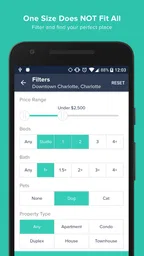
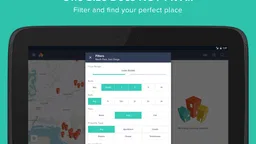
- Search filters help narrow listings by price and property type.
- Map view makes it easier to compare rental locations.
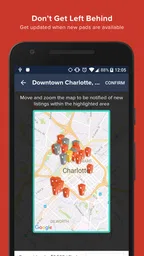
- Saved searches can help track new listings that match your criteria.
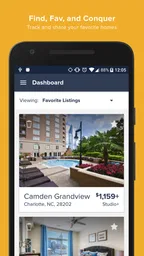
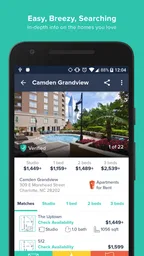
- Listing details often include photos and key property information.
- Contact options let renters reach out about available homes.
What could be better
- Listing details may be incomplete or out of date.
- Some properties may no longer be available when you inquire.
- Rental coverage can vary significantly by location.
- The app may request location access for nearby results.
- Contacting landlords may lead to slow or no responses.





