



HomeGPT: AI Interior Design review
 Analysis by Appsdrops
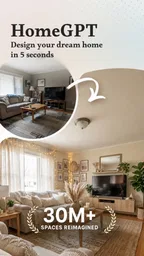
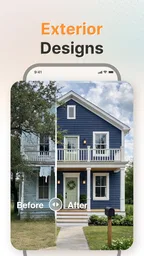
I would treat HomeGPT: AI Interior Design as a quick way to explore visual ideas, not as a replacement for a measured plan or a conversation with a contractor. Its appeal is straightforward: start with a photo of a room or another part of your home and use AI to imagine a different look. That can help when you know a space feels tired but cannot yet picture what would suit it.
That photo-first approach also sets expectations. A generated redesign is a source of inspiration, not proof that a particular sofa will fit, a wall finish will work in your lighting, or a renovation is practical. I find this kind of app most useful when I have a real decision to make and want a few visual directions before spending time or money elsewhere.
Where a promising idea can get stuck
The first hurdle is usually the photo, not the decorating idea. A cluttered frame, a dim corner, or furniture blocking much of a wall gives an image tool less to work with. Before taking a picture, I would step back far enough to show the space clearly, switch on the room lights, and move small items that obscure the area I want to rethink. A tidy photo is easier to assess even before any redesign appears.
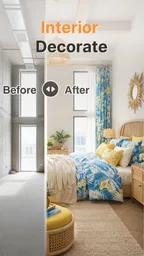
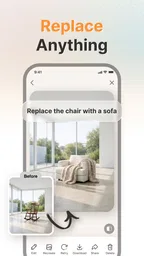
It also helps to decide what you want the image to answer. “Make this room nicer” is broad; “show me a calmer bedroom palette” or “help me imagine a different living-room floor” gives you a more useful comparison. HomeGPT is described as handling rooms, gardens, walls, floors, and furniture from a photo, so it is suited to visual exploration across several parts of a home. That breadth can make the first attempt feel open-ended unless you choose one priority.
For example, if a living room feels cramped, I would not ask an image to change everything at once. I would first explore a lighter wall treatment, then consider furniture, keeping the original photo and the room’s main layout in mind. When several elements change together, it becomes harder to tell which change actually improved the space.
Another common source of disappointment is treating a generated image as a faithful preview. AI can make a room look coherent while altering details that matter in real life, such as proportions, object placement, or the relationship between a window and a piece of furniture. I would use the result to shortlist moods and ideas, then check dimensions and materials separately before acting.
Make the first photo easier to work with
Take the picture from a natural standing position rather than pushing the camera into a corner or using an extreme angle. Keep vertical lines as straight as you can, and avoid including a bright window that overwhelms the rest of the image. These simple choices make it easier to compare a redesign with the room you actually occupy.
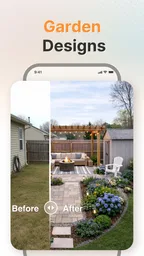
If the space has a feature you want to preserve—a fireplace, an unusual tile, or a built-in shelf—make sure it is visible in the photo. It is easy to focus on what you want changed and accidentally leave out the detail that gives the room its character. I would also photograph a garden in ordinary daylight so the major boundaries and existing planting are readable, rather than relying on a dramatic sunset shot.
Setup checks and a more deliberate workflow
HomeGPT is a free House & Home app from Fire Elite Team, with in-app purchases listed from $3.99 to $69.99 per item. It is rated for Everyone, and its stated minimum operating system is 8.0. Those details matter before you invest effort in a setup: check that your device meets the requirement, and remember that “free” does not mean every possible purchase or option is necessarily included at no cost.
The app’s current version is 1.0.8. I would begin with one clear photo and a modest goal, rather than planning a whole-home makeover before seeing how the app handles a single space. That is a practical way to learn whether its visual suggestions match your taste and whether the image-based workflow suits you.
If you are deciding whether it is worth trying, the app has an average rating of 4.2 from 180 ratings, with 25 written reviews, and more than 50K installs. Those figures offer a little context about its audience, but they do not tell you whether a particular style, room, or photo will produce a result you like. I would use them as background, not as a substitute for testing it with your own room.
Change one design question at a time
A useful workflow is to separate the decision into layers. Start with the fixed surfaces—walls or floors—because they affect the overall mood of a room. Then consider larger furniture, and leave smaller decorative choices until you have a direction. This order prevents accessories from distracting you from a color or flooring choice that will have a much bigger effect.
Keep a short note alongside your images: what you asked for, what you liked, and what looked implausible. That small habit makes comparisons more reliable if you try several ideas. It also helps you translate a visual result into a real-world next step, such as collecting paint samples or measuring the wall where a cabinet might go.
The most useful trade-off is speed versus precision. A photo-based concept can help you move past a blank-page problem quickly, but it cannot settle questions that depend on exact dimensions, product availability, finish samples, or installation constraints. I would bring an appealing result to a retailer or design professional as a reference image, not as a specification.
Recovering from an unhelpful result
If the output looks far from your room, first reconsider the input rather than assuming the idea itself is wrong. Retake the photo with more even lighting, a clearer view of the area, and fewer objects hiding the surfaces you want to change. Then narrow the request to one part of the space. This is a sensible recovery path for a tool that relies on a photograph as its starting point, without assuming any particular technical cause.
If the image is attractive but not useful, identify the mismatch. Is the room’s layout different? Did the visual direction ignore a feature you need to keep? Does the result simply feel too polished for your home? That diagnosis tells you whether to try a better photo, refine the design question, or stop using the image as a basis for that decision.
I would also avoid repeatedly changing several things between attempts. If the wall, flooring, furniture, and lighting concept all shift at once, you lose a clear comparison. Save the ideas that answer one question well, and discard the ones that do not. The goal is not to collect the largest set of pictures; it is to make a decision with less guesswork.
When the app is not the right tool
Sometimes the problem is not the photo or the design prompt: a visual concept is simply the wrong tool for the question. If you need accurate room measurements, a construction drawing, a confirmed material quantity, or a reliable estimate, use a measuring method or consult a qualified professional. A generated image cannot establish whether a wall can be moved or whether a floor is suitable for a particular room.
Likewise, if you already know the exact furniture or finish you plan to buy, a retailer’s product imagery, physical samples, or a room-planning tool tied to actual product dimensions may be more helpful. HomeGPT’s photo-led approach is better for early-stage imagination than for checking whether a specific purchase will fit. For gardens, it can help you think about a visual direction, but practical questions about climate, drainage, and plant care call for advice grounded in the site itself.
There is also a personal preference question. If you enjoy sketching ideas yourself or already have a designer whose process you trust, another image generator may add little. I would skip this app if you expect exact, build-ready results or if you do not want to spend time choosing and retaking photos. It makes more sense for someone who is curious, visually minded, and comfortable treating AI suggestions as rough concepts.
My practical verdict
HomeGPT is an approachable option for turning a home photo into a starting point for design thinking. I would reach for it when I am stuck between a few styles, trying to picture a wall or floor change, or looking for a fresh direction for a room or garden. Its value is less about handing you a finished plan and more about giving you something concrete to react to.
Compared with browsing inspiration pictures, working from your own photo can make the exercise feel more connected to your home. Compared with dedicated planning software, it is a lighter, less exact way to explore an idea rather than a dependable route to measurements or a purchase-ready layout. That distinction is important: use it early, then verify anything that affects fit, cost, or construction by other means.
The app is free to start, but the listed in-app purchases range from $3.99 to $69.99 per item, so I would check the purchase details in the app store before committing to anything. I would also keep the first session focused: choose one room, take a clear photo, and test one design question. That gives you a fair sense of whether the results are useful without turning the exercise into an all-or-nothing renovation plan.
Overall, I would recommend HomeGPT: AI Interior Design to homeowners and renters who want a quick visual nudge before making a decorating decision, especially when they can judge the results with a practical eye. I would not rely on it for technical answers, but as an idea generator it has a sensible role: help you see possibilities, then let real measurements, materials, and your own priorities decide what happens next.
What we like
- AI concepts can help you explore different room styles.
- Room previews make it easier to compare design ideas.
- Useful for finding inspiration before redecorating.
- Can help clarify your preferred colors and decor style.
- A quick way to generate ideas without hiring a designer.
What could be better
- AI suggestions may not account for your room's exact measurements.
- Generated images may show furniture that is hard to find.
- Results can differ from what your space looks like in person.
- Some features may require a subscription or in-app purchase.
- Image generation quality can vary between prompts.





