


Home Security Camera: Camerito review
 Analysis by Appsdrops
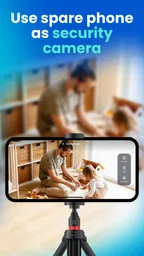
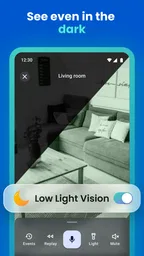
When I have an old phone sitting in a drawer, I’d rather give it a useful job than buy another gadget for a small monitoring task. Home Security Camera: Camerito is built around that idea: it turns a spare phone into a camera you can check remotely, with live video, alerts, and clips. I find the premise appealing for everyday situations such as keeping an eye on an entryway or checking whether a pet has settled down, though it’s important to treat a repurposed phone as a convenient extra set of eyes, not a complete security system.
From spare phone to a useful view
Camerito is a free House & Home app from TappyTaps s.r.o. It has a 4.4 average from around 657 ratings, with more than 50,000 installs. Its age rating is Everyone, and the app was released on November 19, 2024. The current version is 4.10.0, and it requires Android 7.0 or later. In-app purchases range from $2.99 to $79.99 per item, so I’d check what a paid option covers before relying on it for a routine that matters.
The practical appeal is the hardware you already own. A spare phone can be placed where a dedicated camera would be awkward or excessive: on a shelf facing a room, near a pet’s usual resting spot, or temporarily near a doorway while you’re away. That flexibility is the strongest reason I’d try Camerito before shopping for another device.
Before setting it up, I’d think through the camera’s view rather than simply pointing it at the middle of a room. A doorway or a narrow passage often gives a more useful picture than a broad shot of an empty space. I’d also choose a stable surface and a position that isn’t easily bumped. These small decisions matter because a live feed is only helpful if it shows the area I actually need to check.
Setting up a sensible routine
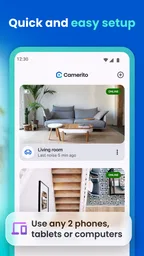
The workflow begins with two roles: the phone left in place to capture the scene, and the phone used to check in. Camerito’s core promise is to connect a spare device with live viewing and alerts, but the value depends on both ends of that handoff working when needed. I’d test the arrangement while still at home, rather than assuming it will behave exactly as hoped after I leave.
For a first trial, I’d put the spare phone in its intended spot, open the app, and then move into another room before checking the view from the device I plan to carry. That simple rehearsal can reveal practical problems early: the camera may be aimed too high, a door may block the view when opened, or the chosen shelf may be unstable. Adjusting the setup before a real absence is less stressful than discovering a blind spot later.
I’d also treat power and network access as part of the setup, not as afterthoughts. A phone doing camera duty needs to remain usable for the period I want to monitor, and a Wi-Fi camera depends on a working connection. I would place the device where it can stay connected and powered as appropriate, while avoiding a position where its cable becomes a trip hazard or can be easily pulled loose. Camerito’s convenience comes from reusing a phone, but that also means I’m responsible for the condition and placement of that phone.
What the handoff feels like
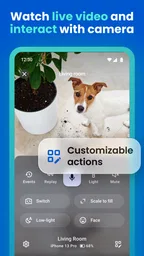
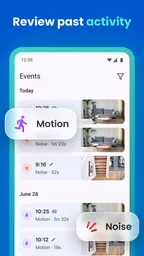
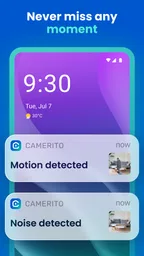
The useful sequence is straightforward in concept: leave the camera phone in position, go about the day, and use the other device to check live video or respond to an alert. That handoff is where Camerito can save a trip across the house or offer reassurance while I’m out. A short clip can also help make an alert easier to interpret than a notification alone, because it gives some visual context around what happened.
For example, imagine leaving a dog at home while you run a quick errand. A camera aimed at the room where the dog usually rests could let you check whether it is calm or moving around. If an alert arrives, a clip may help you decide whether it reflects meaningful activity or something ordinary, such as the pet shifting position. The point isn’t to watch continuously; it’s to have a practical way to check when a specific question comes to mind.
One useful habit is to decide in advance what you want an alert to help you do. If every bit of movement is equally important, alerts can become noise rather than assistance. A camera aimed at a particular doorway or area of activity is more actionable than one pointed at a busy room where people and pets are constantly moving. I’d refine the angle and routine through a few ordinary days, then judge whether the interruptions are worth keeping.
There’s also a privacy handoff to consider. A phone left recording a shared room may capture family members, visitors, or household routines, so I’d be clear about where it is and when it is being used. For a temporary check on a pet or a room, a thoughtful placement can keep the setup useful without turning the whole home into a monitored space. I would avoid pointing it at private areas or using it where other people reasonably expect not to be recorded.
Where Camerito fits among camera choices
Compared with a dedicated Wi-Fi camera, a spare-phone setup is attractive when the need is occasional, the camera position may change, or I want to try remote viewing without buying another device first. The phone itself is familiar and can be moved between rooms, which makes Camerito a flexible option for a temporary check. It can also make sense for someone who already has an unused handset and wants to see whether this kind of monitoring is genuinely useful in their home.
A purpose-built camera is the better choice when I want a permanent installation, a device designed to stay in one place, or a more dependable long-term arrangement. Camerito does not make an older phone’s battery, camera, or network connection new again. A weak handset or unreliable Wi-Fi can undermine the experience no matter how convenient the app’s idea is. For important security coverage, I’d compare dedicated equipment and consider what happens if the spare phone loses power or connection.
It also isn’t a substitute for an alarm or a person who can respond to an emergency. Live video and alerts are useful for awareness, but they don’t guarantee that I’ll see an event in time or be able to act on it. I’d use the app for low-stakes reassurance and routine checks, not as the only safeguard for valuable property or someone who needs active care.
The friction to expect before relying on it
The biggest trade-off is that the camera is another phone with all the practical baggage that entails. It needs a sensible place to sit, enough power for the intended use, and a dependable connection. If I move it often, I also need to remember to restore the angle and position that made the view useful. This is a more hands-on arrangement than mounting a camera and leaving it alone.
Alerts can create friction too. A notification is only helpful if it arrives at a useful moment and gives me enough reason to check. I’d try the setup during normal household activity and notice whether it produces too many interruptions or misses the events I care about. If the result is distracting, changing the camera’s position or limiting the situations I monitor may help; if I need highly dependable coverage, I’d move to equipment designed for that purpose.
Cost deserves a little attention even though the app is free to start. Paid in-app items are listed from $2.99 to $79.99, a broad range that makes it sensible to inspect the particular purchase and its value before committing. I wouldn’t assume that every feature needed for a personal setup is included at no cost, nor would I pay for an option until I knew it addressed a real limitation in my routine.
My verdict after following the workflow
I like Camerito most as a low-commitment way to test remote home monitoring with a phone I already own. Its clearest strength is the simple idea of turning spare hardware into a live view, with alerts and clips to make checking more useful than a static glance. If I were checking a pet’s room, a temporary work area, or an entrance while away briefly, I’d consider giving it a careful trial before buying a separate camera.
I’d skip it if I needed a dedicated, always-on security installation, if the available phone is unreliable, or if any missed connection would be unacceptable. I’d also choose another option if monitoring needs to be shared or managed in a more permanent way than a spare phone can comfortably support. The best result comes from a narrow, realistic goal: choose one area, test the view and alerts while at home, and see whether the check-in routine actually reassures you.
For that kind of use, Home Security Camera: Camerito is worth considering. I wouldn’t mistake it for a complete security solution, but as a practical bridge between an unused phone and a modest monitoring need, it has a clear purpose. The key is to test the whole chain—from placement and connection to the alert and the decision you make after seeing it—before trusting it when you’re away.
What we like
- Provides a practical way to monitor a space remotely.
- Can help users keep an eye on pets or family members.
- Turns a spare device into a potential monitoring camera.
- Remote access may offer added peace of mind while away.
- Useful for checking a room without buying a dedicated camera.
What could be better
- Monitoring depends on a stable internet connection.
- A second device may be needed to act as the camera.
- Continuous use can drain battery and generate heat.
- Camera placement can leave blind spots in the room.
- Video monitoring raises privacy and data security concerns.





