


Home by ShowingTime review
 Analysis by Appsdrops
Home by ShowingTime is most appealing when a home sale involves a steady stream of visits and the people arranging them need to stay coordinated. I see it as a focused companion for the showing process, rather than an all-purpose home-management app: it brings tours, appointments and feedback into one place. That narrow purpose can make a busy stretch of selling a property easier to follow, but it also means the app is most useful to people already involved in a ShowingTime-based workflow.
Keeping the showing process in view
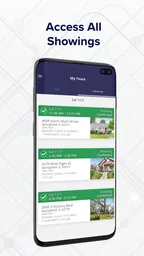
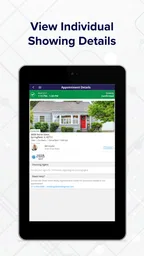
ShowingTime, the developer, describes the app as a way to manage showings, tours and feedback. The practical value is less about doing something novel and more about keeping the moving parts of property visits from getting scattered across calls, messages and memory. When several people are involved in arranging access or reviewing responses, having the showing activity organized around the home can give the process a clearer center.
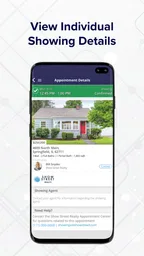
That focus matters because a property showing is not just a calendar entry. Someone needs to know when a visit is expected, someone else may need to prepare the property, and the seller or agent may want to understand what visitors thought. Home is designed around those connected tasks. I would consider it most useful during an active listing, when appointments and follow-up are recurring concerns rather than occasional ones.
The app sits in the House & Home category, but it is not a general-purpose tool for household chores, repairs or decorating. That distinction is worth knowing before installing it. If your goal is to organize a home sale’s viewing schedule and feedback, its purpose is relevant; if you simply want a shared family calendar or a place to store renovation ideas, a broader app will likely fit better.
One useful way to approach it is as a shared record of the viewing process, not as a substitute for every conversation. I would still use direct communication for anything urgent or unusual, such as a last-minute access issue. The app’s strength is in keeping routine showing-related activity easier to track; treating it as the only channel for time-sensitive arrangements would be an unnecessary risk.
Where it can make a real difference
Imagine a seller preparing for a week with several planned visits. They may need to keep the property presentable, avoid being caught off guard, and make sense of feedback after each tour. A tool centered on showings can reduce the mental work of remembering which visit happened and what needs attention next. The benefit is not that it removes the work of selling a home, but that it gives recurring details a more orderly place.
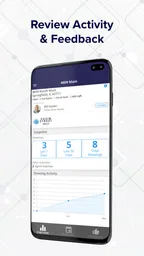
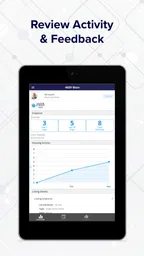
A less obvious advantage is the way a dedicated showing workflow can help separate property feedback from the everyday noise of texts and unrelated emails. If a seller is also coordinating family plans, work and moving preparations, comments about the home are easy to lose in the mix. Keeping attention on the showing process can make it easier to review feedback as a group and identify whether a concern keeps appearing.
I would use that feedback carefully rather than treating every comment as an instruction. One visitor’s preference may be personal; repeated observations may point to something worth discussing with an agent. The app can help make the material easier to follow, but judgment still belongs to the seller and the professionals advising them. That distinction keeps feedback useful without letting a single opinion drive an overreaction.
Another practical tip is to make checking the app part of a predictable routine. For example, a seller can review the day’s showing information at a set time, then prepare the home and make any necessary plans. That is more dependable than repeatedly checking a phone in the hope of catching every update. The app can support coordination, but it cannot make a household’s schedule flexible or prepare a property on its own.
What it does well, and where the friction is
For its intended audience, the strongest quality is its clear subject. Home is not trying to be a broad real-estate marketplace or a general organizer. Its emphasis on visits and feedback gives it a more direct role in the period when a property is being shown. I prefer that focus to an overloaded interface that mixes unrelated household tools into a task that is already stressful.
The trade-off is that a specialist app depends on the user having a reason to use that particular workflow. If your agent or the people arranging your showings do not use ShowingTime, installing this app may not become part of your routine. A shared calendar or ordinary messaging may be more convenient for a small number of informal visits, especially when everyone already coordinates comfortably that way. Before relying on it, I would ask the agent how they expect the app to fit into the showing process.
It is also not the right choice for someone who wants a full property-sales dashboard. Its stated focus is showings, tours and feedback, so I would not choose it as a replacement for tools used to manage listing documents, negotiations, finances or the wider moving process. Keeping those jobs in their appropriate tools is a sensible trade-off, though it does mean users may still switch between apps.
Home is free, which makes trying it less of a commitment than a paid service. Still, “free” does not automatically mean it will save effort for every household. If you only expect one or two visits and already have a simple arrangement with your agent, the additional app may feel like another place to check. Its value grows with the need to keep several showing-related details organized.
Who is most likely to benefit
I would recommend it first to sellers whose homes are receiving repeated visits and who want a more structured way to keep up with the showing process. It may also suit people who prefer to review property feedback in context instead of searching through separate conversations. For those users, the app’s narrowness is a benefit: it keeps the attention on the task that matters during an active showing period.
It can be especially helpful when more than one person in a household needs to stay informed. One person might be handling preparations while another is away at work; a shared, showing-focused workflow can make it easier for both to follow what is happening. I would still agree on who is responsible for acting on updates, because an app cannot resolve confusion about ownership of a task.
By contrast, I would skip it if you are browsing homes casually, managing a rental without a showing workflow that uses the service, or simply looking for a general home organizer. Buyers who want to compare listings or track their search should look for tools built around those activities. The distinction is not a flaw in Home so much as a matter of fit: it is aimed at the logistics around property visits, not every stage of moving or real estate.
The app has an average rating of 3.3 from around 5,300 ratings, with roughly 2,000 written reviews, and it has been installed over 500,000 times. I take that as a reason to approach it with practical expectations rather than assuming it will suit everyone. Ratings can reflect different devices, workflows and expectations; for an individual seller, the key question is whether their agent and showing arrangements make the app useful.
Compatibility and day-to-day expectations
The current version is 2.3.7, and it requires Android 8.0 or later. It is rated for Everyone, so its content rating is not a barrier for ordinary household use. It was released on February 25, 2019, and its continued presence in the category suggests an established app rather than a newly introduced concept, though I would still check that the version available for your device is compatible before making it central to a busy selling schedule.
For a smoother experience, I would set expectations with the agent before the first scheduled visit: who will use the app, when updates should be checked, and how urgent changes will be communicated. That small conversation prevents a common coordination problem—assuming that everyone is watching the same channel. The app works best as part of an agreed routine, not as a replacement for deciding how the household and agent will communicate.
Compared with a general calendar, Home is more closely tied to the property-showing context. A calendar may be better for blocking out family commitments or marking personal preparation tasks, while ordinary messaging is often faster for a quick clarification. The dedicated app is most compelling when the showing process itself needs attention and feedback deserves to remain connected to visits. I would happily use those tools alongside one another rather than forcing one app to do everything.
My verdict for sellers and households
My overall view is that Home by ShowingTime is a practical, purpose-built option for people who are actively coordinating property showings through the ShowingTime workflow. It can help keep visits and feedback from disappearing into a jumble of everyday communication, and its focused approach makes sense during a busy listing period. Its limits are equally clear: it is not a universal home app, and its usefulness depends on whether the people arranging your visits work with it.
If you are preparing a home for regular tours, ask your agent whether this is the channel they use, then make it part of a simple routine for checking visits and reviewing feedback. If your needs are lighter, or your existing calendar and communication habits already handle occasional appointments well, you may not gain enough to justify adding another app. I would recommend it to sellers who need structure around showings, while advising everyone else to choose a tool that matches the broader job they actually have.
What we like
- Lets users confirm showing requests from their phone.
- Provides updates when a tour request changes.
- Makes it easy to share feedback after a property visit.
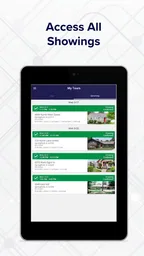
- Shows a history of upcoming and past showings.
- Can help agents and clients coordinate tour details remotely.
What could be better
- Requires participating agents to use ShowingTime.
- Available features may vary by brokerage or region.
- Push alerts can be missed if notifications are disabled.
- Some actions may require signing in or verifying an account.
- The app may not replace direct communication for urgent changes.





