

Hairu: Hairstyle Try On review
 Analysis by Appsdrops
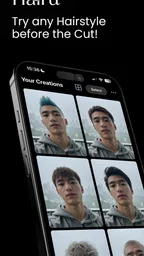
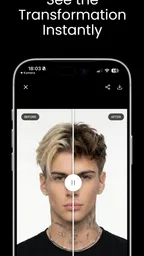
I would treat Hairu: Hairstyle Try On as a shared idea board for hair decisions, not as a substitute for a salon consultation. Its appeal is easy to picture: someone is considering a cut or color, a family member has an opinion, and a quick visual experiment can make the conversation more concrete. In my view, that makes this beauty app most useful before an appointment, when you want to explore possibilities without committing your real hair to a risky change.
Trying ideas together, without deciding for someone else
On a household device, the simplest use is to take turns looking at styles and discussing which direction feels right. One person can be curious about a shorter shape while another prefers keeping the length; seeing options can help turn vague reactions into a more useful conversation. I would keep the person whose appearance is being previewed in charge of the choice. A playful group session works best when feedback is welcome rather than treated as a vote.
That distinction matters because a hairstyle preview is a prompt for discussion, not a promise of how a salon result will look. A digital image may help you compare broad ideas, but it cannot fully represent how a style will behave with your hair’s texture, thickness, or day-to-day routine. I’d use a promising preview to clarify what to ask a stylist, then let the stylist advise on what is practical for the real person and their hair.
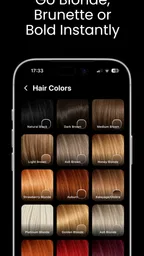
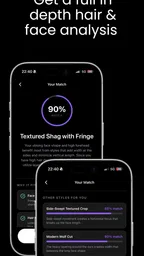
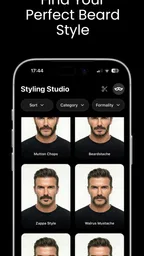
The app is developed by Max App Studio and sits in the beauty category. Hairu’s store description positions it around previewing a hairstyle before making a change, and that is the core job I would expect it to serve: helping people think through a decision rather than replacing professional advice. Its short store label is simply “Hairu,” while the full name makes its hairstyle focus clearer.
Make a useful session out of the first few comparisons
Instead of scrolling through styles at random, I’d start with a specific question: do you want to change the length, the overall shape, or the impression the style gives? Keeping one goal in mind makes comparisons more meaningful. If you change several things in your imagination at once, it becomes harder to tell which part of a look you actually like.
A practical workflow is to shortlist a small number of genuinely different directions, then compare them against the same preference. For example, if the decision is about a dramatic change, ask whether the new shape still feels like you. If the concern is maintenance, think about how often you want to style your hair and whether the preview represents a routine you would enjoy. This is a more grounded use of a try-on tool than choosing the most striking image.
The best result is a clearer conversation, not a final verdict. If one option catches your eye, save or show the image in whatever way the app makes available, then describe the parts you like in plain language: the length, the outline, or the general feel. I would avoid presenting a preview as an exact instruction. A reference can start a discussion, but a stylist still needs to interpret it for your hair and preferences.
Keep personal choices and shared-device use distinct
When several people use the same phone or tablet, the main boundary is practical: make sure everyone knows whose photo or appearance is being used and who is looking at the result. I would not assume that a shared screen creates separate personal spaces. If privacy matters, use the device’s ordinary account and screen-lock habits, and avoid leaving someone else’s images open for the next person to browse.
That advice is especially useful for a family member who is helping a child or teenager explore a style. Let them lead the conversation, and avoid turning a lighthearted preview into pressure to change their appearance. A young person may enjoy trying possibilities without wanting a real haircut, and that is a perfectly reasonable outcome. The app is rated for Everyone, but that age label does not replace a parent’s judgment about how a shared device is used.
I would also agree on a simple household rule before passing the device around: ask before taking or showing another person’s image, and don’t treat someone’s experiment as permission to make a decision for them. That is not an app feature; it is just a respectful way to use any appearance tool together. It makes the activity more comfortable for people who are curious but self-conscious.
Coordinate before the appointment, not during a rushed decision
Hairu makes the most sense when there is enough time to compare ideas. If you are heading to a salon soon, use it beforehand to work out what you want to discuss, rather than trying to settle on a look in the waiting room. A household can help by narrowing the options to a couple of directions, but the person getting the haircut should still make the final call.
For a useful appointment reference, focus on the details that translate well into words. “I like this shorter outline” is more helpful than “make it exactly like the picture,” because the stylist can then explain what suits the person’s hair. I’d also be ready to discuss upkeep: a style that looks appealing in a preview may not fit someone who prefers a low-effort morning routine. That trade-off is easy to overlook when everyone is reacting to the visual change.
Compared with browsing hairstyle photos or looking through social media, a try-on app has a more personal angle: it is intended to help you imagine a style on yourself, rather than only admire it on someone else. On the other hand, a collection of real reference photos can show texture, movement, and different angles more naturally. I would use Hairu for initial exploration and real-world images or a stylist’s advice to check whether the idea translates beyond a preview.
What to expect from the app and its costs
The app is free to download, with in-app purchases listed from $0.99 to $28.99 per item. That range is worth keeping in mind if you are setting it up for family use: free access does not necessarily mean every optional item is free. I would check the purchase screen carefully before confirming anything, particularly on a device used by more than one person, and use the device’s purchase protections if that is part of your household routine.
Hairu has an average rating of 4.6 from around 11,000 ratings, and it has been installed over 100,000 times. Those figures suggest that many people have tried it, but they do not tell me whether every hairstyle will suit every face or how well a particular preview matches an individual’s hair. I’d treat the app as a convenient way to explore, then judge its usefulness by whether it helps you make a more confident and realistic choice.
The current version is 4.2.0, and the stated minimum operating-system requirement is version 7.0. It was released on January 5, 2026. The rating is Everyone, which makes the app broadly suitable from an age-rating perspective, but families should still consider the context: appearance tools can be fun, and they can also make some people more sensitive about how they look. A calm, optional approach is better than framing the preview as a makeover that someone ought to pursue.
Where it fits—and where I would choose something else
I would recommend Hairu to someone who is undecided about a hairstyle and wants a low-pressure way to explore a direction, especially if they enjoy getting a second opinion from someone they trust. It can also help a parent and child talk through a proposed change, as long as the child’s preference stays central. For a household, the strongest use is coordination: agreeing what to ask a stylist, not letting the loudest person pick the look.
I would skip it if you need a guaranteed preview of a precise salon result, or if you already know that digital appearance edits tend to make you more anxious rather than more confident. A stylist is the better option for judging whether a cut works with your actual hair, and real reference photos are better for seeing how a style behaves in different conditions. If your only goal is to collect inspiration, browsing those examples may be enough without adding a try-on step.
My household verdict is that Hairu: Hairstyle Try On is best treated as a shared brainstorming tool with clear personal boundaries. It can make an uncertain choice easier to discuss, but it should not turn a person’s appearance into a group decision or a preview into a guarantee. If you keep those limits in mind, it offers a sensible starting point for exploring a new look—and a useful way to arrive at the salon with a clearer idea of what you want to ask.
What we like
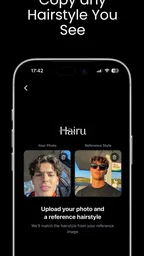
- Preview hairstyles on your own photo before choosing a look.
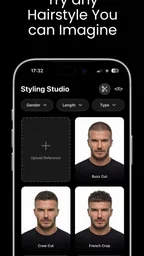
- Compare different cuts without making a salon appointment.
- Useful for sharing style ideas with a hairdresser.
- Virtual previews avoid the risk of an unwanted haircut.
- Can help narrow down options when planning a new look.
What could be better
- Results may not match how a hairstyle looks in real life.
- Photo quality and lighting can affect the preview.
- Some styles may fit your face or hair poorly.
- The app cannot show how a cut will behave as it grows out.
- Virtual styling is not a substitute for a hairdresser's advice.





