
Hairstyle Try On - AI Haircut review
 Analysis by Appsdrops
I see Hairstyle Try On - AI Haircut as a visual planning tool, not a substitute for a stylist’s judgment. Its appeal is simple: you can explore different hair ideas on your own photo before deciding whether to change your look. That makes it useful when you have a style in mind but are unsure how it might suit your face, or when you want something more concrete than scrolling through pictures of other people.
Trying ideas before committing
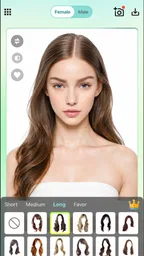
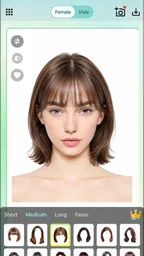
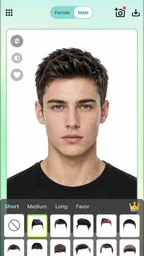
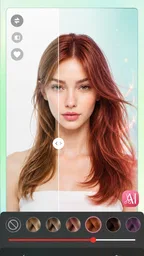
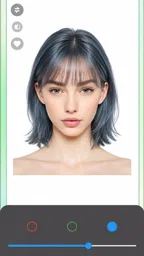
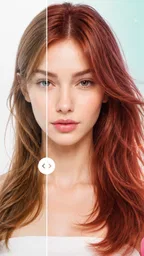
This is a beauty app from JYCoder, and its focus is narrower than a general photo editor: it lets you preview hairstyles and hair colors with AI. The range is broad enough to make experimentation worthwhile. I’d use it to compare the overall direction of a look—short versus long, a different fringe, or a noticeably new color—rather than to expect a perfect prediction of a finished salon result.
The app is rated for Everyone, and its listing shows a 4.4 average from around 138,000 ratings. It has over a million installs, which suggests that trying hairstyles virtually is a familiar use case for many people. Those figures are useful context, but they don’t tell you whether a particular result will fit your face, hair texture, or personal taste. The best test is to try a few ideas on a clear photo and judge the images as inspiration, not a promise.
A practical way to use it is to start with the change you are actually considering. If you’re thinking about a shorter cut, compare a few lengths before getting distracted by dramatic colors. If color is the main question, keep the hairstyle similar while you test shades. Changing one element at a time makes it easier to tell what you like and gives you a more useful reference to discuss with a hairdresser.
What the free access tells you
The app is free to download, so you can begin without paying upfront. It also offers in-app purchases priced from $9.99 to $49.00 per item. That gives the cost picture a clear boundary: there is free access, while some purchases can cost substantially more. I would explore the free experience first and decide whether the app’s results and workflow are useful to me before considering any paid item.
Those purchase prices alone don’t establish which features or content are included in each item, so I wouldn’t assume that paying unlocks a particular hairstyle, removes a restriction, or improves the realism of a preview. Check the purchase details in the app store before spending. The sensible value test is personal: if you only want a one-time idea for your next haircut, free access may be enough; if you expect to return to it for repeated style decisions, first make sure the paid option addresses something you actually need.
The app was released on June 2, 2021, and its current version is 411.0.0. It requires Android 7.0 or later. That makes the operating-system requirement easy to check before downloading, but the version number itself is not a measure of image accuracy. I’d judge the experience by whether the previews help me make a decision, rather than by how large the version number looks.
Where the app earns its keep
Its strongest value is reducing uncertainty before a real appointment. A haircut can take weeks or months to grow out, and a color change can feel like a big commitment. A quick preview cannot remove that risk, but it can help you rule out ideas that clearly don’t appeal to you. That small step can make a consultation more focused: instead of saying “something different,” you can show a direction you want to explore.
For example, imagine you have a salon appointment coming up and have saved several reference photos. Those pictures may feature different lighting, face shapes, and styling, so it can be hard to picture the same cut on you. Trying a few options on your own image can help you narrow the references to one or two broad choices. I would still bring the original inspiration photos too, because a simulated preview and a stylist’s interpretation are not the same thing.
One useful, less obvious workflow is to keep a “decision” set rather than a gallery of every novelty. Save or compare only the looks that answer a real question: which fringe feels more like me, whether a shorter outline is appealing, or whether a cooler color is worth asking about. This prevents an entertaining browsing session from turning into a confusing pile of mismatched edits. It also makes it easier to explain your preference to someone else.
Another good use is to test the emotional reaction, not just the image. A style can look technically plausible and still feel unlike you. I’d pause on each promising preview and ask whether I would be comfortable maintaining that look day to day, whether I would want it styled similarly, and whether I am drawn to the cut or only to the novelty of seeing a different face-framing shape. That reflection is often more valuable than finding a single “perfect” simulation.
Limits that matter when judging a preview
AI previews are visual approximations. They can be helpful for exploring an idea, but they cannot reproduce every detail of how a real cut will fall or how a color will behave on your hair. Hair texture, density, natural growth patterns, styling habits, and the work required to reach a shade all matter in person. I would not treat a flattering image as evidence that a particular style will be easy to achieve or maintain.
Photo choice also affects how useful the comparison feels. For a fair test, use a picture where your face is visible and the hairline is not hidden by a hat, heavy shadow, or an unusual angle. If you compare one idea using a close, straight-on photo and another using a tilted image, the difference may come from the pictures rather than the hairstyle. Keeping the same source photo across experiments is a simple way to make your own comparisons more meaningful.
There is a trade-off between breadth and precision. Having more than 600 hairstyle and hair-color options encourages exploration, but a large collection can make it tempting to browse endlessly without settling on a direction. I’d narrow the search by deciding what I’m willing to change first. Someone seeking an exact, consultation-ready technical preview may be better served by discussing their hair in person with a stylist; this app is more useful as a starting point than as a final specification.
It also isn’t the right choice if what you want is a full salon-planning service or a professional assessment of what your hair can support. The app’s role is to let you visualize possibilities. It cannot replace advice about condition, processing, upkeep, or the practical steps needed to create a particular look. For a major color transformation or a cut that depends on precise shaping, use the preview to frame questions rather than to make the decision alone.
Who is likely to get good value
I’d recommend trying it if you are curious about a noticeable change but hesitant to commit, or if you want a quick way to compare several broad looks before speaking with a hairdresser. It may also suit people who enjoy experimenting with appearance for their own amusement, provided they understand that the images are ideas rather than guarantees. Since it is free to download, it is easy to judge the basic appeal for yourself before deciding whether it deserves a place on your phone.
I would be more cautious if you already know exactly what cut you want and mainly need expert guidance on whether it will work with your real hair. In that case, a conversation with a stylist and a few well-chosen reference images are likely to be more useful than trying many simulations. I’d also skip paid purchases unless their in-app descriptions clearly match a need you have; the price range is broad enough that guessing would be poor value.
For everyday use, the app works best as a short decision aid. Before an appointment, I’d choose a clear photo, test a small number of related styles, and note what I like about each result. Then I’d bring those preferences to the consultation and ask what is realistic for my hair. That process uses the app’s visual strength without asking it to answer questions it cannot settle.
My verdict on the cost and the choice
Hairstyle Try On - AI Haircut is worth a look if your goal is to explore possible hairstyles and colors before making a real-world decision. Its main value is the chance to compare ideas on your own image, which can make an appointment or a personal style decision feel less abstract. I would keep expectations grounded: a preview can inspire and help you narrow options, but it cannot guarantee the salon result.
My buy-or-skip advice is straightforward. Start with the free download, use it to answer a specific style question, and only consider an in-app purchase after checking exactly what it includes. If the free experience already helps you identify a direction, there may be no reason to spend. If you need reliable professional guidance or a precise prediction of how a complex cut or color will turn out, skip relying on an AI preview and ask a stylist instead.
What we like
- Lets you preview a range of hairstyles before changing your real look.
- AI-generated styles can make trying new looks quick and convenient.
- Useful for collecting ideas before visiting a hairdresser.
- Virtual previews avoid the cost and commitment of a real haircut.
- A playful way to compare different looks using your photo.
What could be better
- Results may not match how a style looks with your actual hair texture.
- Photo quality and lighting can affect the realism of previews.
- Some hairstyles may fit your face or head shape poorly.
- AI previews cannot show how a haircut will move in everyday life.
- The app may offer limited options without paid features.





