
HairLook: AI Hairstyle Try On review
 Analysis by Appsdrops
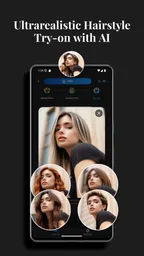
I would treat HairLook: AI Hairstyle Try On as a way to explore ideas, not as a promise of what a salon result will look like. This beauty app uses AI to preview hairstyle changes, including cuts and color variations, so you can consider possibilities before making a real commitment. Its most useful role is helping you explain what you like—and what you definitely do not—when a stylist asks what you have in mind.
That distinction matters for accessibility, too. A visual preview can make a vague idea easier to discuss, but it does not automatically make choosing a hairstyle effortless for everyone. The experience depends on seeing and interpreting an image, and a convincing-looking result still needs a dose of judgment. I see it as a practical visual aid for people who find pictures more helpful than salon terminology, with some clear limits for users who need nonvisual guidance or more control over how they interact with an app.
Making hairstyle ideas easier to read
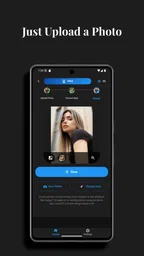
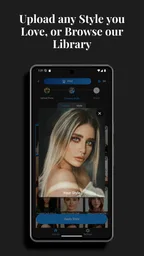
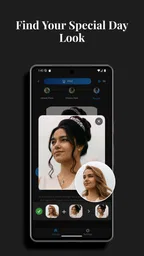
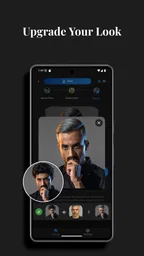
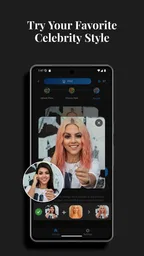
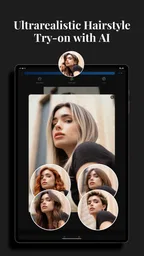
The basic appeal is immediate: instead of trying to imagine a new look from a verbal description, you can use an AI-generated preview as a starting point. That can be especially helpful when you are comparing a broad change, such as keeping your length while exploring a different color, with a more noticeable cut. The app’s focus is narrower than a general beauty editor, which helps keep the purpose clear: it is about hair choices rather than editing every part of a portrait.
For a first-time user, I would approach the result as a comparison tool rather than a verdict. Pick one change to think about at a time. If you are curious about bangs, for example, concentrate on whether the overall shape appeals to you before also judging a new color. Separating decisions makes the preview easier to read and gives you a clearer way to describe your preference to a hair professional.
There is a useful communication benefit here. People often know that they want their hair to look “lighter” or “shorter” but struggle to explain how much. A visual example can narrow that gap. You can use it to say, in effect, “I like this direction, but I would want less contrast,” or “I prefer the length in this picture.” That is more actionable than treating an AI image as a precise instruction.
HairLook is a free app in the beauty category, developed by Antac S.A.S. It has a 3.9 average from 711 ratings, with 34 written reviews and over 10,000 installs. Those figures suggest that people are trying it as a focused styling aid, though they do not tell me how well a particular preview will match every face, hair texture, or expectation.
Keeping the visual task manageable
Because this kind of app is built around images, readability is not only about text size or menus. It is also about whether the hair change remains easy to distinguish from the original photo. My practical advice is to use a clear, well-lit portrait and avoid judging subtle differences on a small, dim screen. If the image itself is hard to inspect, it becomes harder to tell whether a style is genuinely appealing or whether the preview is simply difficult to see.
Try to compare alternatives under the same conditions. If you are deciding between color directions, keep the source photo consistent rather than switching to a different image for each idea. That reduces one source of confusion: lighting, expression, and angle can influence how a look feels. It is a simple workflow tip, but it makes the comparison more meaningful without requiring you to know anything about image editing.
I would also pause before interpreting fine details as reliable. A preview can help with the broad outline of a style, but hair has texture, movement, and density that a still image cannot fully communicate. When a result looks attractive, ask yourself what part you are responding to: the length, the shape around the face, or the shade. That helps you carry a useful preference into a real consultation instead of asking a stylist to reproduce every pixel.
Different ways of interacting, different limits
For someone who can comfortably use a phone and inspect portraits, the visual approach may feel direct. It offers a way to explore a change privately, without needing to book an appointment just to discuss an early idea. That can lower the social pressure of saying, “I might want to try something quite different,” before you are sure.
At the same time, a photo-based experience can place demands on vision, attention, and precise interaction. If you have low vision, difficulty distinguishing colors, or trouble making fine touch gestures, a hairstyle preview may be less straightforward than its simple concept suggests. A screen reader can help with text navigation in many apps, but it cannot by itself explain whether a generated fringe suits your face or whether two nearby shades look different enough to matter. I would not assume that a visual result is accessible just because the app is easy to understand at a glance.
Color decisions deserve particular care. A person who has difficulty distinguishing some hues may find it more useful to focus on contrast, brightness, or the general direction of a change and then ask a trusted person or stylist to help describe the shade. This is not a reason to avoid experimenting; it is a reminder that an on-screen color is only one part of a decision, and that personal support can make the comparison more informative.
Motor comfort can matter in a different way. If repeated tapping, holding a phone steady, or positioning a photo is tiring, do not turn the session into a long sequence of tiny adjustments. Decide on a question first—such as whether you prefer a shorter outline—and keep the exploration focused. Short sessions with a clear goal are more useful than cycling through many possibilities until they start to blur together.
Useful in everyday situations, with realistic expectations
Imagine you have a salon appointment coming up and are torn between keeping your current length and trying a shorter cut. You could explore a few broad directions at home, note the one that feels closest, and bring that preference into the conversation. The strongest result is not necessarily a perfect digital replica; it is a clearer starting point for discussing maintenance, face-framing, and how much change feels comfortable.
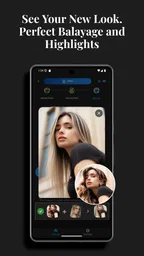
It can also help if you are considering highlights or balayage but do not yet know whether you want a subtle shift or a more noticeable effect. In that case, compare the overall impression rather than treating a preview as a promise of exact placement. Real hair, lighting, and a stylist’s technique all affect the finished look. The app is useful for deciding what to ask about, not for replacing that professional judgment.
For a low-pressure experiment, I would make a short list before opening the app: one cut idea, one color direction, and one concern. Maybe your concern is losing too much length, or whether a warmer-looking shade will suit your usual makeup. This keeps the session purposeful and helps you avoid the common trap of mistaking endless options for better decision-making.
Compared with browsing ordinary hairstyle photos, HairLook offers a more personal point of reference because the aim is to preview styles on your own image. That can be more relevant than looking at a model whose face and hair differ from yours. The trade-off is that a generated preview may look more certain than the real-world result deserves. A salon portfolio shows work performed on actual clients, while an AI preview is better treated as a rough visual conversation starter. For a detailed cut plan, a consultation with a stylist remains the stronger option.
Where the experience may still create friction
The app’s main strength—visual experimentation—is also its biggest limitation for people who need an alternative way to evaluate choices. Without a meaningful visual comparison, the central task becomes difficult to judge. If you rely on spoken descriptions, tactile references, or help from another person, you may find that the app supports the early idea stage but does not resolve the decision on its own.
There is also a risk of overconfidence. AI-generated hair can suggest a shape or shade, but it cannot settle practical questions such as how a cut will behave with your natural texture, how much styling it will take, or how a color will look in different light. I would bring the idea to a stylist as inspiration and ask what adjustments would make it workable for your hair and routine. That step matters most when the change is dramatic or difficult to reverse.
Cost is another consideration before you spend time exploring. The app is free to install, but it includes in-app purchases priced from $6.99 to $9.99 per item. I would first decide whether a visual try-on is genuinely useful to you, then check the purchase choice in the app before committing. If you only need a general reference image, a salon’s own examples or a conversation with a stylist may be enough; if seeing a version of your own look helps you think, the app may offer more personal value.
HairLook is rated for Everyone and is listed at version 3.0.0, with a minimum operating-system requirement of 7.0. It was released on August 22, 2025. Those details make it straightforward to assess whether the app is intended for a broad audience and whether a device can run it, but they do not change the central question: whether a visual, AI-led preview suits the way you make decisions.
Who I would recommend it to
I would recommend trying it if you are curious about a haircut or color but find it difficult to picture the change from words alone. It may be especially useful for someone who wants to arrive at a salon with a clearer preference, or for anyone who wants to test the general direction of an idea before discussing it with family, friends, or a stylist. The app is less compelling if you already have a precise cut in mind and mainly need expert advice about how it will work with your hair.
I would also be cautious about relying on it as the only source of guidance if you have access needs that make visual comparison or touch-based navigation difficult. In that situation, using the preview alongside another person’s description or a professional consultation may make it more useful. If even that does not make the image-based approach comfortable, browsing real salon examples or speaking directly with a stylist is likely a better fit.
My overall view is that HairLook: AI Hairstyle Try On is most helpful when it turns uncertainty into a better question. It can give you a visual starting point for exploring cuts, color, highlights, and balayage, but it should not be mistaken for a guarantee of a finished salon result. Use it to identify what attracts you, note what you would change, and let a professional help translate that idea into something suited to your hair.
For an accessible, low-pressure first step, that is a reasonable role. I would keep sessions focused, compare ideas carefully, and treat the output as inspiration rather than instruction. If you want a personal preview and are comfortable judging images, the free app is worth considering; if you need detailed hair-care advice, exact color guidance, or a nonvisual way to assess styles, a stylist or another source of support will serve you better. HairLook works best as a bridge between “I’m thinking about a change” and a more informed real-world conversation.
What we like
- Preview hairstyles on your own photo before visiting a salon.
- Try a range of looks without cutting or coloring your hair.
- Share hairstyle previews with friends for feedback.
- Useful for comparing styles against your face shape.
- Makes experimenting with a new look quick and convenient.
What could be better
- Results may look less realistic with poor lighting or blurry photos.
- Some styles may not match your actual hair texture.
- The available selection may feel limited for niche looks.
- Premium features may require a paid subscription.
- Photo-based previews cannot fully show how a style moves in person.





