

HairHunt: AI Hairstyle Try-On review
 Analysis by Appsdrops
I find HairHunt most useful as a low-pressure way to explore a haircut before committing to a salon appointment. It is a beauty app from Sugesta LLC that uses AI to place different hairstyles on a photo, making it easier to compare possibilities than to picture a new fringe or short cut from a reference image alone. That visual preview can help people who find it difficult to translate haircut names into a look they can imagine on themselves.
The important caveat is that a preview is a conversation starter, not a promise of how hair will behave after a real cut. Face angle, lighting, hair texture, and the way the image is processed can all affect what looks convincing. I would use HairHunt to narrow down a few ideas and explain them to a stylist, rather than treating its result as a precise salon simulation.
Making the preview easy to read and compare
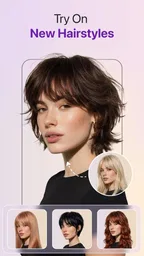
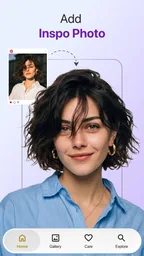
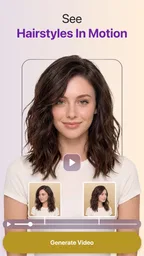
The app’s central task is straightforward: choose a photo and explore possible hairstyles, including options such as bangs, a bob, or a pixie cut. Keeping the experience focused on a recognizable image of yourself is a real advantage over browsing a large gallery of models. A style that looks appealing on someone else can feel very different when you see it placed on your own face.
When I assess a virtual try-on app, I care less about how many styles it can show than whether I can make a useful comparison. With HairHunt, a practical approach is to start with a clear, front-facing photo, then compare one meaningful change at a time. For example, try a shorter length without also changing the fringe. That makes it easier to notice what you actually like instead of reacting to several differences at once.
For readability, the most helpful outcome is a preview that gives you a clear visual reference, not a screen full of salon terminology. If you are unsure whether “bob” means chin-length, longer, blunt, or layered in your case, seeing a version on your own photo can make the conversation more concrete. Still, use plain language with your hairdresser too: point out the length and shape you want, and ask what would suit your hair in real life.
HairHunt has a 4.2 average from around 1,100 ratings, with 72 written reviews. Those figures offer a broad sense of how people have responded, but they do not tell me whether a particular preview will match your face or hair. The app has passed 100,000 installs, which suggests it has found an audience among people curious about virtual hairstyle experiments, while individual results remain the more important test.
Small workflow choices that improve the comparison
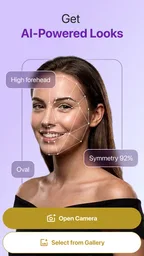
A useful, easily overlooked trick is to keep your source photo consistent while comparing styles. If you switch between photos with different lighting, expressions, or camera angles, it becomes harder to judge whether you prefer the haircut or simply the picture. A neutral expression and an unobstructed view of your hairline give the AI a clearer starting point, and give you a fairer side-by-side mental comparison.
I would also save or note only a small shortlist rather than collecting every appealing result. Three distinct directions—perhaps a fringe, a shorter bob, and a longer shape—are easier to discuss than a dozen near-duplicates. This keeps the app’s role practical: it helps you discover what to ask for, rather than turning a casual browse into an overwhelming catalogue.
Comfort, control, and different ways of using it
A photo-based experience can be more comfortable than trying on a wig in public or asking someone else to imagine a change for you. You can explore ideas privately and at your own pace. That matters for people who feel self-conscious discussing a major change, or who want to prepare before speaking with a stylist. Since HairHunt is rated for Everyone, it is presented for a broad audience; that rating does not mean every person will find its controls or visual results equally accessible.
Motor comfort is worth considering because a virtual try-on usually involves choosing a photo and moving through options. If precise tapping or repeated gestures are tiring, the experience may feel less effortless than the simple idea suggests. I would approach it in short sessions, make one choice at a time, and stop once the previews have answered the question you came in with. That is more useful than repeatedly adjusting a photo in pursuit of a perfect result.
Sensory preferences can shape how well the app works for you, too. Some people enjoy quickly cycling through dramatic transformations; others may find rapid visual changes distracting or prefer to inspect one option at a time. A calmer workflow is to decide in advance what you want to compare—length, fringe, or overall silhouette—and ignore styles that do not answer that question. It makes the session easier to follow and reduces the chance of choosing a look simply because it appeared striking on screen.
For anyone who relies on screen readers, magnification, voice control, or other assistive tools, I would treat actual use on your device as the deciding factor. The app’s purpose is visual, so its central benefit depends on being able to inspect a face-and-hair preview. People with low vision may still find a large, clear source photo useful, but a visual simulation cannot replace a verbal consultation or a tactile understanding of hair length and texture.
When the setting changes the usefulness
HairHunt can be especially handy before a haircut appointment. Imagine you have ten minutes on the bus before meeting your stylist and keep wavering between keeping your length and going shorter. A quick session can help you identify whether you are drawn to a fringe or a more substantial change. I would take that preference into the appointment as a starting point, while leaving room for the stylist to explain what works with your hair’s density, curl pattern, and maintenance needs.
It can also help when you are comparing looks with a trusted friend or family member. Rather than asking “Would bangs suit me?” in the abstract, you can show a few options and talk about what feels comfortable. If you are using the app in a bright public place, though, screen glare and distractions can make subtle differences harder to judge. A quiet moment with the same photo is better for careful comparison than a rushed scroll between errands.
The app is free to install, with in-app purchases ranging from $4.99 to $49.99 per item. I would first decide what you want to learn from the basic experience before considering a purchase, and check the current in-app terms carefully if you reach a paid option. The price range is wide enough that it is sensible to avoid tapping through payment screens casually, especially if you are only curious about one haircut idea.
Where the simulation can fall short
The biggest limitation is the gap between a digital overlay and a real haircut. Hair has texture, volume, movement, and styling demands that a still image cannot fully communicate. A pixie preview might help you see the general direction, but it cannot tell you how often you will want to style it or whether your hair naturally falls into the shape. Likewise, a fringe can look appealing in a photo while requiring upkeep you would rather avoid.
That distinction matters most for people with very distinctive curls, coils, waves, or hairlines. If the preview does not represent your texture convincingly, do not read that as evidence that a style will not suit you. Instead, use it to identify the broad shape you like, then ask a stylist for examples on hair closer to yours. For a decision that depends heavily on texture or technical cutting, a professional consultation is a better tool than any photo-based app.
Compared with browsing haircut pictures on social media or in a salon book, HairHunt has the advantage of putting the idea on your own image. Those usual alternatives may offer more realistic examples of actual finished hair, while the app can make personal comparison feel more immediate. I would combine them: use the preview to choose a direction, then look for real examples with similar hair and bring both references to the appointment.
There is also a risk of over-trusting a polished-looking result. AI can make a style appear more seamless than it would be after a cut, and a flattering preview is not a guarantee of a flattering outcome. I recommend checking whether you still like the idea after viewing it in ordinary light and thinking about your daily routine. If the hairstyle would demand more styling time than you want to give it, that practical mismatch matters more than the screen image.
HairHunt is currently at version 1.3.5, and it supports devices running Android 7.0 or later. It is free to download, while optional in-app purchases can cost from $4.99 to $49.99 per item. Its release date is November 18, 2025, so anyone deciding whether to install should consider both their device compatibility and whether a visual try-on fits the way they prefer to make appearance decisions.
Who will benefit, and who may prefer another route
I would recommend trying it if you are curious about a noticeable change, find haircut names hard to picture, or want a visual aid before talking to a stylist. It is also a reasonable choice if you prefer to explore privately rather than making an immediate appointment. Its main value is helping you turn vague curiosity into a more specific preference.
I would skip it if you need a dependable prediction of how a cut will sit on your particular texture, or if you want detailed advice about upkeep and styling. Someone who already knows the cut they want may get more from a stylist’s portfolio or an in-person consultation. And if visual interfaces are difficult for you to use, a conversation with a trusted stylist may be more informative than repeatedly inspecting simulated images.
A useful visual aid, with sensible limits
My overall view is that HairHunt is best treated as a visual brainstorming tool rather than a virtual stylist. Its focused try-on concept makes experimenting with bangs, bobs, pixie cuts, and other directions feel more personal than browsing reference photos alone. The strongest workflow is simple: use one clear photo, compare a few distinct shapes, and bring the result as a discussion aid rather than an instruction.
For inclusive use, the app’s appeal depends on whether its visual presentation and controls work comfortably for the person using it. A private, unhurried session can make exploration easier, but the photo-based format will not meet every sensory, motor, or vision-related need. I would recommend it to people who want a low-stakes way to narrow down haircut ideas, while being candid that real hair, real lighting, and a stylist’s judgment still matter more than an AI preview.
If you install it, go in with one question—such as whether you like a fringe or a shorter outline—and let that guide the session. That small bit of planning helps you get a useful answer without mistaking a convincing screen image for a guaranteed result. For that purpose, HairHunt earns a place among the tools I would try before a big haircut change.
What we like
- Preview hairstyles on your own photo before visiting a salon.
- Try a range of haircuts without making a real commitment.
- A quick way to explore styles that may suit your face.
- Useful for bringing a visual reference to a hairstylist.
- Can help narrow down ideas when choosing a new look.
What could be better
- AI previews may not match how a style looks in real life.
- Results depend on having a clear and well-lit photo.
- Some hairstyles may fit the photo awkwardly.
- The app may offer limited options without a subscription.
- Uploading a personal photo may raise privacy concerns.





