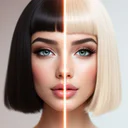
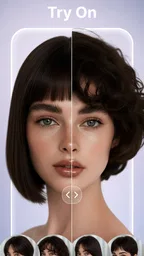
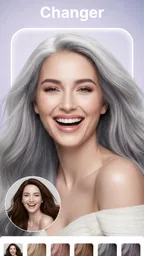
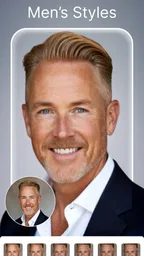
Hair Color & Hairstyle Try On review
 Analysis by Appsdrops
I would use Hair Color & Hairstyle Try On before making a real change, not as a substitute for a stylist. Its appeal is immediate: take a photo, explore a different color or shape, and get a rough sense of whether the idea feels like you. In my experience, that kind of low-stakes preview can make a salon conversation easier, especially when I know I want a change but cannot quite describe it.
Hair Color & Hairstyle Try On is a free beauty app from Toon Tech Ltd, with optional in-app purchases. It is rated for Everyone, and its focus is visual experimentation: hair color, cuts, bangs, and beard styles. That makes it more useful for narrowing down a direction than for predicting exactly how a particular dye or haircut will look in real life.
Why the first few tries feel useful
The best first use is not to hunt for a perfect makeover. It is to compare a few plausible choices against the same photo. A warm brown beside a cooler shade, for example, can reveal which direction suits the image better; trying fringe alongside a no-bangs option can help clarify whether a more noticeable change feels appealing. Keeping the photo constant makes the comparison more meaningful than switching pictures between every experiment.
I would choose a clear, front-facing image with the hair visible around the face, then check that the lighting is fairly even. A photo taken in strong shadow or with hair blending into the background can make an overlay look less convincing. This is a practical limitation of virtual try-ons generally: the result depends on how well the image gives the app a usable view, not just on the style selected.
The app has an average rating of 4.3 from around 9,300 ratings, and more than 100,000 installs. Those figures suggest that plenty of people are willing to try it, but they do not tell me whether its previews will suit every photo or taste. I would judge it on a small personal test: do the edits help me make a decision, or do they merely produce amusing variations?
Make the preview useful, not just entertaining
A useful workflow is to start with one question: “Would a shorter shape suit me?” or “Do I prefer a softer or stronger color?” Then try only a handful of options that answer it. Save or compare the most convincing looks if the app’s available controls make that possible, and review them later rather than making a choice while swiping quickly. This reduces the novelty effect, where every dramatic transformation seems appealing simply because it is different.
Hair previews are especially easy to over-trust when the chosen shade is vivid or the cut changes the outline of the face. I treat the image as a mood board, not a forecast. Real hair has texture, movement, roots, and lighting changes that a still preview cannot fully represent. If I liked a look, I would bring the image to a stylist and ask what parts are realistic for my hair, rather than requesting an exact copy.
Beard-style previews broaden the use beyond hair color and cuts, but they are still best understood as a way to explore a general direction. A mock-up can help someone decide whether facial hair feels worth trying, yet it cannot tell them how their own beard will grow or how much upkeep a particular shape will require.
What keeps it relevant after the novelty
For me, the lasting value depends on whether I am approaching a real decision. Someone considering a color change, a fringe, or a shorter cut may return to compare ideas before an appointment. Someone who already knows exactly what they want may only need the app once. And if I have no intention of changing my appearance, repeated transformations can lose their appeal quickly.
That makes it different from a general photo editor. Those apps are usually built around polishing an image, while this one is aimed at imagining a specific appearance change. It also differs from asking a stylist directly: a stylist can assess hair condition, texture, and maintenance needs, while a visual try-on can help me arrive with clearer preferences. I see the app as preparation for that conversation, not a replacement for professional advice.
There is a useful middle ground between “the preview is exact” and “the preview is pointless.” Even an imperfect image can show that I consistently prefer a darker tone, a softer fringe, or a less dramatic change. That preference is actionable. The key is to compare broad choices and avoid treating small differences in a generated image as reliable evidence about how real hair will behave.
Monthly value and the cost of keeping it around
The app is free to download, while in-app purchases range from $6.99 to $59.99 per item. I would explore the free experience first and decide whether the available options answer my actual question before paying for anything. The range is wide enough that I would check the specific purchase shown in the app carefully, rather than assuming every feature or package costs the same.
For an occasional user, that is the main value test: will I use it for a decision I am genuinely making, or am I paying to extend a short-lived novelty? If I am planning a salon visit, a focused session could be worthwhile. If I just want a few entertaining edits, I would be cautious about spending before I know what is included in the purchase I am considering.
The current version is 9.8.9, and the app requires Android 7.1 or later. That matters if an older device is part of the plan, though I would still check the app store on the device before downloading. The release date is Apr 8, 2025; for my decision, the more practical question is whether the app works smoothly with the photos I want to test and whether its free options are enough.
Where the routine can become tiring
The maintenance burden is light if I use it only when I am considering a change. It does not need to become a daily habit to be useful. In fact, I think occasional use is the sensible approach: choose a photo, compare a few realistic looks, note what appeals, and stop. Repeating the same experiments without a real decision in view is likely to feel less rewarding over time.
One source of friction is the gap between a clean preview and the upkeep of the real style. A striking color may require regular attention; bangs can need frequent shaping; a beard style may take effort to maintain. The app can help me notice what I like visually, but it cannot decide whether I am prepared for the routine. Before acting on a look, I would ask a stylist what maintaining it involves and whether it fits my usual schedule.
Another fatigue point is photo dependence. If the image is poorly lit, the hair is partly covered, or the angle hides the shape, the preview may distract more than it helps. Rather than endlessly adjusting a weak starting image, I would take another photo in even light and use a simple background. That small preparation is more useful than expecting a try-on tool to repair every limitation in the source picture.
Who should choose another route
I would skip this app if I need a dependable technical consultation about coloring, damage, or a cut suited to my hair texture. A stylist is better placed to evaluate those factors in person. I would also choose a conventional photo editor if my goal were retouching, filters, or general portrait effects rather than exploring hair and beard changes.
It may also disappoint anyone expecting a realistic promise of the final result. Different lighting, natural texture, hair density, and individual styling all affect what happens outside the screen. The app is most convincing as a way to organize taste: “more like this, less like that.” It is much less useful as proof that a particular shade or silhouette will look identical after a salon visit.
Toon Tech Ltd’s app is aimed at a broad audience, and its Everyone age rating fits the casual, visual nature of trying looks. Still, I would keep the purpose clear if a younger user is involved: experimenting with an image can be fun, but no preview should be treated as a judgment about someone’s appearance. The strongest use is curiosity paired with realistic expectations.
My long-term verdict
Hair Color & Hairstyle Try On earns space on my phone when I am actively weighing a change. It gives me a quick way to compare hair colors, cuts, bangs, and beard directions before committing, and that can turn a vague idea into a more useful conversation with a stylist. Its 4.3 average and 9.3K ratings provide context, but the deciding factor is whether its previews help me make a real choice.
I would not keep opening it out of habit, and I would not pay simply because the first few transformations are entertaining. I would use a good photo, test a small set of options, and treat the results as inspiration rather than a guarantee. If you are preparing for a change and want a visual starting point, it is worth trying. If you need expert advice or expect a precise simulation, a stylist or a more specialized consultation is the better next step.
What we like
- Try on hair colors before committing to a dye.
- Preview hairstyles using a photo of yourself.
- Explore a range of looks without visiting a salon.
- Useful for comparing options with friends or a stylist.
- A quick way to find inspiration for a new look.
What could be better
- Results may look different from real salon color.
- Photo lighting can affect how shades appear.
- Hairstyle overlays may not fit every face shape.
- Some features or styles may require payment.
- The app's usefulness depends on having a clear photo.





