






GlossGenius: Booking, Payments review
 Analysis by Appsdrops
Running a beauty business means keeping appointments, payments, and client communication from becoming a second full-time job. GlossGenius: Booking, Payments is aimed at that busy, service-based routine: it gives beauty and wellness professionals an app-centered way to manage parts of the business rather than relying on a calendar, payment tool, and scattered notes. I see its appeal most clearly for independent providers who want their booking and payment workflow to feel more organized, but it is worth approaching it as a business system to learn, not a magic fix for every scheduling headache.
Where the first snags tend to happen
The most useful way to judge a business app is to ask what happens before it becomes useful. With a tool like this, the first hurdle is usually not tapping through screens; it is deciding how the app should represent the way you actually work. A hairstylist, nail technician, massage professional, and solo esthetician may all need appointments, but their service lengths, working hours, and client routines can differ substantially. If you rush through setup, the app may reflect a tidy version of your business rather than the one you run every day.
I would start by writing down the services you offer, how long each appointment normally takes, and when you need a buffer to prepare or reset. Then compare that list with the choices in the app before opening your schedule to clients. This simple step helps prevent a common kind of friction: a calendar that looks available but does not leave enough practical time between one service and the next. It also makes it easier to spot whether your current routine is too varied for a straightforward booking setup.
The key trade-off is convenience versus control. A booking system can reduce back-and-forth, but it also asks you to keep business details current. If your hours change often, you take appointments in several different ways, or you make exceptions for regulars, a digital workflow may need more attention than a paper diary. That does not make the app unsuitable; it means the value depends on whether you are willing to maintain one dependable source of truth.
GlossGenius is a beauty app from GlossGenius, and its audience is clearly narrower than that of a general-purpose calendar. That focus is helpful if your work revolves around client services and appointments. It may be less natural for someone who only needs a private calendar reminder, or for a business whose jobs are quoted and scheduled through a highly customized process. Before moving everything over, I would use a small, representative set of services and check that the structure matches your real work.
Setup checks that save time later
When setting up any appointment workflow, check the basics in a deliberate order: business hours, service names, appointment lengths, and the gaps you need between clients. Do not assume that a setting you picked during setup will suit every service. A short appointment and a longer treatment can put very different demands on the day, and a rushed configuration can create either awkward gaps or an overpacked schedule.
I would also check the customer-facing wording you use. A service label that makes sense to you may be unclear to a first-time client. Use familiar names and descriptions, and make distinctions that matter in practice. If two appointments have different durations or expectations, clients should be able to tell which one they are choosing without needing a separate explanation from you.
There is a useful operational tip here: test the booking flow as if you were a new client, then look at the resulting appointment as the business owner. That perspective shift can reveal confusing service choices or a mismatch between the booking information and your actual routine. It is a small check, but it is more informative than simply confirming that the app opens and that your own calendar looks neat.
Another practical consideration is deciding how quickly you want to move clients into a new process. If existing clients are accustomed to messaging you directly, changing the routine all at once can cause confusion even when the new system is working as intended. I would introduce the new booking approach in a clear, consistent way and keep an eye on whether people understand where to make or change an appointment. The app cannot make a transition feel familiar on your behalf.
GlossGenius is free to download, which makes it reasonable to explore without treating installation as a major commitment. Still, free access does not mean there is no setup cost in time: organizing your services and adjusting your routine take attention. Its audience size suggests it is an established option, with over 100,000 installs, while its average score is 4.2 from around 1,600 ratings. Those figures can provide context, but neither tells you whether the booking model fits your particular business.
Recovering a workflow when something looks wrong
When an appointment or payment-related step does not seem to go as expected, I would avoid immediately changing several settings at once. First, identify what specifically failed: is the issue that a client cannot find a suitable time, that the appointment details are unclear, or that a payment step is confusing? Treating these as separate problems makes troubleshooting more useful than guessing at a general app failure.
For a scheduling problem, compare the client’s view with the hours and service details you intended to make available. Check whether the problem affects one service or every service, and whether it happens at a particular time of day. If only one service is affected, its duration or setup may be the place to investigate. If the issue appears across the board, review the broader schedule and the way you have configured availability before rebuilding your whole setup.
For a client who says they cannot complete a booking, ask what they see and at which step they get stuck. A precise description is more useful than “the app is broken.” The client may have misunderstood a service name, selected an option that does not suit their needs, or encountered a temporary interruption. A calm, consistent fallback—such as confirming the appointment through your usual communication method while you check the workflow—can prevent a technical puzzle from becoming a missed client visit.
On the business side, keep a simple note of changes you make while diagnosing a recurring issue. If you adjust hours, service timing, or another setting, record what changed and check the result before making another adjustment. This is especially useful when you work alone: without a record, it is easy to forget which change solved the problem and which one created a new scheduling gap.
For software trouble that persists, basic recovery steps are sensible: make sure the app is current, close and reopen it, and restart the device if the problem continues. The current release is 7.91.0, and the app supports devices running Android 8.0 or later. If your phone is older or the problem continues after basic checks, use the app store’s support route rather than repeatedly altering business settings. Troubleshooting should not put accurate appointments at risk.
When the app is not the cause
Not every missed appointment or confusing payment interaction points to a software defect. A client may have misunderstood what they booked, forgotten an agreed change, or reached you through an older channel while you were relying on the app’s schedule. These are process problems as much as technical ones. Clear service names, consistent booking instructions, and a habit of checking the appointment details can reduce them, but no app can eliminate misunderstandings between people.
Likewise, a schedule that feels too tight may be a sign that the business needs more breathing room, not a different setting. If you regularly run late, look at the real time each service takes, including preparation and cleanup. Shortening appointment lengths to make more slots appear available can create a worse experience for both you and your clients. The better fix may be to adjust the business routine rather than asking the calendar to hide its limits.
Payment concerns also deserve careful diagnosis. Separate a question about the client’s payment method from a question about how your business wants to handle payments. If a client is unsure what happened, gather the details calmly and use the appropriate support or payment channel for clarification. Avoid making duplicate charges or asking someone to repeat a payment simply because the first screen was unclear. A careful check protects trust while you work out whether the confusion came from the app, the customer’s device, or the process itself.
For teams or businesses with unusual scheduling rules, multiple layers of approval, or a need to coordinate work outside beauty and wellness services, a general business platform may be a better fit. GlossGenius’s focus is an advantage when your work matches its intended setting; it can feel limiting if you need a system built around a very different operation. I would not choose a specialized service app solely because it has booking in its name. The better question is whether its approach fits how your clients choose and receive services.
Who is likely to get the most from it?
I would consider it if I were an independent beauty or wellness professional who wants a more coherent appointment routine and is ready to keep business information up to date. It is particularly worth exploring if scheduling currently involves repeated messages, handwritten notes, and checking more than one calendar. Bringing those habits into a focused workflow can make the day easier to oversee, provided the setup reflects how you actually work.
It is a weaker choice for someone who rarely books clients, prefers to handle every appointment personally, or already has a dependable system that clients understand. Moving tools has a cost in attention: services must be organized, clients need to learn the new routine, and you must check that the schedule remains accurate. If your existing process is simple and causes no meaningful trouble, switching just to have another app may not improve your day.
The app is rated for Everyone, so its store age label is broad, but that is not the same as saying it is designed for every kind of user. Its professional purpose matters more than the age classification. I would judge it by your business needs and comfort with managing appointments digitally, not by the rating label alone.
My practical verdict
After weighing the likely setup work against the day-to-day purpose, I see GlossGenius as a focused option for beauty and wellness professionals who want their booking and payment routines to be less scattered. Its strongest case is not that it removes every business hassle; it is that a well-maintained system can make appointments easier to organize and give clients a clearer route into your services. The app has been available since January 10, 2017, and its 793 written reviews offer more user feedback to explore if you want additional perspectives before committing your workflow.
My recommendation is to begin with a realistic test: configure the services you use most, review the schedule from both sides, and try the process with a few willing clients before relying on it for every appointment. Pay attention to where people hesitate and whether the calendar leaves enough room for the way you deliver each service. That trial will tell you more than a quick browse of app screens.
I would give it a try if appointment coordination is taking time away from your clients. I would skip it, or compare it with a broader business tool, if your scheduling rules are unusual or your current routine already works smoothly. The best fit is the one you can keep accurate without constant effort; GlossGenius can help with that for the right service business, but the setup and follow-through still belong to you.
What we like
- Clients can book appointments online at any time.
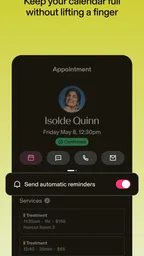
- Automated reminders can help reduce missed appointments.
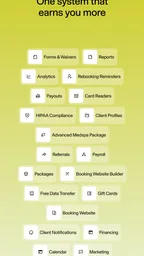
- Built-in payment tools support a smoother checkout.
- Client profiles make appointment details easier to track.
- The app is tailored to beauty and wellness businesses.
What could be better
- Some features may require a paid subscription.
- Payment processing fees can affect business earnings.
- The service is less suited to businesses outside its target industries.
- Clients need internet access to book online.
- Changing from another booking system may take time.





