



GigU - Drive Smart, Earn More review
 Analysis by Appsdrops
I see GigU as a practical companion for people who earn through app-based work and want a clearer routine around their day on the road. It is an Auto & Vehicles app from GigU, built for gigworkers rather than for general driving tasks. That focus matters: its value is less about replacing the delivery or ride-hailing apps you already use and more about helping you approach gig work with your goals and earnings in mind.
My overall impression is that GigU makes the most sense as a work aid, not a promise of higher income. Tools can help you make more deliberate decisions, but they cannot guarantee good demand, remove traffic, or make an unprofitable job worthwhile. If you already think about how each shift fits your target, the app is worth considering as a way to support that mindset. If you expect it to find work for you or automatically improve every trip, you may be disappointed.
A routine that starts before the first trip
A useful way to approach a gig-work helper is to make it part of a repeatable routine. Before starting a shift, decide what you want that session to accomplish, then use the app alongside the services through which you actually receive work. This keeps the purpose clear: GigU is there to support your working decisions, while the usual gig platforms remain central to finding and completing jobs.
For example, imagine you have a few hours available after another commitment. Rather than opening several apps and accepting the first tempting offer, take a moment to set a realistic aim for the session. Keep track of whether your choices are moving you toward it, and review the result when you finish. That simple before-and-after habit is more useful than treating any single tool as a shortcut to guaranteed earnings.
This kind of routine is especially relevant for drivers and couriers who work irregular hours. When one day is a short evening shift and another is a longer stretch, it helps to judge each session on its own terms instead of relying on a vague sense that you were busy. GigU’s stated focus on supporting gigworkers and their goals fits that kind of planning, though users should still make their own decisions about whether a job suits their circumstances.
The app is free to install, and its age rating is Everyone. It has an average rating of 4.4 from around 52,000 ratings, with over a million installs. Those figures suggest that it has reached a sizeable audience, but popularity alone does not tell you whether its approach fits your particular line of gig work. I would use the trial period to decide whether it genuinely improves your own routine.
Make the first check practical
When you begin using a work-focused app, avoid trying to change everything at once. First establish how you currently plan a shift and what you want help with: staying focused on a target, making a more consistent review of your day, or simply bringing more structure to work that otherwise feels reactive. Then see whether GigU supports that specific need. A clear test makes it easier to tell whether the app is useful, rather than confusing novelty with lasting value.
One non-obvious habit is to separate shift planning from shift evaluation. Before work, decide what would count as a worthwhile session for you. Afterward, reflect on what happened without rewriting the goal to make the day look better. This will not control demand or traffic, but it can show whether your own work patterns are helping or hindering your plans. GigU can be part of that process; it should not be treated as a substitute for your judgement.
Settings are personal, not magic
I would check the app’s available settings before relying on it during a busy shift, but I would keep that check grounded in what is actually on screen. The right setup depends on how you work and what information you want to consult. Make changes one at a time, then see whether they make the app easier to use in real conditions. Avoid assuming that a particular setting or automation exists just because another driver app offers it.
A sensible rule is to leave anything you do not understand at its default until you know why you would change it. This is especially important when you are trying to keep your attention on the road. Do your setup while parked, and do not browse or adjust an app while driving. If using GigU adds more distraction than clarity, simplify your routine or check it only before and after a shift.
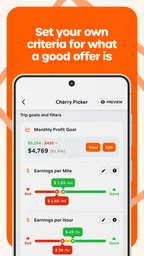
There is also a useful distinction between setting a goal and letting a goal dictate every choice. A target can help you structure a work session, but it should not pressure you into accepting a poor fit or staying out longer than makes sense. Treat the goal as a reference point, not an instruction to ignore safety, fatigue, expenses, or the realities of the work available to you.
Build faster habits around it
Experienced gigworkers often gain more from consistency than from constant tinkering. A repeatable pattern might be: prepare your setup while parked, decide what you are aiming for, work through your normal platforms, and make a brief review when the shift ends. Once that sequence becomes familiar, you spend less effort deciding how to begin each day and more attention on the work itself. GigU is most likely to help when it fits into that pattern without becoming another task to manage.
Another useful approach is to compare like with like. A short weekday session and a long weekend shift are not necessarily fair measures of one another. Keep your own notes or use whatever tracking method already works for you, and compare similar kinds of sessions. That can help you notice whether a change in your routine is genuinely useful, rather than attributing every good or bad result to the app.
For a driver who switches between different kinds of gig work, it is worth resisting the urge to treat every job as interchangeable. The demands of a delivery run and a passenger trip can differ, as can the time and costs involved. Consider what your own work requires before applying the same target or habit across every shift. GigU may support a general goal-oriented approach, but the experienced user still has to supply context.
If your phone is already crowded with work apps, decide in advance when you will consult this one. Opening another screen every few minutes can fragment attention and make a shift feel more complicated. A pre-shift check and an end-of-shift review may be enough for your needs. If you find yourself repeatedly reaching for it without a clear question, that is a sign to simplify rather than add more steps.
Where the app fits—and where it does not
GigU is not a replacement for the main platforms that provide gig work. Those apps are where workers typically see and manage the jobs they perform; a companion tool has a different role. Compared with relying only on memory or a loose personal routine, a dedicated gigworker app may give you a more intentional framework for pursuing goals. Compared with a spreadsheet or handwritten notes, it may be more convenient if its approach matches the way you prefer to work.
On the other hand, a simple notebook can be better if you want complete control over what you record or prefer not to add another app to your workflow. A spreadsheet can suit someone who enjoys comparing their own records in detail. And if your main need is navigation, vehicle maintenance, or a particular feature offered by a work platform, a tool dedicated to that task may be a better choice than a broader gigworker companion.
The key limitation is that an app can help organize decisions without controlling the factors that determine how a shift goes. Your opportunities still depend on the work available and the conditions around you. Do not interpret a goal-oriented tool as a guarantee that you will earn more, and do not assume that installing it will make every gig worthwhile. Its real usefulness has to show up in your own routine.
There is also a learning trade-off. Any extra app requires attention: you need to understand how it fits your work, keep your habits consistent, and decide when to check it. If you are new to gig work, it may be tempting to look for one tool that solves everything. I would instead learn the basics of your work platform and vehicle first, then add GigU only if you can name a specific planning problem it helps you address.
Cost, compatibility, and expectations
The app is free, with optional in-app purchases priced from $6.95 to $49.95 per item. I would start by assessing the free experience against a concrete need before paying for anything. A purchase is easier to evaluate when you know exactly what you hope to gain and have already made the app part of a workable routine. Avoid paying simply because you feel that a paid option must be necessary for gig work.
GigU is currently at version 1.3.5 and requires Android 8.0 or later. That makes device compatibility a straightforward thing to check before installing, particularly if you use an older phone for work. The app was released on August 18, 2024, and is developed by GigU. These details matter most for practical decisions: whether your device can run it and whether you are comfortable adding a relatively focused work companion to your phone.
People often wonder whether an app like this is suitable for every gigworker. I would say it is most promising for someone who already works through gig platforms, wants to be more deliberate about goals, and is willing to build a simple habit around checking and reviewing their work. It is a weaker fit for someone who wants the app itself to supply jobs, make decisions automatically, or replace the tools they already use to perform their work.
My verdict after weighing the trade-offs
I would recommend GigU to a friend who wants a more intentional approach to gig work and is comfortable treating the app as one part of a larger routine. Its focus on gigworkers gives it a clearer purpose than a generic driving utility, and the free starting point makes it reasonable to see whether that purpose matches your needs. The strongest case for it is not a hidden trick; it is the chance to turn scattered work sessions into something you plan and review more consistently.
I would skip it if your current system already works well, if you mainly need a specialist tool such as navigation, or if adding another screen would distract you during work. I would also be cautious about expecting any companion app to deliver a specific income result. Use your own experience to judge whether it makes planning easier, and keep safety and sound decisions ahead of targets.
For me, the best way to use GigU is modest and repeatable: prepare while parked, set a realistic intention, work through the services you already rely on, and review the session afterward. If that process helps you stay more organized, the app may earn a place in your workday. If it adds friction without helping you make clearer choices, a simpler routine is the better tool.
What we like
- Shows nearby fuel stations and helps compare prices.
- Offers route guidance for drivers on the road.
- Can help drivers find local service opportunities.
- Designed with a straightforward interface for everyday use.
- Combines driving tools and earning features in one app.
What could be better
- Earnings may depend on location and available demand.
- Some features may require account registration.
- Navigation and location tools need reliable GPS access.
- Frequent driving can increase battery and data use.
- Availability of services may vary by area.





