


Gather: Family Location & GPS review
 Analysis by Appsdrops
I think Gather: Family Location & GPS makes the most sense when a household wants one shared place for two practical routines: checking where family members are and keeping an eye on vehicle maintenance. It is a lifestyle app from gather.life, and that combination gives it a more specific purpose than a map used only to ask, “Where are you?” I would recommend it to people who can agree on sharing location and are willing to keep the vehicle information up to date. It is less compelling if you only need occasional directions or prefer not to share your whereabouts.
Start with a simple, shared routine
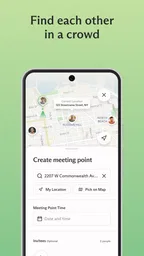
The most useful way to approach Gather is to decide as a group what you expect it to do before relying on it. Live location sharing can reduce the need for check-in messages, while family locator updates can help make everyday coordination easier. The vehicle maintenance tracker adds a separate, practical reason to return to the app. In my view, those pieces work best as a shared household routine rather than as features one person sets up and everyone else forgets.
A realistic example is a family juggling school pickup, work, and a car that several people use. Instead of sending repeated “Are you close?” texts, family members can consult the shared location information when timing matters. Whoever handles the car can use the maintenance tracker as a place to keep vehicle upkeep on the household’s radar. The benefit is not that the app makes plans for you; it is that fewer small details have to live in someone’s memory or an old message thread.
I would begin with a limited trial: invite only the people who genuinely need to coordinate, agree when location sharing is useful, and add the vehicle details you intend to maintain. That gives everyone a chance to see whether the shared arrangement feels helpful before it becomes a default. A location app is only useful when the people involved understand what is being shared and are comfortable using it.
It is also worth separating the two jobs in your mind. Location sharing helps with immediate coordination; maintenance tracking is about remembering vehicle-related tasks over time. They do not replace one another, and neither should be treated as a complete household organizer. Keeping those expectations modest makes it easier to judge whether Gather earns a place in your routine.
Make the first setup useful, not elaborate
When setting up a shared family tool, I prefer to start with the smallest group and purpose that will actually help. If a relative only needs occasional updates, they may not need the same everyday role as someone responsible for pickups or the car. A clear conversation about who is included and why can prevent the app from feeling like an obligation or a way to monitor everyone indiscriminately.
For the vehicle side, decide who will enter and maintain the information. If several people assume someone else is handling it, the tracker can become stale. One person taking responsibility—or an explicit handoff when the car changes users—is a simple habit that makes this feature more valuable. The same principle applies to shared location: agree on when you will check it instead of using it as a substitute for every conversation.
Settings and habits that make it easier to live with
Before relying on location updates, I would check the app’s available settings and the phone’s own location controls. Make sure the relevant people have configured their devices in a way that supports the sharing they agreed to, and review those choices after changing phones or adjusting privacy settings. I would not assume that a map view is automatically current in every circumstance; if timing is important, a direct message or call remains the sensible backup.
Privacy deserves the same attention as convenience. Talk through who can see location information and when using the app is appropriate. For some households, that may mean checking it chiefly for pickup coordination or travel; for others, it may be useful for everyday awareness. The key is consent and a shared understanding. If one person feels pressured to share, the household has a relationship problem that an app cannot solve.
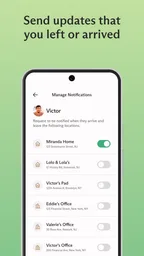
Notifications can also shape the experience, so I would keep them purposeful rather than allowing every update to compete for attention. If the app or device offers notification controls, choose the alerts that support real decisions and mute the ones that merely create noise. This is a practical trade-off: too few prompts can make an app easy to forget, but too many can make people ignore the information that matters.
A useful non-obvious habit is to make the maintenance tracker part of an existing car routine. For example, review it when the household is already discussing who will use the vehicle or when someone is preparing for a trip. That is more reliable than expecting a separate app to trigger a new habit on its own. I would also keep any important vehicle paperwork or professional advice where it belongs; an app tracker is a reminder and record-keeping aid, not a substitute for servicing guidance.
Another helpful pattern is to agree on a fallback. If someone’s location does not appear as expected, do not spend the whole pickup window troubleshooting. Send a message, call, or use the usual meeting point. That small rule prevents a convenience feature from becoming a single point of failure, especially when plans are changing quickly.
Use repeatable shortcuts instead of constant checking
Experienced users tend to get more value by creating predictable habits, not by opening a location screen every few minutes. In a family that shares school runs, for instance, the person waiting can check once when the pickup window begins and then contact the driver if plans need clarification. That avoids turning location access into a running commentary on someone’s movements.
For a shared vehicle, a simple handoff routine can connect the two sides of the app without inventing extra features: the person who has the car takes responsibility for noting relevant upkeep, then passes that responsibility along when another household member takes over. This is especially useful when one person usually books servicing but another drives most often. The app can support the routine, while the family’s agreement keeps the information dependable.
I would also avoid treating the map as proof that someone is available to respond. Seeing where a person is does not tell you whether they are driving, busy, or able to answer. A short message remains better when you need a decision, while location sharing is better for broad context. That distinction makes the app feel less intrusive and helps prevent misunderstandings.
Gather’s approach differs from using a general-purpose map for location alone because it also brings vehicle maintenance into the same household tool. Compared with a family group chat, it can give a more direct view of location rather than relying on someone to send updates manually. On the other hand, people who already use a location-sharing service they trust may see little reason to switch unless the vehicle tracker is useful to them too.
Where the convenience has limits
Live location is inherently dependent on people choosing to share it and on their devices being configured for that purpose. I would not use it as a guarantee of someone’s exact arrival time, nor as an emergency service. For a time-critical pickup, combine it with a clear plan and direct contact. If the household cannot agree on appropriate sharing, a calendar, group message, or fixed meeting point may be a better fit.
The maintenance tracker also depends on follow-through. If information is entered inconsistently, the feature can give a false sense of organization rather than a useful record. Before making it central to car care, decide who updates it and how the family will verify important details. Anyone who wants a specialized vehicle-management system with a particular workflow should compare those needs carefully rather than assuming a family locator will cover them.
There is a broader trade-off between combining tools and using separate ones. Keeping location and maintenance together can reduce app switching for a household that needs both. But someone who wants only a private navigation tool may find the family focus unnecessary, while a household that already has a reliable maintenance process may not gain much from the tracker. I would choose Gather for the combination, not simply because location sharing is familiar.
The app is free and rated for Everyone, which makes it straightforward to consider for a household with different ages. Still, an age rating is not a replacement for a family conversation about privacy, device access, and expectations. Adults should explain the purpose of sharing to younger users and avoid presenting continuous visibility as a test of trust.
Who I would recommend it to
Gather is a reasonable choice for families or small households that regularly coordinate arrivals and share responsibility for a vehicle. It has a 4.6 average from around 6.3 thousand ratings and has been installed over 100 thousand times. Those figures suggest that people are using it, but they do not tell me whether its particular mix of location and upkeep tracking matches your household. I would judge it by whether both parts solve a real recurring problem for you.
The app’s current version is 1.470.6, and it runs on Android 7.0 or later. If you are considering it for a mixed-device household, check compatibility on each person’s phone before building a routine around it. Gather was released on September 3, 2024, and its 483 written reviews offer another place to look for recent user experiences when deciding whether the current build suits your needs.
I would skip it if you do not want ongoing location sharing, if the other people involved are not comfortable joining, or if you need a tool dedicated to navigation or detailed vehicle records. A standard map is often enough for directions, and a simple shared calendar or chat can be better for families who only need occasional coordination. Choosing the lighter option is sensible when the extra shared visibility would add more tension than convenience.
My verdict is that Gather is most useful when a household turns it into a modest, agreed-upon routine: check location for coordination, use direct communication when a decision is needed, and assign someone to keep vehicle information current. That combination can save small bits of time and reduce avoidable check-in messages. It will not manage family logistics by itself, and it works best when everyone understands its limits. If those conditions fit your life, I think it is worth trying; if not, a simpler tool may serve you better.
What we like
- Location sharing helps family members coordinate meetups.
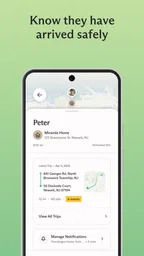
- Arrival alerts can notify you when someone reaches a saved place.
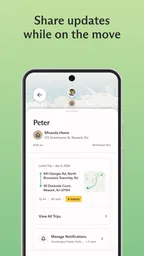
- A shared map makes it easy to check family members’ locations.
- The app can help locate a misplaced phone when location services are active.
- Place alerts can reduce the need to send repeated check-in messages.
What could be better
- Accurate updates depend on a stable internet connection.
- Background location access can increase battery consumption.
- Family members must agree to share their location.
- GPS readings may be inaccurate indoors or in dense urban areas.
- Location sharing raises privacy concerns for some users.





