
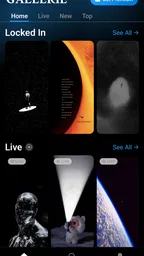

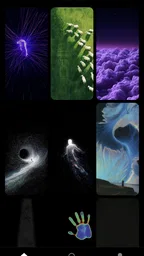

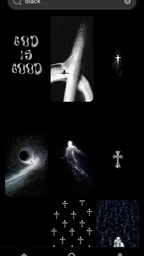
Gallerie Wallpapers review
 Analysis by Appsdrops
Choosing a wallpaper sounds like a tiny bit of phone maintenance, but it can take longer than it should. You scroll through mixed-quality images, find a promising one, and then discover it does not look as good on your screen as it did in the preview. Gallerie Wallpapers aims to make that first part easier by focusing on high-quality wallpapers and filtering out weaker options. I like that straightforward promise: less time sorting through visual clutter, more time finding something that feels right for your phone.
A simpler starting point for personalizing your phone
As a personalization app, Gallerie Wallpapers is built around a familiar need: giving your device a look that feels a little more like yours. It is a free app from Sibelius Studios LLC, and its central idea is easy to understand even before you start browsing. Rather than positioning itself as a broad collection of phone tools, it puts the wallpaper itself front and center.
That focus matters in everyday use. When I want to change my screen, I am usually not looking for a complicated project. I want to browse, spot an image that suits my mood, and see whether it works as a background. The app’s emphasis on curated quality speaks to that simple workflow. Its pitch is not that every image will be perfect for every person, but that the browsing experience should avoid making me sift through as much low-quality material.
The app has reached over a million installs and holds an average rating of 4.6 from around 35,000 ratings. Those figures suggest that plenty of people have tried it, though the most useful question for any individual is still whether its collection matches their taste. Wallpaper choice is personal: an image that looks polished to one person may feel too busy, too bright, or simply not their style to someone else.
From opening the app to choosing an image
The natural first step is to browse with a rough idea in mind. Maybe I want something calm behind my icons, a striking image that gives the screen more character, or simply a change from the background I have been seeing every day. Gallerie Wallpapers’ quality-first approach gives that search a clear starting point: look for an image that catches the eye, then judge whether it suits the device and the way I use it.
That distinction between an attractive image and a useful wallpaper is important. A picture can look impressive on its own but become distracting once it sits behind app icons and other screen elements. I would take a moment to consider the overall composition, the amount of visual detail, and whether the colors feel comfortable for repeated viewing. A good wallpaper is not only something I admire once; it is something I can live with whenever I pick up my phone.
After finding a candidate, the next part of the workflow is deciding whether it feels right as a background rather than just as artwork. This is where personal preference takes over. Some people want a bold focal point; others prefer a quieter image that stays in the background. The app’s quality filter can help narrow the field, but it cannot make that choice on my behalf. The final decision still comes down to how the image fits my screen and my taste.
The handoff from browsing to the home screen
A wallpaper app’s job does not end when an image looks appealing in a gallery. The real handoff is from browsing to using that image on the phone. That is the point where I stop judging a picture in isolation and start thinking about the screen it will occupy. Will icons remain easy to pick out? Does the image feel balanced in the space available? Is it something I will still enjoy after the novelty wears off?
Those questions are useful even when the image itself is high quality. A polished wallpaper can still be a poor match for a particular layout or personal routine. I would treat the selection as a small design decision rather than automatically choosing the most dramatic option. For a screen I look at constantly, a background that feels comfortable and clear can be more satisfying than one that only makes a strong first impression.
Once I have made a choice, the outcome is refreshingly easy to understand: the phone gets a new visual identity. That small change can make a familiar device feel more personal without requiring a full redesign. In that sense, Gallerie Wallpapers is appealing because the goal is concrete. I am not learning a complicated system; I am looking for a better background and deciding whether it belongs on my screen.
What the quality-first approach gets right
The strongest part of the app’s concept is its restraint. Wallpaper collections can become tiring when the user has to wade through a lot of images that do not meet a reasonable standard. Gallerie Wallpapers’ promise to filter out the bad makes the browsing task sound more intentional. I appreciate that kind of focus because it respects the reason people open a wallpaper app in the first place: they want options worth considering, not an endless pile to sort manually.
It also makes the app easy to recommend as a starting point for someone who wants to personalize a phone without turning the task into a hobby. You can approach it with a particular mood in mind or simply browse until something clicks. Either way, the quality-led identity gives the experience a clear purpose. It is not trying to make wallpaper selection feel more complicated than it needs to be.
There is a practical benefit to keeping expectations grounded, too. A curated collection can reduce friction, but it cannot guarantee that every person will find the right image immediately. Taste varies, and a background that works beautifully for one screen may not suit another. I see the app’s promise as a helpful filter at the beginning of the search, not a replacement for taking a moment to decide what I actually want to look at every day.
Where the workflow can lose momentum
The main point where this kind of workflow can break is the gap between general quality and personal fit. “High quality” is a useful baseline, but it does not tell me whether a wallpaper matches my preferred colors, mood, or home-screen arrangement. If I have a very specific look in mind, I may still need patience while browsing. The filter can remove weaker choices, yet it cannot make every remaining image feel relevant to me.
Another possible snag is choosing too quickly. It is easy to pick an image because it looks striking in the moment, only to find that it feels busy once the phone is back in regular use. I would avoid treating the first appealing result as an automatic winner. Taking a beat to imagine the wallpaper behind icons and on a screen I check often is a simple way to make the final choice more satisfying.
There can also be a mismatch between what I expect from a personalization app and what a focused wallpaper app is designed to provide. If I arrive looking for a wide range of customization tools, a wallpaper-centered experience may feel narrow. That is not necessarily a flaw; it is a matter of expectations. Gallerie Wallpapers makes most sense when the task is specifically finding a background, rather than changing every part of a phone’s appearance in one place.
Cost, compatibility, and everyday expectations
Gallerie Wallpapers is free to download, with optional in-app purchases priced from $0.99 to $12.99 per item. That gives people a way to try the app before deciding whether they want to spend anything. I would approach any optional purchase with the same common-sense question I use for wallpaper choices: does the item offer something I genuinely want, or am I happy with the experience I already have?
The current version is 2.0.5, and the app requires Android 8.0 or later. It is rated Teen, which is a detail worth keeping in mind for families deciding what to install. The release date shown for the app is October 18, 2025. These practical points do not change the core browsing idea, but they help set expectations before making it part of a regular personalization routine.
With 129 written reviews alongside its much larger rating total, there is some user commentary to explore in the app store if I want a broader sense of other people’s experiences. I would treat opinions as individual perspectives rather than a promise that my own search will go the same way. Wallpaper satisfaction depends heavily on taste, so the best test is whether the collection offers images I personally want to keep looking at.
The result: a more considered screen
When the workflow goes well, the payoff is small but noticeable. I start with a screen that feels generic or overdue for a change, browse a collection intended to prioritize quality, and end with a background that better suits my preferences. That is not a dramatic transformation, but it is exactly the kind of low-effort personalization many people want: one decision that makes a familiar device feel a little fresher.
My favorite aspect of the idea is that it keeps the task understandable. I do not need to overthink what the app is for. I open it to look for a wallpaper, judge the options by my own standards, and choose an image that works in daily use. The quality-first promise can make that search less frustrating, while the final call stays where it belongs—with the person using the phone.
Gallerie Wallpapers is a focused choice for anyone who wants a cleaner route to finding phone backgrounds. Its main appeal is the promise of high-quality wallpapers without making the user do all the filtering alone. It may not suit someone expecting a broad customization suite, and individual taste will always shape the result, but those are fair trade-offs for an app with a clear, narrow purpose. If a fresh background is all you need, I think it is worth exploring as a straightforward way to make your screen feel more personal.
What we like
- Offers a large selection of wallpapers for personalizing your device.
- Lets you preview images before setting them as wallpaper.
- Provides an easy way to browse available wallpaper categories.
- Includes images suited to a range of screen styles and preferences.
- Makes it simple to refresh your home screen's appearance.
What could be better
- Image quality may vary across the wallpaper collection.
- Some wallpapers may not fit every device screen perfectly.
- Finding a specific image can take time in a large gallery.
- Wallpaper availability may depend on an internet connection.
- The app may include ads that interrupt browsing.





