Fuel Forward review
 Analysis by Appsdrops
I would consider Fuel Forward if I regularly stop at Phillips 66, Conoco, or 76 stations and want a phone-based way to handle fuel payments and savings. It is a free auto-and-vehicles app from Phillips 66 Mobility, built around those fuel brands rather than as a general-purpose wallet. That focus is its main appeal—and also the first thing to check before installing: the app is most useful when those stations fit your usual routes.
For a first-time user, the sensible goal is modest: get set up before you are at the pump, then see whether the app can make a familiar fill-up smoother. I would not treat it as a guaranteed way to find the cheapest fuel everywhere. It is better understood as a brand-specific tool that may reward you for keeping payment and fuel savings in one place.
What to expect from Fuel Forward
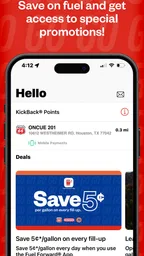
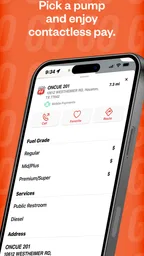
The app is aimed at two practical jobs: mobile payment and fuel savings at participating Phillips 66, Conoco, and 76 locations. That is different from a general fuel finder, which may help compare stations across many brands but does not necessarily handle payment at the pump. Fuel Forward makes more sense when you already buy from one of its covered brands and want a station-specific option.
I would think of it as a companion for a regular stop, not a replacement for every part of a driving routine. If your nearest station is from another chain, or your trips take you through areas with few of these locations, the app may sit unused. If one of the three brands is already part of your weekly commute, the focused setup could be worthwhile.
The app has an average rating of 4.4 from around 9,600 ratings, and it has been installed over a million times. Those figures suggest that plenty of drivers have tried it, but they do not tell you whether your local station supports the exact payment experience you want. I would judge it by one real visit rather than assuming every location works in precisely the same way.
Its content rating is Mature 17+, an unusual detail for a fuel-payment app, so it is worth checking the age label in your app store before downloading it for a younger driver. The app is free, which keeps the decision low-risk, though the value still depends on whether its participating stations match your habits.
Before you install: check whether it fits your route
My first practical tip is to start with your routine, not with a search for the biggest possible discount. Think about where you normally refuel: near home, at the end of a commute, or on a regular longer drive. If Phillips 66, Conoco, or 76 is already a convenient stop, the app has a natural role. If using it would mean taking a detour, any savings can be offset by the extra distance and time.
Fuel Forward is not the best choice for someone who wants one app to manage every gas station brand. In that case, a broad station-search or payment option may be more useful, even if it does not provide the same brand-specific experience. I would keep the distinction clear: Fuel Forward is for making certain stations easier to use, not for planning every possible fill-up.
Set it up while you are parked
I recommend installing and exploring the app before you need fuel. Create a little time to follow its on-screen setup and review the payment and savings areas while you are somewhere safe. A pump is a poor place to learn a new interface: there is pressure to keep traffic moving, and switching between the phone and the pump can make a simple task feel rushed.
The app is currently at version 7.11.0 and requires iOS 11 or later on Apple devices. Before installing, I would check that the phone you plan to use meets that requirement and that you can access the account details needed during setup. I would also make sure the device is charged enough for a stop; phone-based payment is convenient only if the phone is available when you reach the station.
Once inside, take a moment to understand where the app presents payment and fuel-savings information. The useful habit is to look for the next action before you are standing beside a vehicle: know which screen you need, and avoid assuming that opening the app alone completes a payment. The pump or the app should make clear when a transaction has actually started or finished.
I would also treat the first setup as a chance to decide whether the app belongs on your home screen. If you expect to use it often, keeping it easy to find can shave off friction at a regular stop. If you only visit these stations occasionally, there is less reason to build it into your daily routine; opening it when you know a qualifying stop is coming may be enough.
Your first successful fill-up
For the first try, choose a station from one of the covered brands that you already intended to visit. Park, open the app, and follow the payment instructions shown for that stop rather than improvising from memory. Keep your usual backup payment method available until you are confident the app has completed the process. That is not a criticism of mobile payment; it is a sensible way to avoid turning a first attempt into a delay.
A realistic example is a weekday commute with a familiar Conoco station near the route. Before leaving work, I would open Fuel Forward and check that I can reach the relevant payment and savings information. At the station, I would follow the app’s displayed steps and verify the result before driving away. That short rehearsal helps separate setup problems from station-specific questions and gives you a clear answer about whether the app fits your routine.
One non-obvious benefit of trying it on a planned stop is that you can compare the whole experience, not just the promise of savings. Notice whether the app is easy to find, whether the instructions make sense at the pump, and whether the process feels quicker than paying in your usual way. If the savings are modest or the steps add hassle, that is useful information too; convenience has to work in practice to count.
Do not assume that a single successful visit proves every location will behave identically. A brand name may cover many stations, while the exact experience can depend on the location and its equipment. When something on the pump does not match the instructions you see in the app, pause and use the station’s normal payment method rather than repeatedly trying an unclear sequence.
Where first-time users can get confused
The most likely misunderstanding is expecting Fuel Forward to behave like a universal mobile wallet. It is designed around three fuel brands, so it should not be your only payment plan at an unrelated station. I would keep a bank card or another familiar option available, especially during the first few uses and on road trips where you cannot choose the next stop.
Another point to keep straight is the difference between finding a useful offer and completing a payment. Savings information can influence where you choose to refuel, but it does not necessarily mean that the payment has been authorized. Read each screen as a step in a process, and look for a clear confirmation before assuming the transaction is done. This small check is more valuable than rushing through prompts at the pump.
If you are traveling, plan around the brands rather than relying on Fuel Forward as a complete trip-planning tool. A general map or station-search app may be better for comparing all nearby fuel options; then Fuel Forward can be useful when the chosen stop is one of its supported brands. Using both approaches is more realistic than asking one focused app to cover every need.
Privacy and account comfort matter as well. Since this app is used for mobile payments, I would read its in-app explanations and the app-store privacy details before adding payment information. That is sensible for any financial feature, not a special warning about this app. If you are uncomfortable managing fuel payment on a phone, paying directly at the station remains a perfectly reasonable alternative.
Who should make it part of a routine?
I would recommend giving Fuel Forward a try if you often use Phillips 66, Conoco, or 76 and prefer to prepare payment on your phone. It is especially suited to drivers who repeat the same commute or errands, because familiar stops make it easy to learn the process and decide whether the savings are worth keeping the app installed.
It is less compelling for drivers who choose stations solely by the lowest price, refuel across many unrelated brands, or rarely visit the covered networks. A broad fuel-comparison app may serve those needs better, while a standard card is simpler for someone who wants no extra account or app in the payment routine. Fuel Forward earns a place through fit, not through being the right answer for every driver.
The app is free, and its release date is October 1, 2014, so it has been around long enough to become an established option rather than a brand-new experiment. Still, an app’s age and popularity cannot substitute for checking your own station experience. I would use the first visit as a practical test and keep it only if the payment flow and savings genuinely improve a stop you already make.
My next step after trying it
After one successful fill-up, I would make a simple decision: does the app save effort or provide a useful savings reason to return to these stations? If yes, keep it handy and check it before your usual stops. If not, there is little benefit in opening it out of habit. That test avoids letting a fuel app become another unused icon on your phone.
My overall view is that Fuel Forward is a focused, potentially handy tool rather than an essential app for every motorist. Its strongest case is straightforward: you already use one of its three station brands, you want mobile payment and fuel savings in the same brand-specific experience, and you are willing to set it up before arriving at the pump. For that driver, the best first move is to try it on a familiar, planned stop while keeping a backup payment method ready. If your fueling habits do not match those brands, a more general option will probably serve you better.
What we like
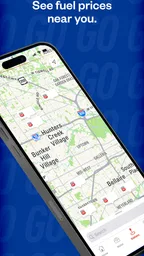
- Fuel prices are easy to compare at participating stations.
- The app can help locate nearby fuel stations.
- Eligible users can access fuel savings through the app.
- A digital payment option can make checkout more convenient.
- The interface is designed for quick use while traveling.
What could be better
- Savings and features may vary by location.
- Not every fuel station participates in the program.
- An internet connection is needed for many app features.
- Payment options may not suit every user.
- Fuel prices shown may change before you arrive.





