
Ford™ review
 Analysis by Appsdrops
I can see why a Ford owner would try the Ford app early on: it puts vehicle-related tools in one place instead of making every small task feel like a separate errand. The more useful question is whether it still earns a place on your phone after the first week. In my view, it can—especially if you regularly manage a Ford through your phone—but its lasting value depends on the car and services you actually use, not on novelty alone.
From first-week convenience to everyday habit
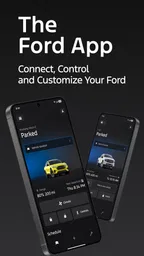
Ford, made by Ford Motor Co., sits in the lifestyle category, though it is much more practical than that label suggests. FordPass is now the Ford app, and the change in name reflects its role as a broader companion for owners rather than a single-purpose novelty. I would think of it as a mobile front door to Ford-related ownership tasks, not as a replacement for the vehicle itself or for every service you might need.
The first few days are usually when an ownership app feels most appealing. You are curious about what it can do, you may be setting up your account, and you want to see whether it makes ordinary interactions with your vehicle easier. That initial exploration is worthwhile, but I would avoid judging the app by how many screens you open on day one. The better test is whether you return to it for a real task a week later.
A useful first-week approach is to set it up when you have time, while you are near the vehicle and can check that the account and car details are the ones you intend to use. Then try one task you would otherwise handle another way. That small test tells you more than browsing every menu: it shows whether the app fits your routine and whether its vehicle-specific tools apply to your Ford.
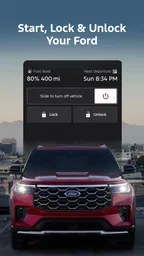
For example, imagine leaving home on a cold morning and wanting to check something about the car before heading out. If the relevant vehicle feature is supported and configured, opening the app may be more convenient than going back outside simply to check. The important qualification is that app capabilities depend on the vehicle and its available services. I would treat the app as a useful companion, not assume every Ford owner sees identical controls.
Where the recurring value comes from
The strongest long-term case is consolidation. Ford owners often have a mix of routines: checking vehicle information, handling ownership-related tasks, and finding help when something needs attention. Keeping Ford-specific tools together can reduce the mental effort of remembering where to go. That benefit is modest on any one day, but it becomes more meaningful when you use the app repeatedly over months.
Its audience is substantial: it has more than 10 million installs and a 4.7 average from around 473,000 ratings. Those figures suggest that many people find a reason to keep it, but they do not guarantee a smooth experience for every vehicle or owner. I would put more weight on whether the functions you need are available for your specific car than on popularity alone.
One practical tip is to make the app earn its place through a recurring job. If you only open it once during setup and never have a reason to return, it may not be worth keeping prominent on your home screen. If it helps you with a task you otherwise put off—such as checking ownership information before making a call or preparing for a service visit—it has a clearer role. The useful habit is not “open the app every day”; it is “use it when a Ford-related task comes up.”
That makes the app different from a general vehicle log or a broad car-shopping tool. Those alternatives can be better for tracking multiple makes, comparing used cars, or keeping a brand-neutral maintenance record. Ford’s app has a narrower advantage: it is intended for Ford ownership, so it is the more natural place to start when the task concerns a Ford vehicle or Ford service. If you own several brands, you may still want a separate cross-brand tool for records and reminders.
What maintenance really asks of you
The app is free, which makes trying it low-risk, and its content rating is Everyone. Still, free does not mean there is no setup effort. You need to get the right account and vehicle context in place, and you should take a moment to learn which functions apply to your car. That initial housekeeping is the main maintenance burden: without a correct setup, a convenient app can become another place where information is incomplete or confusing.
I would also keep expectations realistic around connectivity. A phone app can make ownership tasks easier, but it cannot remove the need to check the vehicle, follow the owner’s manual, or contact a service professional when a problem calls for one. If a screen does not show what you expect, first check that you are using the right vehicle and account, then use the appropriate Ford support or service route rather than treating the app as a definitive diagnosis.
For service planning, a helpful workflow is to use the app as a starting point, then keep your own notes about symptoms, dates, and questions before speaking with a service center. This is useful because a convenient digital record is not the same thing as a complete account of what you noticed while driving. A short note such as when a warning appeared or what changed can make the follow-up conversation clearer.
There is a trade-off here: an app tied to one manufacturer can be more relevant for that brand, but it is less useful as a universal vehicle organizer. If you sell the Ford, change vehicles, or mainly want a single place to manage a mixed household fleet, a brand-independent solution may fit better. I would not maintain two overlapping tools unless each has a distinct job.
When convenience turns into friction
The main source of fatigue is expecting the app to be equally useful every day. Vehicle ownership has quiet stretches, and a companion app may sit unused until a question or task arises. That is not necessarily a failure. It becomes frustrating only if you expect constant activity or keep checking it without a clear purpose.
Another possible friction point is the gap between what an owner hopes the app will do and what their particular vehicle supports. Before relying on a feature for an important routine, check that it is available for your car and that setup is complete. This is especially sensible if you are considering using the phone instead of a familiar in-car control or an established service process. Keep a backup plan for anything time-sensitive.
Some owners may also prefer a direct phone call, a dealer visit, or the vehicle’s own controls. That preference is reasonable. The app is not automatically faster simply because it is on a phone; if you have to search through menus for an occasional task, the familiar route may be simpler. I would keep it for the jobs where it saves a step, and ignore the rest rather than trying to turn it into a daily ritual.
It is available at no charge, and the age guidance is Everyone, so cost and age classification are not major barriers for most households. The more important question is fit: do you own a Ford, and does the app cover the parts of ownership you want to handle digitally? Someone who does not have a Ford, or who wants a comprehensive tool for every make, is unlikely to get much lasting value from it.
Who should keep it installed
I would recommend giving it a fair trial if you own a Ford and want a single mobile starting point for Ford-related ownership tasks. It is especially sensible for someone who prefers handling routine checks and information on a phone rather than searching through paperwork or relying on memory. The app’s large community—around 45,000 written reviews—also indicates that it is an established choice, though individual usefulness still comes down to vehicle compatibility and personal habits.
I would be less enthusiastic if you rarely use digital tools for your car, already have a reliable system that covers your needs, or primarily want maintenance tracking across different manufacturers. In those cases, a paper record, a general-purpose vehicle app, or direct contact with a service provider may be more straightforward. There is no benefit in adding another app simply because it is available.
On Android, the stated minimum operating system is version 10, so check your device before installing. The app was released on April 28, 2016, but what matters more to a new user is whether it works with their phone and Ford vehicle today. I would install it, complete only the setup needed for my car, and test one recurring task before deciding whether it deserves a lasting spot.
My long-term verdict is measured but positive. The Ford app earns space when it removes friction from real ownership tasks, not when it merely adds another screen to check. For a Ford owner who finds one or two useful routines in it, keeping it installed is an easy choice. For everyone else, especially people seeking a brand-neutral garage manager, its narrow focus is a genuine reason to choose something different.
What we like
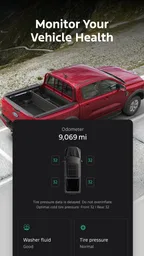
- Check vehicle health and maintenance details from your phone
- View fuel levels and odometer readings remotely
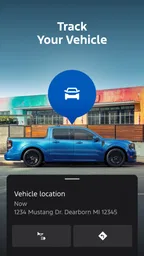
- Locate your parked vehicle on a map
- Schedule service appointments through the app
- Access roadside assistance information when needed
What could be better
- Remote features require a compatible Ford vehicle
- Some connected features require a paid subscription
- Availability varies by vehicle model and location
- Remote commands may take time to complete
- Vehicle data may not update when connectivity is weak





