
Flowbird Parking review
 Analysis by Appsdrops
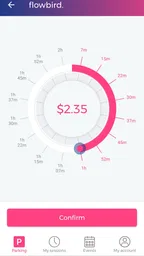
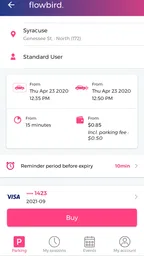
I find Flowbird Parking most useful when I want to handle a parking session from my phone instead of relying entirely on a meter. It is a free app in the auto and vehicle category, developed by Flowbird, and its focus is straightforward: mobile phone parking. That idea can save a little hassle on a busy day, but the real value depends on whether Flowbird’s service is available where you park.
What you get without paying for the app
The app itself is free to download, so trying it does not require an upfront purchase. That is a useful distinction for a parking tool: you can see whether it suits your routine without first paying for access. Parking charges are a separate matter, though. Free access to the app should not be mistaken for free parking; you still need to follow the rules and charges that apply to the space you use.
I would treat it as a practical payment companion, not a promise that every parking visit will cost less. The benefit is convenience when the relevant parking location supports the service. If you usually park somewhere that does not accept it, installing the app will not replace the local meter or other accepted payment method. Before depending on it for a trip, check that Flowbird is usable for the specific place you intend to park.
There is a modest but useful signal of reach: Flowbird Parking has over a million installs, with an average rating of 3.8 from around fifty thousand ratings and about twelve hundred written reviews. Those figures suggest that many drivers have tried it, while the rating also leaves room for mixed experiences. I would not use popularity alone to decide whether it will work for my own parking routine; local availability matters more.
Where the convenience can make a difference
The clearest value is avoiding a trip back to a meter or the need to keep coins handy. Imagine arriving late for an appointment, parking in a supported area, and wanting to get indoors promptly. Handling the session on your phone can make that moment smoother than searching for change or interrupting your walk to use a machine. It is a small improvement, but one that matters when you are carrying bags, managing children, or trying to make a scheduled visit.
That convenience is especially relevant for people who park in the same supported districts repeatedly. Once the app is part of a familiar routine, the phone becomes an alternative to the physical payment process. Occasional visitors may still appreciate it, but they have more reason to check the local instructions carefully, since familiarity with one town or parking area does not guarantee the same arrangement elsewhere.
A useful habit is to make the parking decision before walking away from the car: confirm the location’s rules, check that the app applies there, and complete the required payment steps before settling into your day. This is not a special feature claim; it is simply the safest way to use any phone-based parking service. A quick check at arrival can prevent the false confidence of assuming that an app works everywhere.
How it compares with a meter or other parking apps
Compared with a traditional meter, a phone-based option can be more convenient when the meter is awkwardly placed or you do not have suitable change. A meter may still be the clearer choice if it is right beside the car, accepts your preferred payment method, and gives you a simple, visible way to finish the transaction. I would not reach for a phone automatically when the physical option is faster and accepted.
Compared with another parking app, Flowbird’s main question is not which one has the most attractive interface; it is which service the location accepts. Drivers who move between cities may encounter different systems and may need to keep more than one option in mind. For a regular route covered by Flowbird, using one familiar service can reduce friction. For someone whose parking areas use a different provider, that other app—or the local meter—is the more sensible choice.
There is also a practical backup issue. A phone-based approach depends on having your device available and being able to complete the process when you arrive. If your battery is low, you have poor access to your phone, or you prefer not to manage parking digitally, a meter or another accepted method may be less stressful. I would keep a backup payment plan when parking somewhere unfamiliar rather than assuming the app alone will cover every situation.
Small decisions that make the experience more dependable
For occasional use, I would check the parking signs before opening the app rather than searching by guesswork. The sign is the authority on the space and its restrictions; the app is a means of handling parking where its service applies. That order matters because a smooth payment flow cannot make an unsuitable space legal or change the local time limits.
For repeat visits, it helps to make a mental note of the exact areas where the service has worked for you. That is more useful than assuming that nearby streets share the same arrangements. A driver who parks in a downtown district one week and a different neighborhood the next should treat each location as a fresh check. This simple practice reduces the chance of relying on an app based on a previous, unrelated visit.
If you are paying while in a hurry, pause long enough to verify that you are handling the intended parking place and session. Phone convenience is most valuable when it reduces unnecessary steps, not when it encourages a rushed tap without checking the surroundings. I would also avoid leaving the process until the end of a visit if the local rules require payment at arrival; follow the instructions for that location rather than relying on memory.
Who is most likely to get value from it
I would recommend trying Flowbird Parking to drivers who often park in areas that support it and like handling routine tasks on their phones. It is also a reasonable option for people who dislike carrying coins or making a separate walk to a payment machine. The value is cumulative: a minor convenience becomes more worthwhile when it helps on repeated visits, rather than just once in a place you may never return to.
It is less compelling for drivers who rarely park in Flowbird-supported locations, already find meters easy to use, or would rather keep parking payments off their phone. People travelling somewhere unfamiliar should not assume that the app is a universal pass for street parking. Checking local signs and accepted methods remains essential, and a different local service can be the better tool if that is what the area uses.
The app is rated for Everyone, which makes its stated age suitability broad. Flowbird Parking was released on December 7, 2018, and its current version is 3.17.4; it supports devices running Android 7.1 or later. These details may help someone with an older compatible phone decide whether installation is worth trying, but compatibility does not guarantee that every device or location will provide the same experience.
My verdict: useful when the location fits
My overall view is positive but conditional. The strongest reason to use Flowbird Parking is convenience in places where its parking service is accepted, not a claim that it replaces every meter or works in every town. Since the app is free to download, I think it is worth trying if your regular parking spots are covered. I would not make it my only plan for an unfamiliar trip until I had checked the local arrangements.
The tradeoff is that the app’s usefulness depends on your parking habits and the locations you visit. A regular user in a supported area may appreciate having payment on the phone; a driver who mostly uses other systems may gain little from adding it. Keeping the local signs in view and a backup method available makes the convenience more dependable.
So, if you want a no-upfront-cost way to manage parking by phone and Flowbird serves the places you use, I would give it a try. If your usual locations rely on meters or another provider, choose the method those places accept instead. Flowbird Parking is best seen as a handy option for the right parking routine—not a universal solution.
What we like
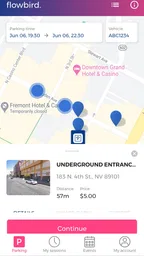
- Finds participating parking zones using your location.
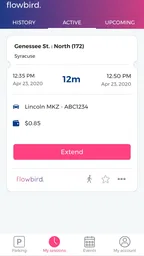
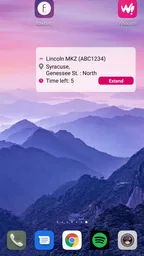
- Lets you extend parking remotely where local rules allow.
- Sends reminders before your parking session expires.
- Stores vehicle details for quicker parking sessions.
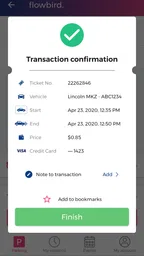
- Provides a digital record of parking transactions.
What could be better
- Coverage depends on whether your city supports Flowbird.
- Location access may be needed to find nearby zones.
- Parking rules and zone details can be easy to overlook.
- Payment methods may vary by location.
- A weak mobile signal can disrupt app use at the curb.





